Why Podcast Transcripts Make Episodes Findable
What publishing podcast transcripts actually does for search and accessibility, where the SEO claims are overstated, and how to publish them so they work.
What publishing a transcript actually does for discovery and accessibility, which of the common claims hold up, and how to publish one so it earns its place rather than sitting at the bottom of a page.
Search engines cannot index audio. A podcast episode page without a transcript typically offers a title, a short description and nothing else crawlable, which is a few hundred words at most. Adding the transcript takes that to several thousand words of relevant text, and it is also the accessibility baseline for anyone who cannot or does not want to listen.
The useful question is not "will a transcript improve my SEO?" It is "what is currently on this page for anyone to find?" For most episode pages the honest answer is almost nothing, and that is the real problem a transcript solves.
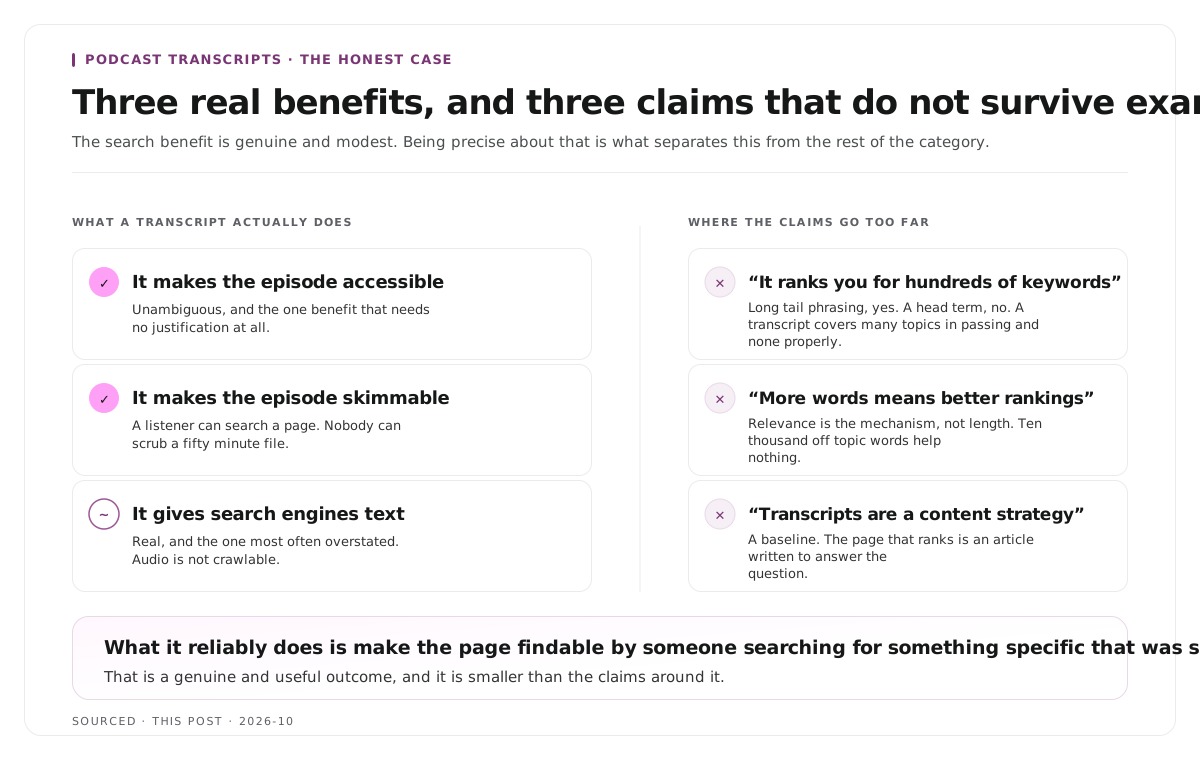
What a transcript actually does
Three distinct benefits, and they are not equally strong. Being precise about this matters, because the category is full of claims that do not survive examination.
It makes the episode accessible. This one is unambiguous and it is the reason that needs no justification. People who are deaf or hard of hearing, people in environments where they cannot play audio, people who process written language more comfortably than spoken, and people whose first language is not the one you are speaking in all gain access to something they previously could not use.
It makes the episode skimmable. A listener who remembers one answer and wants to find it again cannot scrub a fifty minute file efficiently. They can search a page. This is a user experience benefit rather than a search one, and it is the benefit existing listeners feel most.
It gives search engines something to index. This is real and it is the one most often overstated. The mechanism is simple: audio is not crawlable, so without a transcript your episode page contains a title, a description and some links. With one, it contains the full conversation.
Where the SEO claims go too far
Three things get asserted in this category that are worth qualifying.
"Transcripts will rank you for hundreds of keywords." A transcript is unstructured conversational text. It mentions many topics in passing and covers none of them in the way a page written to answer a question does. It helps a page become findable for long tail phrasing, particularly specific things a guest said. It does not make an episode page competitive for a head term.
"More words means better rankings." Word count is not the mechanism. Relevance is. A transcript helps because it is relevant text about the episode's subject, not because it is long. Ten thousand words of off topic conversation does not help a page rank for the one topic it was about.
"Transcripts are a content strategy." They are a baseline, not a strategy. The page that ranks for a topic is usually an article written to answer that question, not a transcript where the question happened to be discussed. The transcript supports the episode page. It does not replace written content.
What a transcript reliably does is make an episode page findable by people searching for something specific that was said in it. That is a genuine and useful outcome, and it is smaller than the claims around it.
How to publish them so they work
The difference between a transcript that helps and one that sits there is almost entirely presentation.
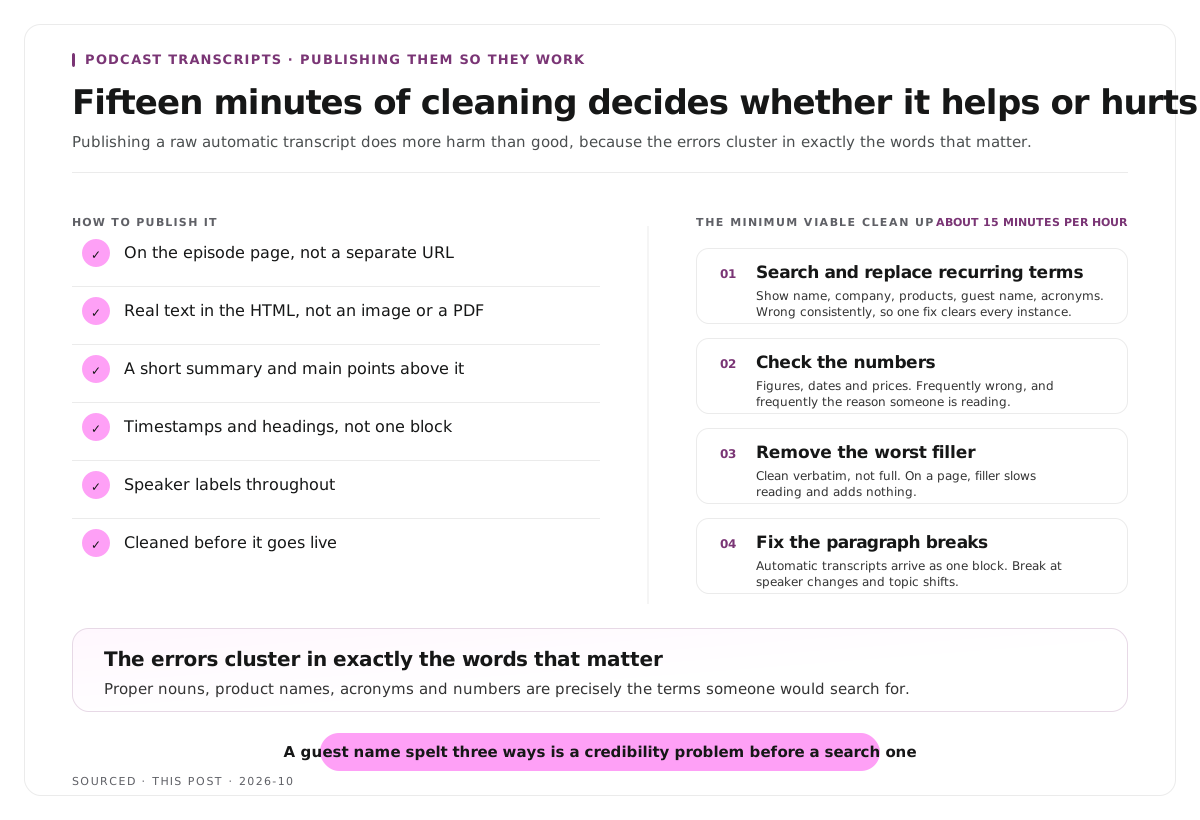
Put it on the episode page, not on a separate page. The point is to give that page content. Splitting the transcript onto its own URL creates a thin episode page and an orphaned wall of text.
Make it real text in the HTML. A transcript inside an image, a PDF, or loaded only after a click may not be indexed. If it is behind an accordion, ensure the text is present in the page source rather than fetched on interaction.
Add a short summary above it. Nobody lands on a page and reads a transcript. A summary and the main points give a reader a reason to stay, and the structure for that is in podcast show notes.
Add timestamps and headings. A transcript broken into sections with headings is navigable. One continuous block is not. The approach is the same as building chapters, covered in how to create video chapters from a transcript.
Label the speakers. A conversation where the reader cannot tell who is talking is close to useless.
Clean it before publishing. This is the step most often skipped, and it is the subject of the next section.
Clean it before you publish it
Publishing a raw automatic transcript does more harm than good, for a reason that is easy to miss.
The errors cluster in exactly the words that matter. Automatic transcription handles ordinary speech well and fails on proper nouns, product names, acronyms and numbers. Those are precisely the terms someone would search for, and precisely the terms that make your brand look careless when they appear misspelt on your own site.
A guest's name spelt three different ways across one page is a credibility problem before it is a search problem.
The minimum viable clean up, which takes about fifteen minutes for an hour of audio:
- Search and replace recurring terms. Your show name, your company, your products, your guest's name, and the acronyms you use. These are wrong consistently rather than randomly, so one correction fixes every instance.
- Check the numbers. Figures, dates and prices, since these are both frequently wrong and frequently the reason someone is reading.
- Remove the worst filler. Clean verbatim rather than full verbatim. On a page, filler slows reading and adds nothing.
- Fix the paragraph breaks. Automatic transcripts often arrive as one block. Breaking at speaker changes and topic shifts is what makes it readable.
You do not need word by word accuracy across the whole document. You need the searchable terms correct and the structure readable.
The second use nobody plans for
A published transcript is an archive you can search, and most shows never exploit it.
Finding what you have already said. Three years of episodes with transcripts is a searchable record of every topic you have covered, every guest claim, and every explanation you have given. That is the raw material for a newsletter, an article, or answering a customer question with the exact thing a guest said eighteen months ago.
Finding clips. The transcript is how you locate moments worth cutting for short form, and reading beats scrubbing by a wide margin. Reading an hour of transcript takes roughly twelve minutes against an hour of watching. The selection criteria are in how many clips you should make from one podcast episode, and the production workflow in how to repurpose a podcast into 10 clips.
Producing captions. A timestamped transcript is most of a caption file already, and the clips cut from the episode need captions regardless, since most short form viewing happens muted. The formats and when each applies are in captions vs subtitles vs SDH.
That is the honest case for transcripts. The search benefit is real and modest. The compounding benefit is that every episode becomes a searchable asset rather than an audio file you can no longer look inside.
Worked example: two episode pages
This is an invented example, not measured data.
Two shows publish an interview on the same subject on the same day.
The first page has a title, a sixty word description, a player and a link to the guest. Total crawlable text, under a hundred words. It is findable by people searching the show name or the guest name, and by nobody else.
The second page has the same elements plus a two hundred word summary, six timestamped section headings, and a corrected transcript of around eight thousand words. It is findable by all the same people, plus anyone searching a specific phrase the guest used, and it is usable by someone who cannot listen.
Neither page ranks for a competitive head term, because an episode page is not an article written to answer a question. The difference is between a page with one route in and a page with many small ones, and over several hundred episodes that difference compounds.
Where Montage fits
Montage does not publish transcripts, does not host episode pages and has no SEO features. Getting the transcript onto your site is a job for your host or your CMS.
It produces a timestamped transcript as the first stage of turning a recording into publishable video. Upload an episode, up to 20GB at 4K, and it returns that transcript alongside 8 to 10 scored clip candidates, each trimmable by editing the transcript text, with branded captions and vertical reframing applied, exporting as MP4 for social or XML, FCPXML and JSON for an editor.[1]
The relevant point is that correcting a name in the transcript corrects it everywhere downstream, because the captions are generated from the same source. The clean up described above and the clip production are therefore the same pass rather than two.
To try it on one episode, use the podcast clip finder, and the pipeline behind clip selection is explained in how AI video clipping works.
Limitations and troubleshooting
The transcript is published and nothing changed. Expected in the short term. The benefit is cumulative across a back catalogue and shows up as a slow increase in long tail entries rather than a visible jump.
The guest's name is misspelt across the page. The transcript was published raw. Search and replace the recurring terms before publishing, every time, and keep the term list.
The transcript is in an accordion and does not appear to be indexed. Check whether the text exists in the page source or is fetched on click. Content that only arrives after interaction may not be seen.
The page now looks like a wall of text. Add a summary, headings and timestamps above and within it. A transcript is a reference section, not the body of the page.
A guest asked for something to be removed. Remove it from the published transcript and note the removal rather than leaving an unexplained gap.
The transcript contradicts the show notes. Usually because the notes were written from memory and the transcript from the recording. Write the notes from the transcript.
Frequently asked questions
Do podcast transcripts help SEO?
Yes, modestly. Search engines cannot index audio, so without a transcript an episode page has very little crawlable text. A transcript makes the page findable for specific phrases from the conversation, but it does not make it competitive for head terms.
Should you publish the full transcript or a summary?
Both. A summary and timestamped headings give a reader a reason to stay, and the full transcript underneath provides the searchable detail and the accessibility baseline.
Where should a podcast transcript go?
On the episode page itself, as real text in the HTML. Putting it on a separate URL leaves a thin episode page and an orphaned page of text.
Does a transcript need to be perfectly accurate to be useful?
No, but the searchable terms do. Proper nouns, product names, acronyms and numbers are both the most common errors and the most likely search terms, so correct those and the general accuracy matters far less.
Are podcast transcripts required for accessibility?
They are the baseline for making audio content available to people who are deaf or hard of hearing. Specific legal obligations depend on your jurisdiction and the nature of your organisation.
Can you publish an automatic transcript without editing it?
You can, and it tends to backfire, because automatic transcription fails most often on exactly the names and terms that make a brand look careless when misspelt publicly.
Does Montage publish transcripts to my website?
No. Montage produces a timestamped transcript as part of turning an episode into clips. Publishing it is handled by your podcast host or CMS.