Captions vs Subtitles vs SDH: The Actual Difference
Captions, subtitles and SDH explained, why two competing definitions are both in use, what W3C actually says, and which one your video needs.
What captions, subtitles and SDH each mean, why two incompatible definitions are both in common use, what the W3C standard actually says, and how to decide which your video needs.
Captions are a text version of the speech and the non-speech audio needed to understand a video. Subtitles are conventionally the translated version for viewers who cannot follow the spoken language. SDH combines the two, carrying non-speech information in a translation friendly format.
The useful question is not "which one is correct?" It is "which definition is my audience using?" There are two competing framings in circulation, both defensible, and most articles on this subject assert one as fact without acknowledging the other exists.
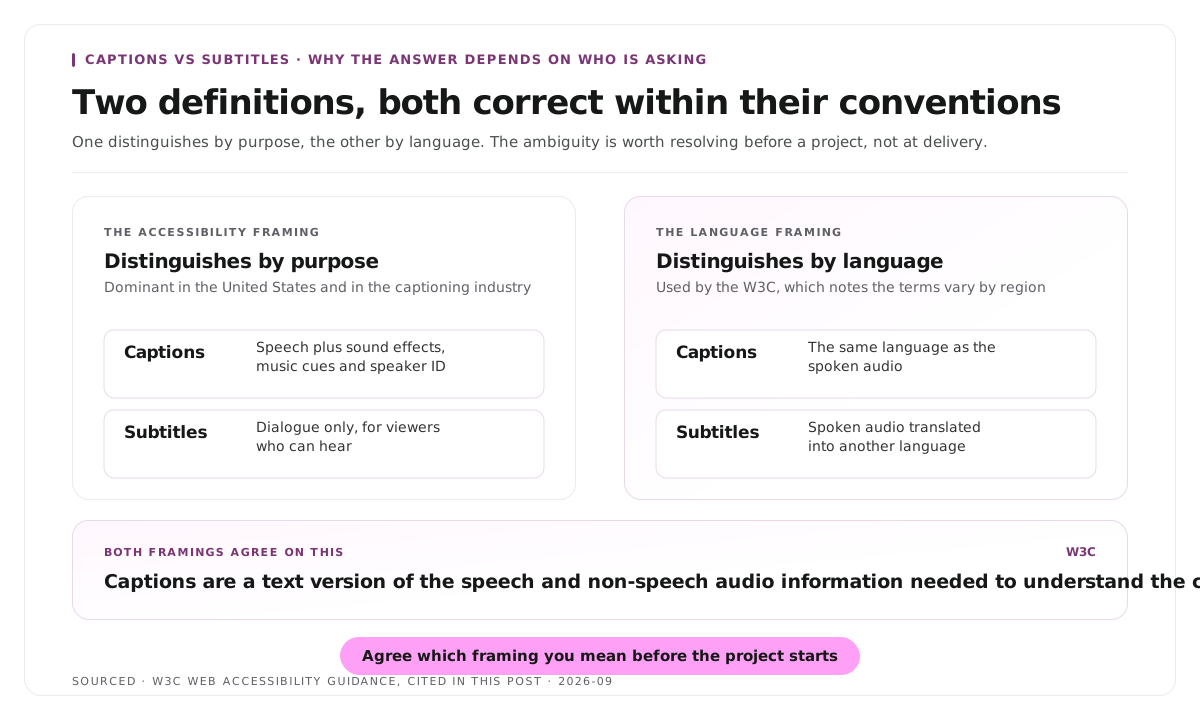
Two definitions, both in use
The accessibility framing, dominant in the United States and in the captioning industry, distinguishes by purpose. Captions serve viewers who cannot hear, so they include sound effects, music cues and speaker identification. Subtitles serve viewers who can hear but do not understand the language, so they carry dialogue only.
The language framing, used by the W3C, distinguishes by language. In its guidance, captions are used "for the same language as the spoken audio" while subtitles are used "for spoken audio translated into another language." The W3C also notes explicitly that the terms vary by region, with some places using "subtitles" for both purposes.
Both are correct within their conventions. The practical consequence is that "we need subtitles" means different things to a broadcaster in London and a compliance officer in Chicago, and the ambiguity is worth resolving explicitly before a project starts rather than at delivery.
What both framings agree on is the W3C definition of what captions must contain: "a text version of the speech and non-speech audio information needed to understand the content." The non-speech part is the load bearing distinction, whichever naming convention you use.
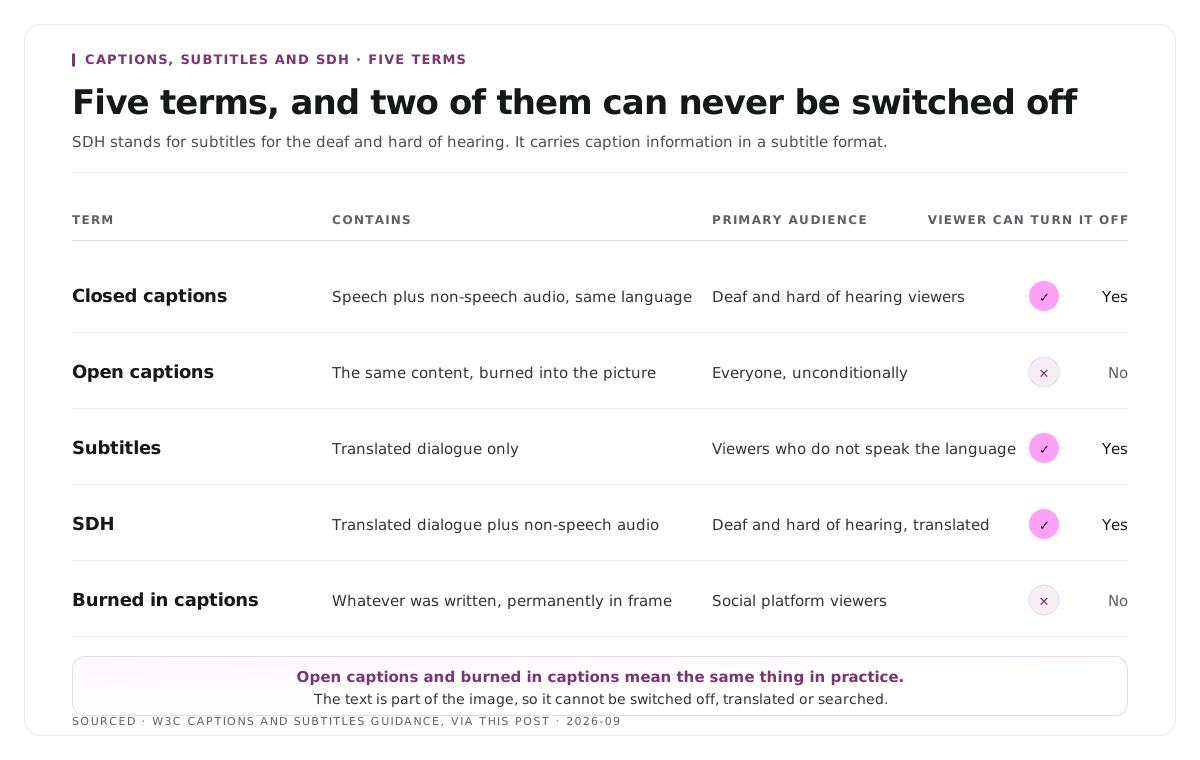
The five terms, defined
| Term | Contains | Primary Audience | Viewer Can Turn Off |
|---|---|---|---|
| Closed captions | Speech plus non-speech audio, same language | Deaf and hard of hearing viewers | Yes |
| Open captions | Same content, burned into the picture | Everyone, unconditionally | No |
| Subtitles | Translated dialogue | Viewers who do not speak the language | Yes |
| SDH | Translated dialogue plus non-speech audio | Deaf and hard of hearing viewers, often for translated content | Yes |
| Burned in captions | Whatever was written, permanently in the frame | Social platform viewers | No |
SDH stands for subtitles for the deaf and hard of hearing. It exists because closed caption formats were designed for broadcast systems and do not travel well across platforms or languages, so SDH carries the same information in a subtitle format.
Open and burned in mean the same thing in practice. The text is part of the image, so it cannot be switched off, translated or searched.
What each one costs you
The trade off is the same in every case, and it is worth stating plainly.
Selectable text can be toggled, translated, indexed by search engines and read by assistive technology. It requires a player that supports it, and it will not display at all on platforms that ignore caption tracks.
Burned in text always displays, on every platform, with no dependency on player support. It cannot be turned off by someone who does not want it, cannot be translated without re-exporting the video, and contributes nothing that a search engine or screen reader can use.
For social clips, burned in is effectively mandatory, since most feed playback is muted and several platforms do not reliably display a separate track. For anything on a player you control, provide a selectable track, and supply both where you can. The treatment choices by platform are covered in caption styles for B2B and B2C platforms.
The file formats
SRT is the most widely supported format. Plain text, sequential numbering, start and end timecodes, and almost no styling. If you can only produce one file, produce this.
VTT, or WebVTT, is the web standard. It supports positioning, basic styling and metadata, which SRT does not, and it is what HTML5 video players expect.
SCC and CAP are broadcast formats, encoding both text and display instructions for television systems. You will only meet them working with broadcasters.
TTML and DFXP are XML based and used in streaming delivery specifications.
For most people the decision is SRT for maximum compatibility, VTT for web players, and a conversion between them when required. The timing inside any of these files is bound to the cut it was made from, so regenerate rather than re-time after an edit, a point covered in how to edit a podcast, the audio and video workflow.
Writing them well
The format decisions matter less than these.
Two lines maximum, broken on natural phrases. A line break inside a name or a number causes misreading.
Identify speakers when more than one person talks. A dash or a name prefix. Without it, a conversation becomes unattributable text.
Describe sound that carries meaning. A door closing that changes the scene is information. Ambient noise is not.
Match the timing to the speech, not to convenient breaks. Text that arrives before the words does the opposite of helping.
Proofread proper nouns. Automatic transcription gets names, products and numbers wrong at a predictable rate, and those are exactly the words readers rely on. The same list of recurring terms is worth reusing across every episode, as covered in how to make shareable podcast clips for social media.
The transcript that feeds all of this is also what produces chapters and clips, covered in how to create video chapters from a transcript.
Worked example: one video, three deliverables
This is an invented example, not measured data.
A company records a forty minute webinar and needs it in three places.
On their own site, a VTT track sits alongside the video. Viewers toggle it, search engines index the text, and screen readers can reach it.
On LinkedIn and YouTube Shorts, the clips carry burned in captions, because a caption track is not reliably displayed in those feeds and most viewing is muted.
For the German market, a translated subtitle file is produced from the same transcript, carrying dialogue only, with a separate SDH version for viewers who need the non-speech information as well.
One transcript, three outputs, three different correct answers. The question was never which format is best.
Where Montage fits
Montage does not produce caption files for broadcast, does not handle SCC or TTML, and does not translate. It is not a captioning or localisation service.
What it does is take a long recording and return the moments worth publishing, with branded captions burned into the clips it produces. Upload up to 20GB at 4K and it returns 8 to 10 scored clip candidates rather than an unranked pile, each trimmable by editing transcript text, with vertical reframing applied, exporting as MP4 for social or XML, FCPXML and JSON for an editor.
That covers the burned in case for social clips and nothing else on this page. Selectable tracks, translation and compliance deliverables all sit elsewhere, and the transcript editing approach is described in text based video editing.
Limitations and troubleshooting
The client asked for subtitles and rejected what we delivered. Two definitions are in use. Ask whether they mean translated dialogue or same language accessibility text before quoting.
The caption file will not display on the platform. The platform likely ignores caption tracks. Burn them in for that destination.
Captions are out of sync. The file was generated against an earlier cut. Regenerate from the final edit rather than re-timing by hand.
Captions read well on a monitor and badly on a phone. They were sized for the wrong screen. Check at playback size and add a background if the footage is bright.
Sound effects are cluttering the text. Only describe audio that carries meaning. Continuous ambient noise does not need noting.
A translated file is missing the non-speech information. That is the distinction SDH exists for. A plain subtitle file carries dialogue only by convention.
Frequently asked questions
What is the difference between captions and subtitles?
Two conventions are in use. The accessibility framing says captions include non-speech audio for viewers who cannot hear, while subtitles carry translated dialogue. The W3C framing distinguishes by language, with captions for the same language as the audio and subtitles for translated audio.
What does SDH mean?
Subtitles for the deaf and hard of hearing. It carries non-speech audio information in a subtitle format, which travels across platforms and languages better than broadcast caption formats do.
What is the difference between open and closed captions?
Closed captions are a separate track the viewer can switch on or off. Open captions are burned into the picture and always display, which also means they cannot be translated or searched.
Should social media clips use burned in captions?
Yes. Most feed playback is muted and several platforms do not reliably display a separate caption track, so burning them in is the only way to guarantee they appear.
What caption file format should you use?
SRT for the widest compatibility and VTT for web players, which supports positioning and styling. Broadcast formats such as SCC only matter when a broadcaster requires them.
Does Montage produce caption files?
No. Montage burns branded captions into the clips it produces. Selectable caption tracks, translation and broadcast formats are handled by other tools.