1 long video → 10+ clips

Montage helps content teams find the best moments in long-form video, refine them with transcript-based editing, and export branded clips ready to publish.

AI-scored moments
Sentence-level editing
Branded captions
Editor handoff
or

For content teams who post weekly, not one-time experiments.

Montage user
Montage user
Montage user
Trusted by 1,000+ content producers

What Montage does

Montage is an AI video repurposing platform for teams that care about quality, not random clips. It scores the strongest moments in podcasts, webinars, events, and long-form recordings, lets teams refine clips at the sentence level, and exports branded videos or editor-ready XML, FCPXML, and JSON.

Sentence-Level Editing

Cut by deleting text. Trim by removing a word. Edit video the way you write.

Publish-Ready Export

MP4 for social, XML for Premiere, FCPXML for Final Cut. 4K at full resolution.

The bottleneck isn't footage. It's editorial bandwidth.

Even producers with large budgets don't make 50 episodes a month. The constraint is how many good editorial decisions you can make per hour of footage. Montage expands that bandwidth.

How it works

1. Upload & Brief

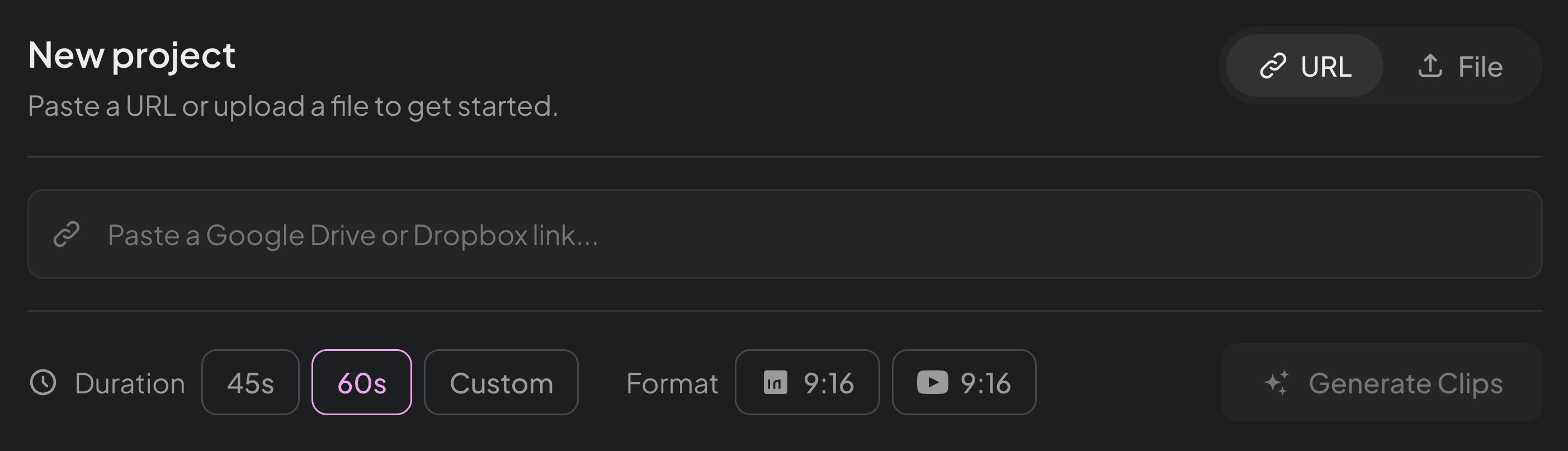
Drop your video — up to 20GB, any resolution up to 4K — and describe what you're looking for. Your brief guides which moments the AI surfaces.

2. Review Scored Moments

AI surfaces 8-10 candidates, each scored on Brief Match and Platform Fit. Review only what's worth your editorial attention.

3. Refine & Publish

Edit at the word level. Remove filler, adjust boundaries, reframe for vertical. Export publish-ready MP4 or hand off as XML.

What You Get

Built for serious video production — not toy demos

Handle 20GB, export at 4K, and edit at the word level.
Every feature is built for producers who treat content as a discipline.

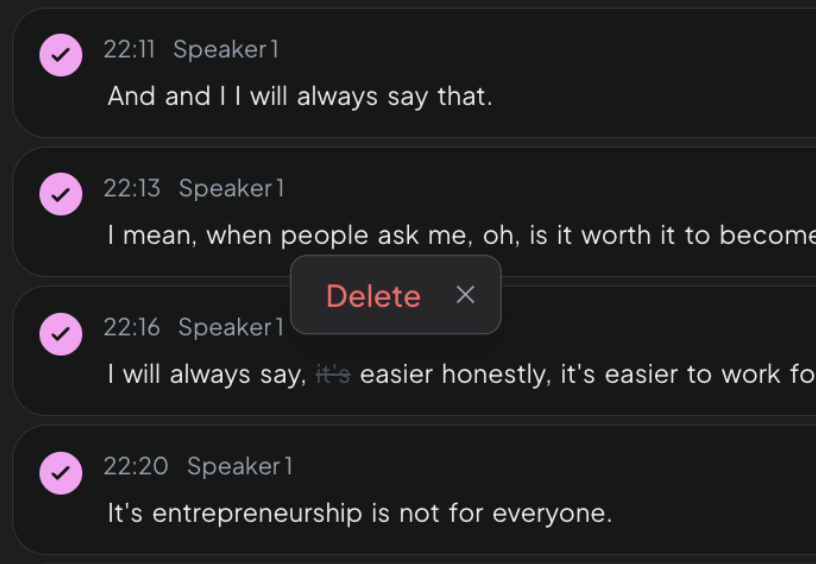
Sentence-Level Editing

Edit video by editing text.

Highlight a sentence and delete it — the video cuts seamlessly. Adjust clip boundaries by a single word. Remove filler, tighten pacing, nail the ending. Like a Google Doc for video.

Professional Standard
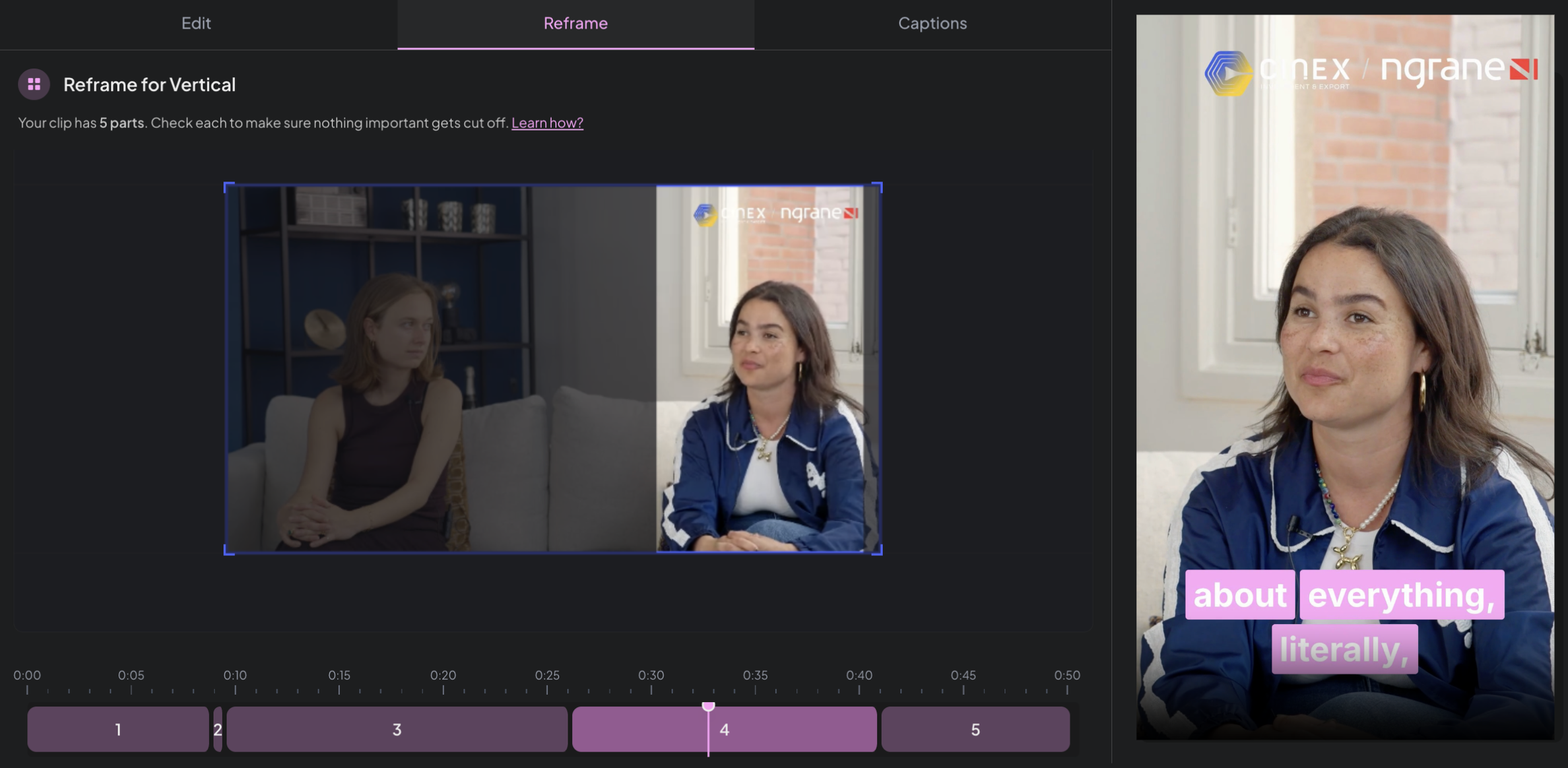
Smart Reframing

Horizontal → vertical in one click.

Speaker tracking keeps the face centered across every aspect ratio. Shoot once in landscape, export for LinkedIn, Shorts, and Reels — each one properly framed.

Professional Standard
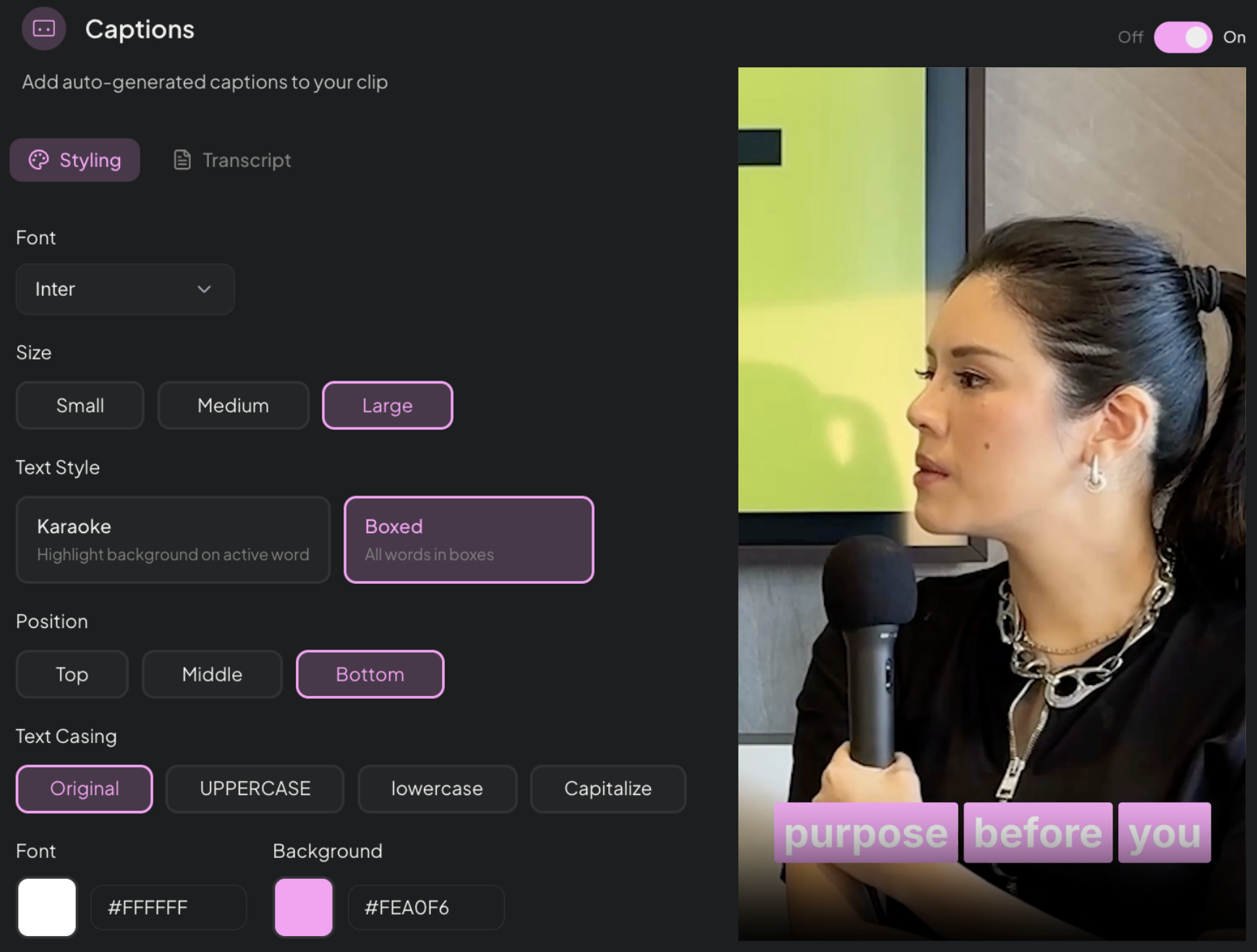
Branded Captions

Your fonts. Your colors. Your style.

Captions that match your brand — not a generic template. Choose your typeface, colors, and animation style. Every clip looks like it came from your team.

Professional Standard
Multi-Format Export

Publish-ready or hand off to your editor.

Export MP4 for social, XML for Premiere Pro, FCPXML for Final Cut, or JSON for custom workflows.

Professional Standard
Videos up to 20GB

Built for real footage. Not demo clips.

Upload hour-long webinars, multi-hour conferences, and full podcast seasons. Montage handles up to 20GB at full 4K resolution.

Professional Standard
Montage sentence-level editing interface showing transcript with delete action
Montage reframing interface showing landscape to vertical conversion with speaker tracking
Montage captions editor showing font, size, style, position and color customization

.MP4

Social platforms

.XML

Premiere Pro

.FCPXML

Final Cut

.JSON

Custom workflows

Montage upload interface showing URL and file upload options

Also Included

4K / Full HD Export

Process and export at full source resolution. No downscaling.

AI Clip Scoring

Clips are scored and ranked automatically so you review the best candidates first.

Shareable Review Links

Share any clip as a URL. Clients and teammates can review without logging in.

Google Drive + URL Upload

Import from Drive or paste any video URL. No re-uploading.

Background Library Indexing

Upload your video library while offline. Montage indexes it in the background.

Dynamic Reframing

Tracks moving speakers and panning cameras so every reframe follows the action.

Built For Producers

One tool. Every content team that has standards.

Every speaker deserves clips worth sharing

Upload keynotes and panels. Montage scores each moment against your brief. Edit at the sentence level and export branded clips the same day.

47 speakers → 200+ curated clipsSame-day turnaroundPer-speaker control
See Events Solution

A Different Game

They optimize for speed.
We optimize for editorial quality.

Clip Generators
Montage
Optimizes for time-to-first-clip
Optimizes for quality of editorial decision per clip
Generates 30+ random clips — you hunt for the good ones
Surfaces 8-10 scored candidates — you refine the winners
Built for casual, intermittent users
Built for producers who post weekly and have standards
Take it or leave it — minimal refinement
Sentence-level editing, word-level control
Caps uploads at 2-4GB
Handles videos up to 20GB at full 4K resolution
1,000+
Content producers
20GB
Max upload size
4K
Full resolution export
8-10
Curated clips per video

Simple Pricing

Start free. Upgrade when you're ready.

No hidden fees. No per-clip charges. One price for everything you need.

Free

$0

Try Montage with no commitment. See what AI-powered clipping feels like.

Get Started
What's included
90 mins processing — lifetime, no card required
AI-powered clip generation
Proprietary clip intelligence — webinars, podcasts, panels
Professional caption styles
1080p export
Montage branded outro
×Editor handoff package
×Custom caption presets
×4K export

Starter

$19/mo

For solo creators shipping clips every week. No watermark, post anywhere.

What's included
Everything in Free, and additionally:
2 hrs processing included — top up as you go
Videos up to 1.5 hrs
1080p export · all aspect ratios
No Montage branded outro
Upload from Drive, Dropbox
Animated captions & speaker badge
Standard AI models

Pro

Most Popular
$49/mo

Everything you need to create professional clips. No watermarks, no limits on your creativity.

What's included
Everything in Starter, and additionally:
4 hrs processing included — top up as you go
Videos up to 2.5 hrs
4K export
Custom branding — outro, logos, lower-thirds, fonts & colors
Audio enhancement
Background music
Editor handoff — XML, transcripts, subtitles
Captions in 10+ languages · translations
Best-in-class caption accuracy

Need multi-client workspaces or event coverage?

Agency plans from $199/mo · Event packages from $1,999
Events Pricing

Frequently Asked Questions

Content producers — the people who decide what gets posted. If you have editorial judgment and publish regularly, Montage is for you.

Opus optimizes for speed and volume. Montage optimizes for editorial quality with a short scored list, sentence-level control, 20GB uploads, 4K export, and editor handoff.

No. You edit by editing text. For additional visual polish, export XML and continue in Premiere.

Videos up to 20GB and resolutions up to 4K. Upload from your computer, Google Drive, or a supported URL.

Yes. Share any clip as a URL so clients, speakers, or teammates can review it in their browser without logging in.

Your footage deserves better
than random clips.

Give your content the editorial attention it deserves — at the speed your calendar demands.