How to Repurpose a Podcast Into 10 Clips: A Producer's Workflow
A producer's workflow for turning one podcast episode into 10 short clips, covering moment selection, cut boundaries, captions, vertical framing and scheduling.
A repeatable workflow for turning one podcast episode into short form video, covering how to select moments that stand alone, where to place the cut boundaries, how to reframe and caption, and how to schedule the output across two weeks.
To repurpose a podcast into clips, read the transcript rather than scrubbing the recording, mark the passages that make complete sense without the episode around them, cut each to 20 to 60 seconds starting on the hook, reframe to a vertical aspect ratio, caption, then publish across the following two weeks.
The useful question is not "how many clips can I get from this episode?" It is "which passages would still make sense to someone who has never heard the show?" That number is usually between five and ten, and it does not increase because you want it to.
Selection is the job, not editing
Editing a podcast clip takes minutes. Choosing which passage to cut takes judgement, and it determines whether the clip works at all.
A clip succeeds when a stranger understands it without context. It fails when the speaker says "that changed everything" and the viewer never learns what "that" was. No amount of captioning, framing or music repairs a passage that begins after the setup.
This is why the workflow below starts with reading rather than cutting.
Step 1: work from the transcript
Scrubbing a 60 minute recording to locate good moments is the slowest available method, and it is the main reason podcast repurposing gets attempted for three weeks and then abandoned.
Obtain a timestamped transcript from your host, a transcription service, or a clip tool that transcribes on upload. Then read it. Reading an hour of transcript takes roughly twelve minutes. Watching the hour takes an hour.
If audio cleanup forms part of your process, sequence it correctly using how to edit a podcast, the audio and video workflow.
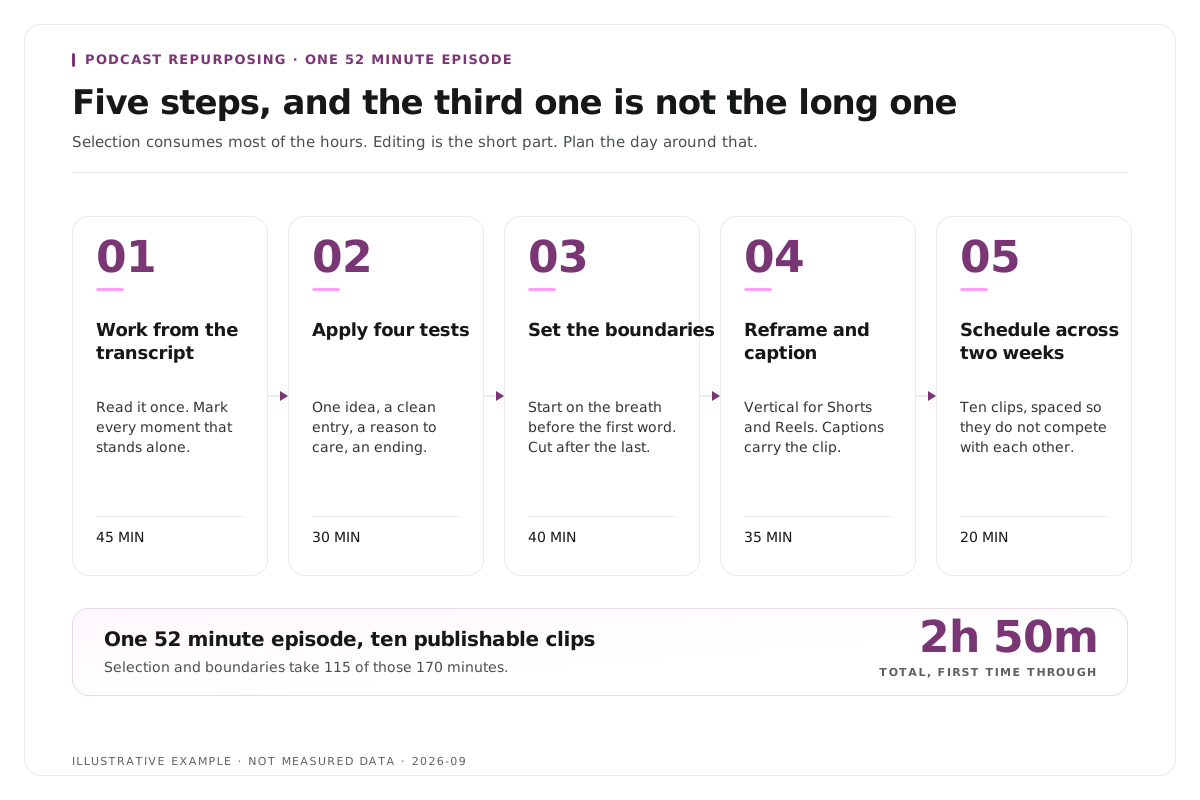
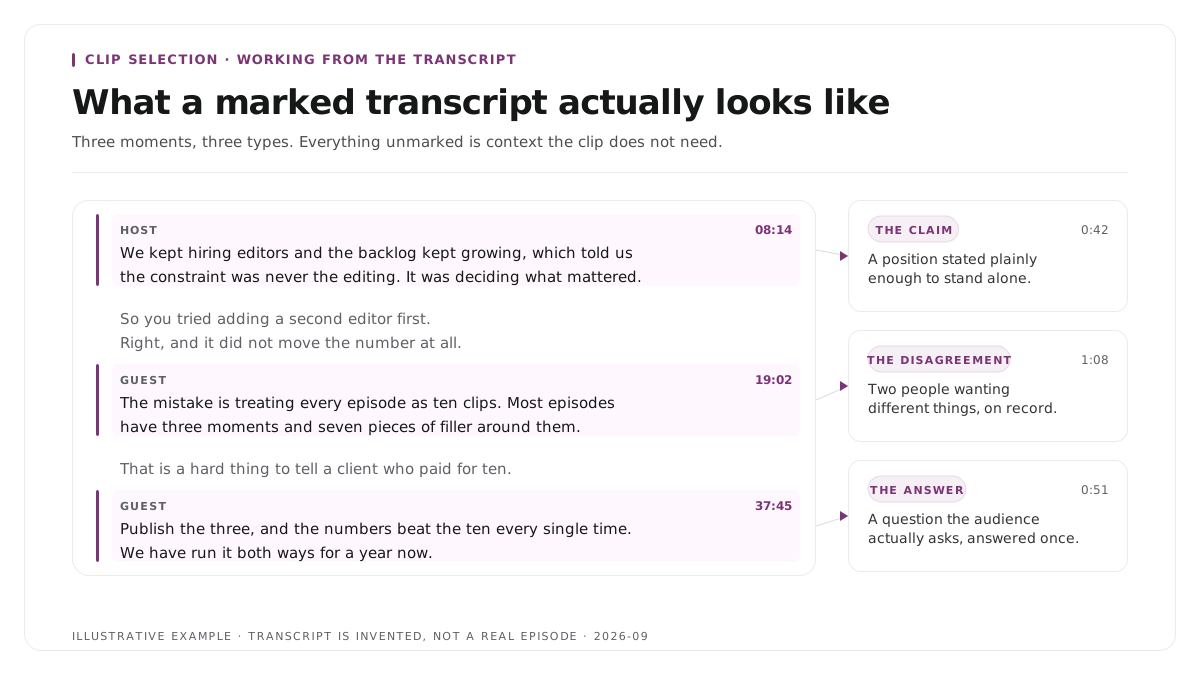
Step 2: apply four tests to each candidate
Mark a passage only when it passes all four.
- It stands alone. No "as I was saying earlier", no unexplained pronoun, no reference to something said ten minutes before.
- It opens with a hook. A claim, a number, a disagreement or an admission in the first sentence.
- It resolves. The thought completes inside 60 seconds.
- It concerns one idea. Two ideas in one passage is either two clips or none.
Four moment types recur across shows:
| Type | What it sounds like | Where it performs |
|---|---|---|
| The contrarian take | "Everyone says X. That is wrong, and here is why." | LinkedIn, X |
| The specific number | "We went from four hours a week to forty minutes." | All platforms |
| The story | A 45 second anecdote containing a turn | TikTok, Reels |
| The practical method | One tactic, explained completely | YouTube Shorts, LinkedIn |
Introductions, housekeeping, sponsor reads, "great question" and context free laughter never work as clips.
One shortcut is underused. Read the comments on the full episode. Lines that listeners have already quoted back to you are pre validated, so the guesswork has been done for you.
Step 3: set the boundaries
Start on the hook. If the strong line arrives eight seconds into the passage, start at eight seconds and delete what precedes it.
Cut to between 20 and 60 seconds. Below 20 seconds a point rarely lands. Above 60 seconds it needs justifying.
End on a complete sentence, ideally a strong one, and never mid word. Then remove filler inside the clip. Deleting "um", "you know" and false starts reduces a 55-second clip to 40 without losing a word of substance.
Editing by transcript is substantially faster for this task than editing on a timeline, because deleting the sentence removes the video with it. The approach is described in text based video editing.
Step 4: reframe and caption
Podcasts are recorded in a horizontal aspect ratio. Short form platforms are vertical. A centre crop will remove half of a two person interview, so the crop has to follow whoever is speaking.
Use a vertical 9:16 frame for TikTok, Reels and Shorts, and 1:1 or 4:5 for the LinkedIn feed. YouTube now accepts Shorts of up to three minutes, so a longer passage no longer has to be split to qualify.[1]
Burn in captions, because most short form video is watched without sound. Keep the font, position and colour identical across every clip, since consistency is what makes a reposted clip still read as yours. Then proofread the captions for names, products and units, because automatic transcription mangles proper nouns and a misspelt guest name is the error people screenshot.
Caption treatment by audience is covered in caption styles for B2B and B2C platforms.
Step 5: schedule across two weeks
Publishing eight clips on release day makes them compete with each other and with the episode.
| Week | Day | Clip |
|---|---|---|
| 1 | Monday, episode day | Strongest clip, with the episode link |
| 1 | Wednesday | Clip 2 |
| 1 | Friday | Clip 3 |
| 2 | Monday | Clip 4 |
| 2 | Wednesday | Clip 5 |
| 2 | Friday | Best performer, re cut for a second platform |
Measure completion rate and saves rather than views. A clip watched to the end by 400 people is doing more for a show than one scrolled past by 4,000. That argument is developed in the video content operations metrics that actually matter, and the LinkedIn specific cadence in the three week LinkedIn repurposing method.
Worked example: a 52 minute interview episode
This is an invented example, not measured data.
Consider a 52 minute interview containing a six minute section on pricing. The most quotable sentence is "we doubled the price and churn went down."
Starting there produces confusion, because the viewer does not know what was priced, who the customers were, or what churn had been doing. The stronger selection begins 14 seconds earlier and includes the assumption that preceded the decision, the change itself, and the result.
The worked cut runs 41 seconds. It contains the belief, the action and the consequence, which is a complete causal chain. The duration is not the lesson. The chain is.
Cutting the same passage to 22 seconds would fit a stricter format and destroy the meaning, because removing the prior assumption leaves a claim with no reasoning attached.
Where Montage fits
Montage is useful when the source is a long spoken recording and you want to review candidate moments before producing the final vertical video. It accepts files up to 20GB at 4K, returns 8 to 10 scored candidate clips rather than an unranked list, allows each selection to be refined by editing transcript text, applies branded captions, and exports MP4 for social platforms or XML, FCPXML and JSON for an editor.[2]
The editorial work does not transfer. You still decide which moments the episode should yield, verify that the boundaries preserve the speaker's meaning, review the frame, approve the captions, and choose what is published. Montage does not schedule posts, does not publish to any platform, and does not decide which scored candidate deserves to go out.
To test the approach on a single episode before committing a season, use the podcast clip finder. For a comparison of the wider category, see the best podcast clip makers in 2026, and for the show page itself, see Montage for podcasts.
Limitations and troubleshooting
The episode yields only three usable clips. That is a normal outcome for a conversational episode with few self contained passages. Publishing three good clips outperforms publishing eight weak ones, because weak clips teach an audience to scroll past you.
Automatic selection suggests moments that do not stand alone. Automated scoring identifies energy changes, quotable phrasing and topic boundaries reliably. It judges whether a passage survives without its surrounding context poorly. Treat every suggestion as a shortlist entry requiring approval.
The clip is accurate but confusing. A pronoun, a number or a name is missing its referent. Move the start boundary earlier rather than adding an explanatory title card, because a title card that supplies missing context is a sign the wrong passage was chosen.
Captions misspell the guest's name. Correct the text before styling it, and keep a list of recurring names and product terms to check on every episode.
The vertical crop loses the second speaker. Cut between speakers rather than framing both, or use a split layout. A two person crop that shows two half faces serves neither.
Related workflows: how many clips to make from one podcast episode, how to repurpose podcast episodes for LinkedIn consistently, and how many clips per recording.
Frequently asked questions
How many clips should you make from one podcast episode?
Eight to ten candidates from a 45 to 60 minute episode, of which five to seven are usually worth publishing. Pursuing twenty clips from one recording means publishing passages that do not stand alone.
How long should podcast clips be?
Between 20 and 60 seconds, with 30 to 45 seconds performing most consistently across TikTok, Reels, Shorts and LinkedIn. Longer clips are justified when the passage contains a story with a turn in it.
Can AI select good podcast clips without review?
No. Automated selection finds candidate moments reliably and judges self containment poorly. The output is a shortlist for a human to approve, not a finished edit.
What format should podcast clips use?
A vertical 9:16 frame with burned in captions for TikTok, Reels and Shorts, and 1:1 or 4:5 for the LinkedIn feed. Caption in every case, because most viewing is muted.
Can Montage publish clips to social platforms?
No. Montage produces exportable clips. Scheduling and publishing remain separate human actions.
If you have a long interview, podcast, panel or webinar and already know the kind of moment you want, use Montage to direct the first cut from your footage. You keep the final editorial call.
Sources
[1] https://support.google.com/youtube/answer/15424877 : Understand three-minute YouTube Shorts, YouTube Help
[2] https://montage.app : Montage