Podcast Show Notes: A 20 Minute Workflow With 4 Templates"
What to put in podcast show notes, four templates you can copy, and a transcript-first workflow that produces them in twenty minutes instead of an afternoon.
A workflow for producing podcast show notes from the episode transcript, covering the eight elements every set needs, four templates for different show formats, and where the timestamps actually come from.
To write podcast show notes, read the episode transcript rather than replaying the audio, mark the three to eight points where the subject turns, lift the summary and main points from the words the guest actually used, then attach the links, the call to action and the full transcript. Aim for 300 to 500 words plus the transcript.
The useful question is not "how long should show notes be?" It is "what is a listener trying to do when they open them?" There are only three answers. Decide whether to listen, jump to a specific moment, or retrieve something that was mentioned. Every element below serves one of those three, and anything that serves none of them can be cut.
Why show notes earn their twenty minutes
Show notes do three jobs at once, which is unusual for a task this small.
They give existing listeners a place to retrieve what they heard, which is what the links, resources and guest details are for. They give search engines something to index, since an audio file contains nothing crawlable and the show notes are the only readable version of the episode. And they give a potential listener enough information to commit forty minutes, which a title alone never does.
The third job is the one most shows underuse. A summary written as a promise converts a browser into a listener. "How Sarah Jones cut client churn by 30% without hiring anyone" does that work. "Episode 42 with Sarah Jones" does not.
Show notes are also the piece most often reused elsewhere, since the summary and main points become the basis of the LinkedIn post, the newsletter entry and the episode announcement. That reuse pattern is set out in how to repurpose podcast episodes for LinkedIn consistently.
Step 1: read the transcript, do not replay the episode
This is the step that decides whether the job takes twenty minutes or an afternoon.
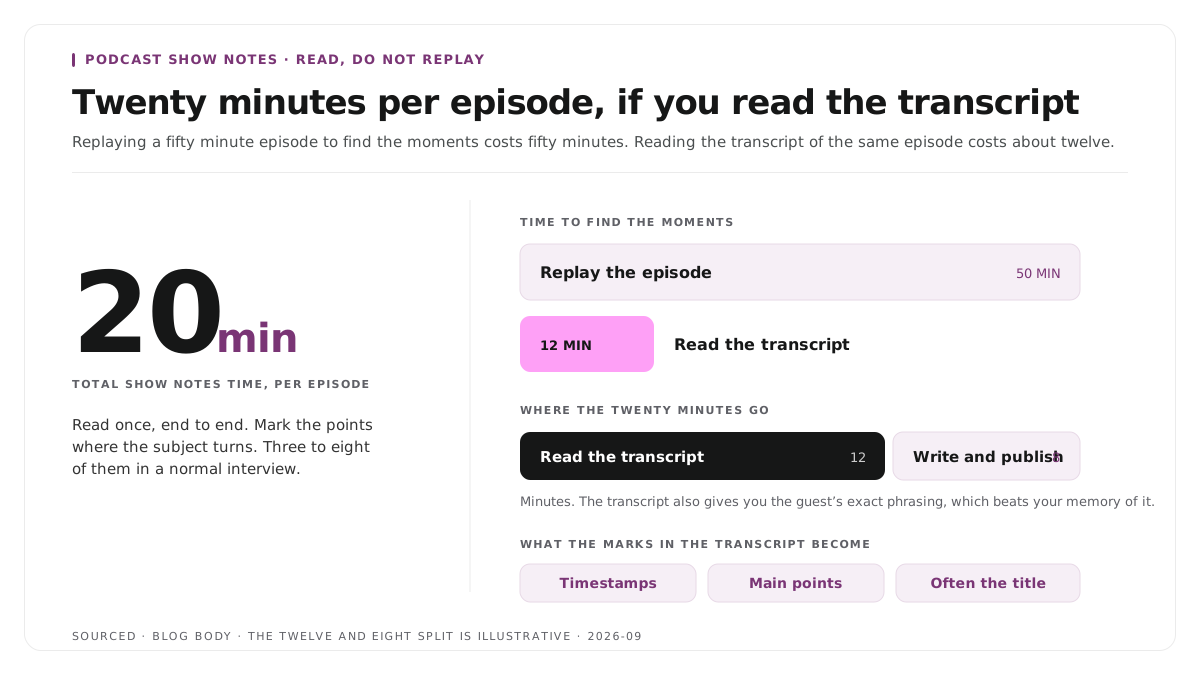
Replaying a fifty minute episode to find the moments worth summarising takes fifty minutes. Reading the transcript of the same episode takes about twelve. The transcript also gives you the guest's exact phrasing, which is better raw material than your memory of what they said.
Read it once, end to end, and mark the points where the subject turns. There are usually between three and eight in a normal interview. Those marks become your timestamps, your main points and, frequently, your title.
If audio cleanup and editing happen before this, the sequence matters, and how to edit a podcast, the audio and video workflow sets out the order.
Step 2: assemble the eight elements
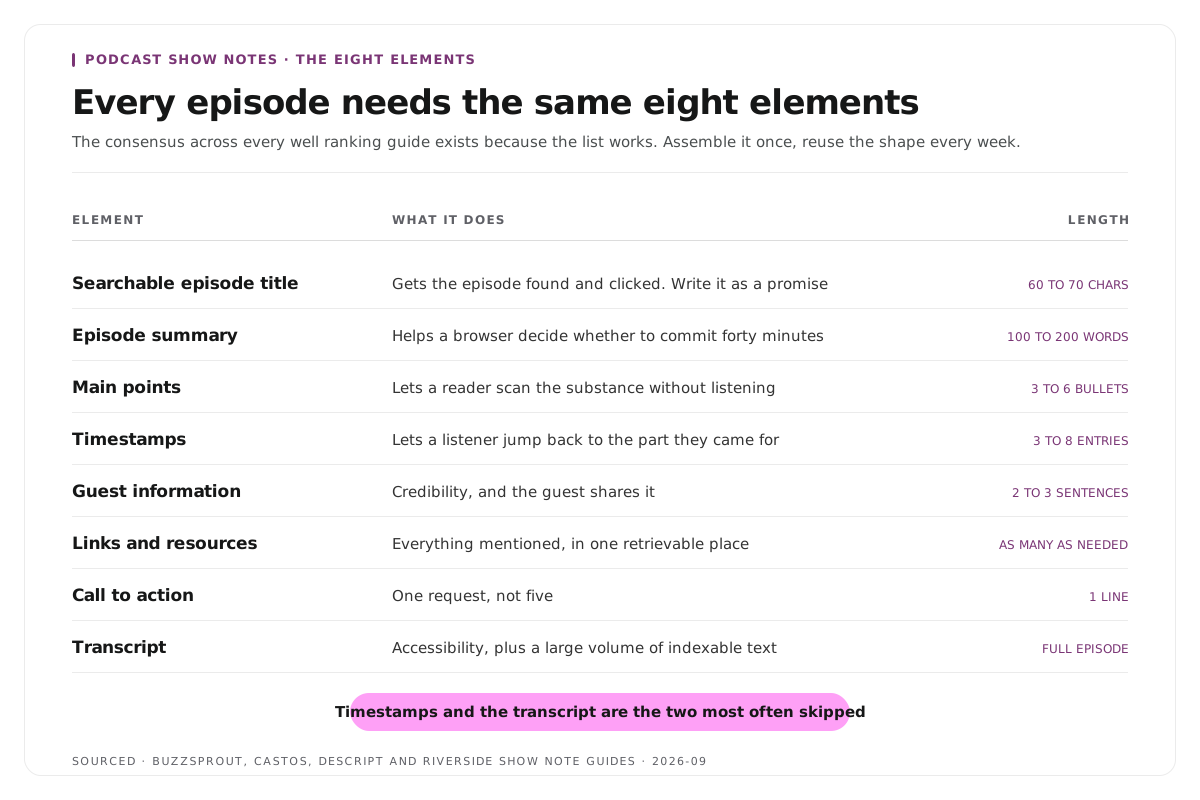
Every well ranking guide on this subject lists broadly the same eight elements. The consensus exists because the list works.
| Element | What It Does | Length |
|---|---|---|
| Searchable episode title | Gets the episode found and clicked. Write it as a promise | 60 to 70 characters |
| Episode summary | Helps a browser decide whether to listen | 100 to 200 words |
| Main points | Lets a reader scan the substance | 3 to 6 bullets |
| Timestamps | Lets a listener jump to the part they came for | 3 to 8 entries |
| Guest information | Credibility, and the guest shares it | 2 to 3 sentences plus links |
| Links and resources | Everything mentioned, in one retrievable place | As many as needed |
| Call to action | One request, not five | 1 line |
| Transcript | Accessibility, plus a large volume of indexable text | Full episode |
Two are worth expanding on.
Timestamps are the element most often skipped and most often wanted. A listener who remembers one specific answer will not scrub a fifty minute file to find it again.
The transcript is the largest single addition available to you. It is the accessibility baseline, and it is also several thousand words of relevant text attached to an episode that otherwise contributes nothing readable.
Step 3: pick one of four templates
Do not invent a format per episode. Pick the one that matches your show and reuse it.
Template 1: the short version
For daily shows, solo episodes and anything under twenty minutes, where the effort has to match the format.
[Episode title written as a promise]
[Two sentences on what this episode covers and who it is for.]
In this episode:
, [point one]
, [point two]
, [point three]
[00:00] Intro
[04:12] [First main turn]
[19:40] [Second main turn]
[One call to action]
Template 2: the interview episode
For guest driven shows, where the guest is a distribution channel and the notes need to be shareable.
[Episode title including the guest's name and the promise]
[150 word summary written in the third person so the guest can share it.]
About [guest name]
[Two or three sentences. Role, company, why they are worth listening to.]
[Guest's links]
What you will learn
, [takeaway one]
, [takeaway two]
, [takeaway three]
Timestamps
[00:00] [...]
Mentioned in this episode
, [every book, tool, article and person named]
[Call to action]
Full transcript
[...]
Template 3: the educational episode
For teaching formats, where readers use the notes as a reference after listening.
[Episode title stating the skill or outcome]
[Summary stating the problem this episode solves.]
The short answer
[Two or three sentences answering the episode's question directly.]
Covered in this episode
[Numbered outline matching the episode structure, each with a timestamp.]
Resources
, [templates, tools, further reading]
[Call to action]
Full transcript
[...]
Template 4: the narrative episode
For story driven shows, where revealing the content defeats the purpose.
[Episode title that creates a question]
[100 word setup that establishes the situation and stops before the turn.]
[One pulled quote, chosen to intrigue rather than summarise.]
Credits
[Everyone involved.]
Sources and further reading
, [...]
[Call to action]
Step 4: publish the same structure every episode
Consistency does more for show notes than any individual improvement.
Readers learn where the timestamps sit and stop hunting for them. Search engines see a predictable structure across every episode page. And the person writing them stops making decisions, which is what turns a forty minute task into a twenty minute one.
Fix the running order once. Title, summary, main points, timestamps, guest, links, call to action, transcript. Then do not move it.
Worked example: turning one transcript into both outputs
This is an invented example, not measured data.
A 48 minute interview transcript is read once, taking about ten minutes. Six moments are marked where the conversation turns.
Those six become the six timestamps. Four of them also contain a self contained answer, so they become clip candidates. The guest's own phrasing in two of them becomes the pulled quote and the episode title.
One read produced the show notes structure, the clip shortlist and the title. Run as three separate tasks from memory, the same work takes most of an afternoon and produces a weaker result, because paraphrasing loses the specific wording that made the moment good in the first place. The clip side of that read is covered in how many clips you should make from one podcast episode.
Where Montage fits
Montage does not write show notes, does not generate summaries, does not draft titles and does not publish to your podcast host. If you want a tool that writes the notes for you, that is a different category of product and you should buy that instead.
What Montage produces is the transcript that Step 1 depends on, and the clip candidates that fall out of the same read. Upload the episode, up to 20GB at 4K, and you get a timestamped transcript alongside 8 to 10 scored clips, each trimmable by editing the transcript text, with branded captions and exports to MP4, XML, FCPXML or JSON.
You still choose which timestamps matter, write the summary, pick the title and decide the call to action. Those are editorial judgements about your own show and no tool should be making them for you.
For the transcript editing approach see text based video editing, to test it on one episode use the podcast clip finder, and for the wider category see the best podcast clip makers in 2026.
Limitations and troubleshooting
The summary reads like a description rather than a pitch. It is describing what the episode contains instead of promising what the listener gets. Rewrite the first sentence around the outcome.
The timestamps drift. They were generated from the raw recording rather than the final cut. Any trim shifts everything after it, so always take them from the finished edit.
The transcript misspells names and product terms. Automatic transcription reliably mangles proper nouns. Keep a running term list for your show and check it every episode, because a misspelt guest name is the error people notice and screenshot.
Nobody reads the show notes. They may not be readable. Long unbroken paragraphs with no headings and no timestamps produce a block that readers skip. Headings, bullets and timestamps are the format, not decoration.
There is too much to include. Cut the links nobody will click before you cut the timestamps. Retrieval is what readers actually arrive for.
Frequently asked questions
How long should podcast show notes be?
Around 300 to 500 words, not counting the transcript. Long enough for a summary, main points and timestamps, short enough that a reader scans rather than reads.
What should podcast show notes include?
A searchable title, a summary of 100 to 200 words, three to six main points, three to eight timestamps, guest information with links, every resource mentioned, one call to action, and the full transcript.
Do show notes help podcast SEO?
They are the only indexable text attached to an episode, since audio contributes nothing crawlable. A descriptive title, a real summary and a full transcript give a search engine something to match a query against.
Should you include a full transcript in show notes?
Yes. It is the accessibility baseline, it lets people retrieve exact quotes, and it adds several thousand words of relevant text to a page that would otherwise carry a few hundred.
Where do the timestamps come from?
From a timestamped transcript of the final edit. Reading that transcript and marking where the subject turns takes a fraction of the time scrubbing the audio does.
Does Montage write show notes?
No. Montage produces the timestamped transcript and the clip candidates from your recording. Writing the notes and publishing them remain your steps.