How to Turn a Livestream Into Clips
A two pass workflow for turning a long livestream into short clips, how many a stream realistically yields, and why streams are harder to clip than recordings.
A workflow for turning hours of livestream into short clips, what a stream realistically yields, why streams are harder to clip than recorded content, and how to capture during the stream so the work afterwards is shorter.
To turn a livestream into clips, run a rough pass across the whole recording to shortlist candidates, then hand trim the ones worth keeping. A three hour stream typically contains ten to twenty postable moments. Finding them by scrubbing takes three to six hours. A first pass that surfaces candidates takes a fraction of that.
The useful question is not "how do I clip my stream?" It is "what did I mark while it was happening?" Almost all the cost of clipping a stream comes from locating moments afterwards, and almost all of that cost can be removed during the broadcast.
Why streams are harder to clip than recordings
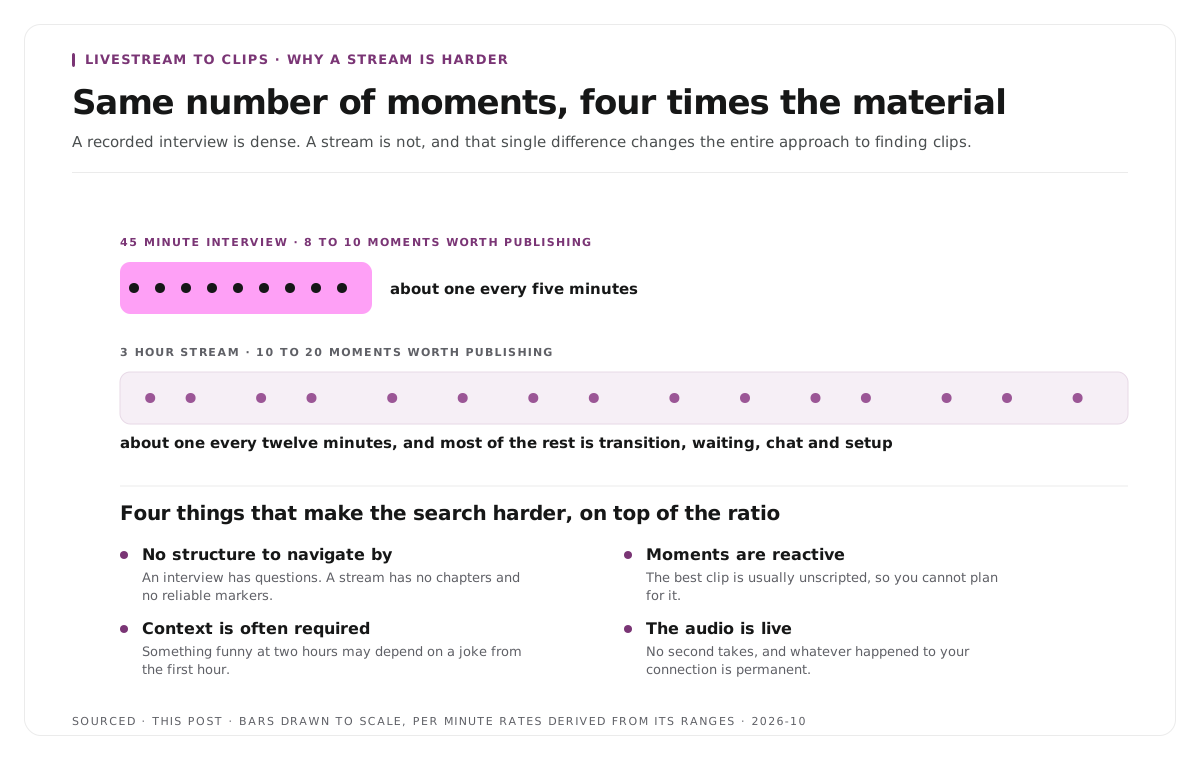
A recorded interview is dense. A stream is not, and the difference changes the whole approach.
The ratio is much worse. A forty five minute interview might contain eight to ten moments worth publishing. A three hour stream contains ten to twenty, from four times the material. Most of a stream is transition, waiting, chat interaction and setup, and none of that clips.
There is no structure to navigate by. An interview has questions, which are natural boundaries. A stream has no chapters and no reliable markers, so without something marked in advance you are searching linearly.
Moments are reactive rather than planned. The best clip from a stream is usually something unscripted: a genuine reaction, a mistake, an unexpected tangent. You cannot plan for them, which means the only option is catching them as they happen or finding them later.
Context is often required. Something funny at the two hour mark may depend on a running joke from the first hour. That is the hardest category, because the moment is genuinely good and genuinely unusable without setup.
The audio is live. No second takes, overlapping voices if there are guests, and whatever happened to your connection is permanent.
Mark moments while you stream
This is the highest leverage habit available and it costs nothing during the broadcast.
Use the platform clip button. Most streaming platforms let you or your moderators clip a recent moment with one action. Those clips are usually too short and badly trimmed to publish directly, but each one is a timestamp, which is all you actually need.
Ask your moderators to mark things. A moderator who drops a timestamp in a channel every time something lands saves you hours. This is the single best use of moderator attention during a long stream.
Say something out loud. A verbal marker, even just "that was good", creates a findable spike in the waveform and a searchable phrase in the transcript.
Watch chat for reactions. A sudden burst of messages is the audience telling you where the moment was. Chat replay timestamps are a map of your own stream.
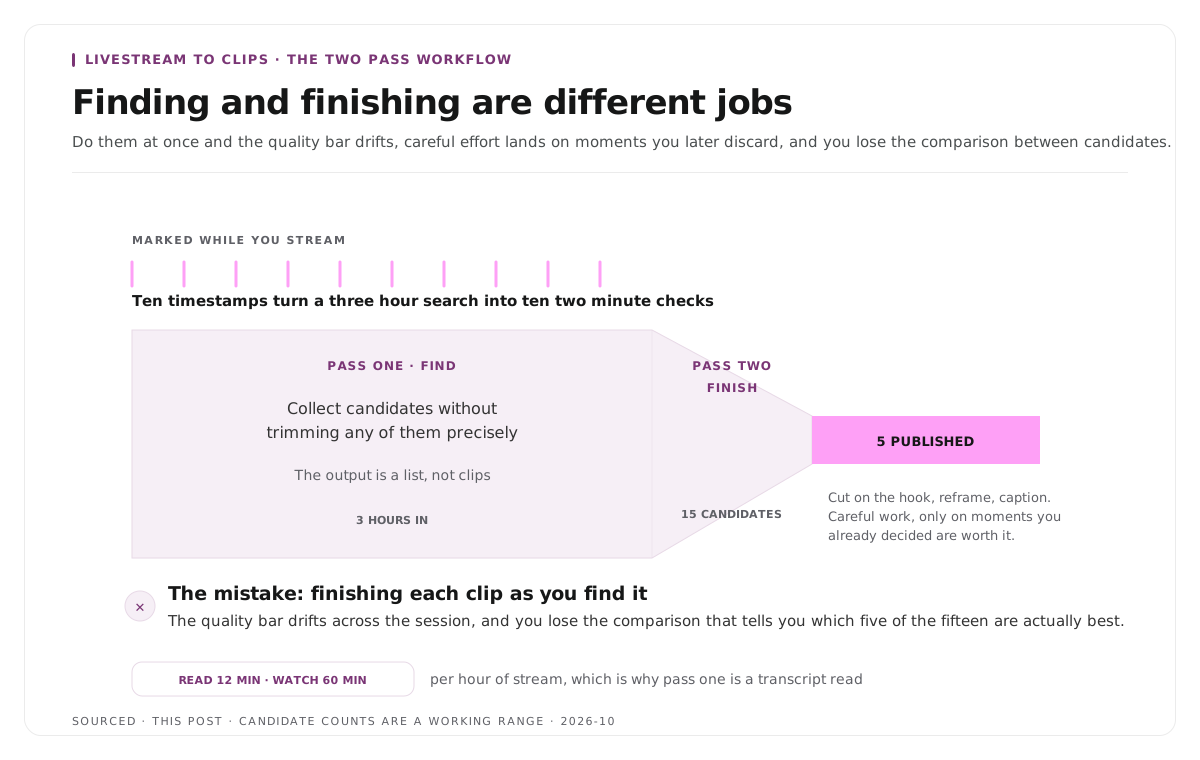
Ten marked timestamps turn a three hour search into ten two minute checks. Nothing else in this workflow saves comparable time.
The two pass workflow
The method that works at volume, and the reason it works is that finding and finishing are different jobs.
Pass one, shortlist everything. Go through the full recording once and collect candidates without trimming any of them precisely. Use your marked timestamps, chat spikes, and either a transcript read or an automated pass over the whole stream. The output is a list, not clips.
Pass two, finish the keepers. Take the shortlist, cut each one properly, set the start on the hook, reframe to vertical and caption. Only now do you do careful work, and only on moments you have already decided are worth it.
The mistake is doing both at once, finishing each clip as you find it. That means the quality bar drifts across the session, you spend careful effort on moments you later discard, and you lose the comparison between candidates that tells you which five of the fifteen are actually best.
Reading a transcript is the fastest way to run pass one on a stream with a lot of talking. Twelve minutes per hour against sixty, which on a three hour stream is the difference between an afternoon and a coffee break.
What makes a stream moment clippable
Apply the same test as any clip, with one addition specific to streams.
It stands alone. A stranger with no knowledge of the stream, the running jokes or the people in chat can follow it completely. This is where most stream moments fail, and it is why the funniest thing in a three hour broadcast is frequently unusable.
Something actually happens. A reaction, a reveal, a mistake, a strong opinion, a result. Twenty to sixty seconds in which an event occurs rather than a discussion continues.
It opens on the hook. Start where the thing happens, not thirty seconds before while you were still setting it up. Stream clips are routinely published with the lead in attached, which wastes the opening, and the reasoning is in how to write a hook for short form video.
It resolves. The moment completes rather than continuing past the end of the clip.
The honest filter is that most of what felt good live does not travel. Energy in a stream comes partly from being there, and a clip has none of that. Judge candidates on how they read cold rather than on how they felt in the moment.
Vertical reframing on stream footage
Streams present a specific framing problem that recorded video usually does not.
The layout is already composite. Gameplay or a shared screen with a webcam box in the corner does not crop to vertical in any useful way. A centre crop gives you the middle of the content and loses the face.
The usual fix is a stacked layout. The main content on top, the webcam below, which fills a 9:16 frame and keeps both. This is standard for stream clips and reads as native rather than as a compromise.
Face only moments crop normally. Where you are talking to camera with no screen content, a straightforward vertical crop around your face works.
Guests make it harder. Multiple participants in a grid have no single vertical crop, which is the same problem panels present, covered in how to clip multi speaker panel discussions without losing context.
Caption everything regardless, since most short form viewing is muted and stream audio is often busy.
Publishing the clips
Spread them out. Fifteen clips from Saturday's stream posted on Sunday compete with each other. The same fifteen across two weeks keep a feed active between broadcasts, and the cadence logic is the same as in how to repurpose a podcast into 10 clips.
Lead with the strongest. Not chronological order. The best moment goes out first while the stream is still recent.
Do not require context in the caption. If a clip needs three lines of written setup to make sense, it was the wrong clip.
Point back to the full stream where it is still available. Clips reach new people, and some of them will want the whole thing.
Worked example: a three hour stream
This is an invented example, not measured data.
A creator streams for three hours and wants clips.
Without marking anything, they scrub the recording afterwards. It takes most of an afternoon, they find eleven candidates, and they finish six. By the time they are done the stream is four days old.
With marking, a moderator drops nine timestamps during the broadcast and the creator says "that was good" twice more. The next morning they check eleven timestamps in about twenty five minutes, shortlist eight, and finish five properly. Three go out that day.
Same stream, roughly the same number of clips, and the difference is roughly three hours and four days of freshness. All of it came from marking during rather than searching after.
Where Montage fits
Montage does not stream, does not connect to streaming platforms and has no live features. It processes a recording after the broadcast has finished.
Upload the stream recording, up to 20GB at 4K, which matters because long streams produce large files, and it returns a timestamped transcript alongside 8 to 10 scored clip candidates, each trimmable by editing the transcript text, with branded captions and vertical reframing applied, exporting as MP4 for social or XML, FCPXML and JSON for an editor.[1]
That covers pass one of the workflow above. Two honest limits apply to streams specifically. Scoring works on what was said, so a visual moment with no verbal reaction is harder to surface than a spoken one. And it cannot know your running jokes, so a moment that needs context from ninety minutes earlier will be scored on its own merits and you will have to reject it yourself. The pipeline is explained in how AI video clipping works.
To try it on one recording, use the podcast clip finder.
Limitations and troubleshooting
The funniest moment makes no sense as a clip. It depends on context from earlier in the stream. Either include enough setup to make it work, which usually makes it too long, or accept that it belongs to the stream.
Clips keep starting too early. You are cutting from where you noticed the moment rather than where it began. Move the start forward to the first word of the actual thing.
The vertical crop loses the webcam. Composite layouts do not centre crop. Use a stacked layout with content above and camera below.
Nothing in three hours felt clip worthy. Possible, and more often it means nothing was marked and the search was too shallow. Check the chat replay for message bursts.
The clips underperform compared with the live audience reaction. Expected. Live energy does not transfer, and a clip has to work cold for someone who was not there.
The file is too large to work with. Long streams at high bitrate produce very large files. Export the audio separately for the transcript pass if the tool allows it.
Frequently asked questions
How many clips can you get from a livestream?
A three hour stream typically contains ten to twenty postable moments, of which perhaps five to eight are worth finishing. The ratio is considerably worse than recorded interviews, because most of a stream is transition and setup.
What is the fastest way to find clips in a long stream?
Mark moments during the broadcast using the platform clip button, moderators, or a spoken marker. Ten timestamps turn a three hour search into ten short checks.
Why do stream clips feel flat compared with the live moment?
Live energy comes partly from being present and from shared context in chat, and none of that transfers. Judge candidates on how they read cold rather than on how they felt at the time.
How do you crop a stream to vertical?
Composite layouts do not centre crop usefully. Stack the main content on top and the webcam below to fill a 9:16 frame while keeping both. Face only moments crop normally.
Should you post all your clips at once?
No. Spread them across the following week or two so they do not compete with each other and your feed stays active between broadcasts.
Can AI find stream clips automatically?
It can produce a shortlist from what was said, which removes most of the searching. It cannot know your running jokes, and a purely visual moment with no verbal reaction is harder for it to surface.
Does Montage work with livestreams?
It processes the recording after the stream ends. There is no live integration and no connection to streaming platforms.