How to Transcribe an Interview: A Complete Step by Step Guide
How to transcribe an interview accurately: choosing a transcription style, notation conventions, speaker labels, timestamps, proofreading order and consent.
How to produce an interview transcript you can actually work from, covering the style decision that has to come first, the notation conventions that keep a transcript honest, speaker labels, timestamps, the order to proofread in, and what consent and storage require.
To transcribe an interview, decide the transcription style before you start, listen to the recording once end to end, transcribe at reduced speed or correct an automatic draft, label every speaker, add timestamps at each speaker change, mark pauses and unclear passages with a consistent notation, then proofread against the audio in priority order.
The useful question is not "How do I type this faster?" It is "What is this transcript for?" A transcript supporting a published quote, a transcript coded for qualitative research, and a transcript used to find video clips are three different documents with three different accuracy standards. Choosing the standard first is what separates a one-hour job from a five-hour one.
Match the transcript to the interview type
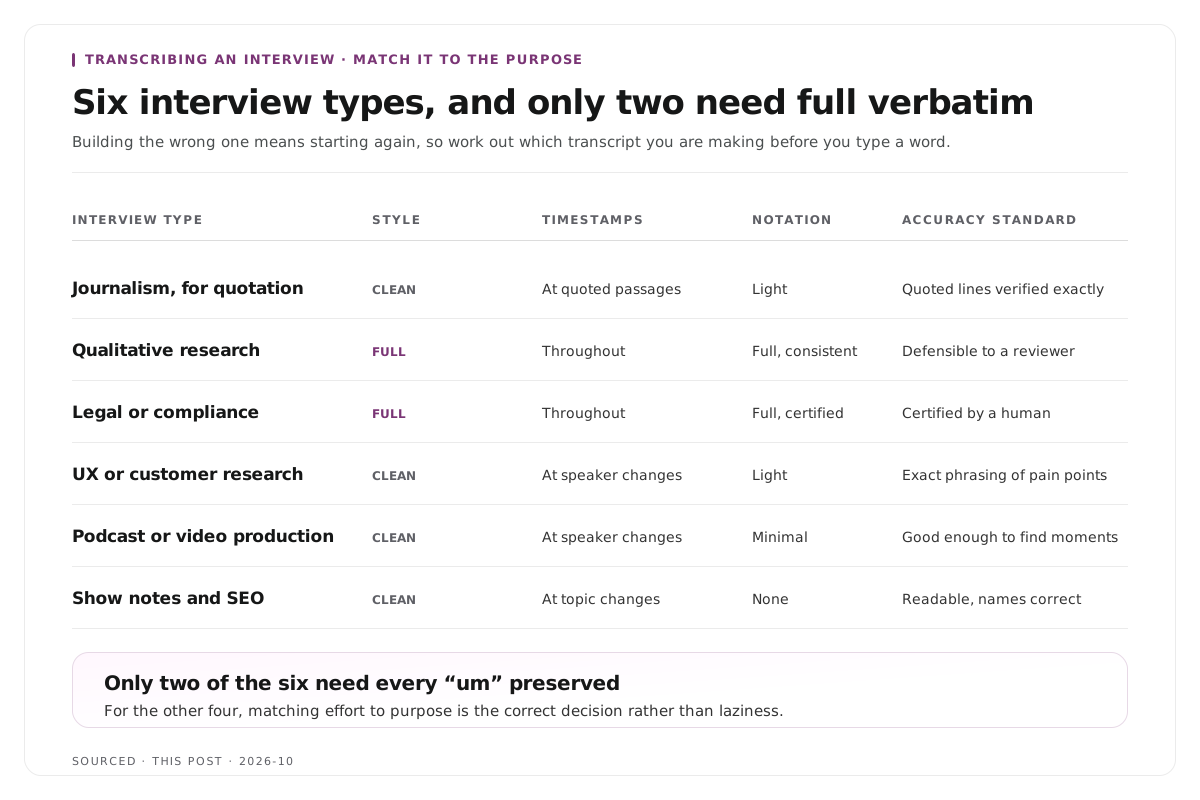
Before anything else, work out which of these you are making. The requirements differ enough that building the wrong one means starting again.
| Interview Type | Style Needed | Timestamps | Notation | Typical Accuracy Standard |
|---|---|---|---|---|
| Journalism, for quotation | Clean verbatim | At quoted passages | Light | Quoted lines verified word for word |
| Qualitative research | Full verbatim | Throughout | Full, consistent | Every utterance, defensible to a reviewer |
| Legal or compliance | Full verbatim | Throughout | Full, certified | Certified by a human transcriber |
| UX or customer research | Clean verbatim | At speaker changes | Light | Themes and exact phrasing of pain points |
| Podcast or video production | Clean verbatim | At speaker changes | Minimal | Good enough to locate and cut moments |
| Show notes and SEO | Clean verbatim | At topic changes | None | Readable, names correct |
Two things follow from this table.
Only two of the six require full verbatim. Most people producing a transcript do not need every "um" preserved, and preserving them creates a document that then has to be cleaned before it is usable.
Only two require certified or defensible accuracy. For the other four, matching effort to purpose is not laziness, it is the correct decision. A transcript used to find clips does not need the standard of one submitted with a thesis.
Step 1: choose the transcription style
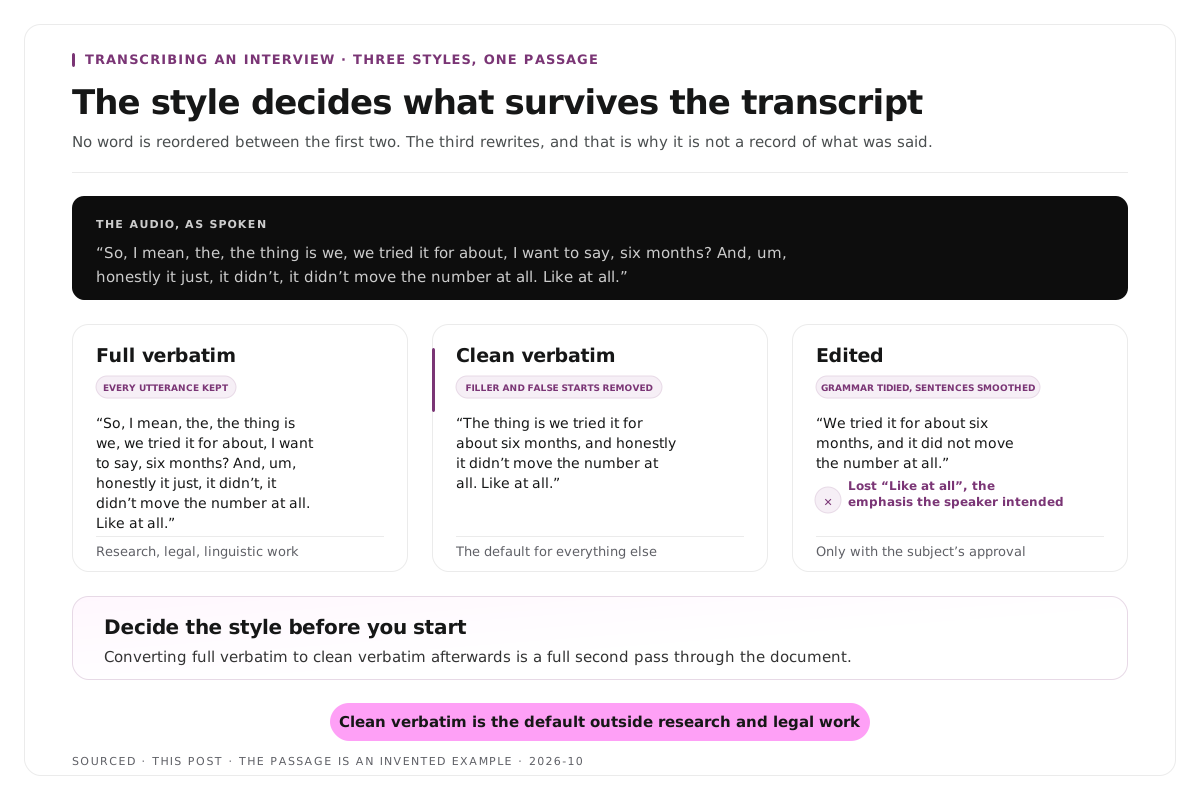
Three styles exist and the difference between them is substantial. Here is the same passage in all three.
The raw audio, as spoken:
"So, I mean, the, the thing is we, we tried it for about, I want to say, six months? And, um, honestly it just, it didn't, it didn't move the number at all. Like at all."
Full verbatim. Every utterance, every repetition, every filler, every false start, plus non verbal sounds.
"So, I mean, the, the thing is we, we tried it for about, I want to say, six months? And, um, honestly it just, it didn't, it didn't move the number at all. Like at all."
Clean verbatim, sometimes called intelligent verbatim. Filler, stutters and false starts removed. No word reordered, nothing paraphrased, meaning untouched.
"The thing is we tried it for about six months, and honestly it didn't move the number at all. Like at all."
Edited transcript. Grammar tidied, sentences smoothed, repetition removed for readability.
"We tried it for about six months, and it did not move the number at all."
Notice what the third version lost. "Like at all" carried emphasis that the speaker clearly intended, and the edited version removed it. That is the risk with edited transcripts, and it is why they should not be presented as a record of what was said.
Which to use:
- Full verbatim when how something was said is part of the evidence. Research, legal work, linguistic analysis, anything where hesitation itself is data.
- Clean verbatim for almost everything else. It is the default for journalism, publication, podcasting and production.
- Edited only when you are preparing a quote for print and the subject has approved the wording.
Decide now, because converting full verbatim to clean verbatim afterwards is a full pass through the document.
Step 2: fix what you can before transcribing
Transcription accuracy is set largely by the recording, not by the tool or the typist. Five properties matter, in roughly this order of impact.
Overlapping speech is the hardest case. When two people talk at once there is no correct transcript, only a choice of which voice to follow. Recording each speaker to a separate track removes the problem entirely and nothing else does.
Background noise. Steady noise such as air conditioning is handled better than intermittent noise such as a door or a notification.
Microphone distance. A speaker an arm's length away transcribes noticeably worse than one three to six inches from the microphone, because the ratio of voice to room drops.
Accent and pace. Fast speakers with few pauses are harder than slow ones, and models handle widely represented accents better than others.
Vocabulary. Product names, acronyms and unusual proper nouns are wrong by default, because nothing in the model expects them.
If the recording has already happened, you can still improve the file. Noise reduction before transcription helps, and the order of audio repairs is covered in how to edit a podcast, the audio and video workflow. If you are recording remotely and the interview has not happened yet, the capture decisions that protect accuracy are in how to record a podcast remotely.
Step 3: choose your method.
Three routes, with honest costs.
| Method | Time per Hour of Audio | Cost | Best For |
|---|---|---|---|
| Type it yourself | 4 to 6 hours | Your time only | Short recordings, sensitive content, poor audio |
| Automatic, then correct | 20 to 60 minutes | Low per hour | Almost everything |
| Human transcription service | Turnaround of hours to days | Highest per hour | Legal, certified, research grade, very poor audio |
Typing it yourself is slower than people expect. Four to six hours per hour of clear audio is normal at an average typing speed, and poor audio or several speakers pushes it higher. It remains the right choice when the content is too sensitive to upload anywhere, or when the audio is so poor that correcting an automatic draft would take longer than typing from scratch.
Automatic transcription with a correction pass is the right default for most purposes. Accuracy on clean single speaker audio is high enough that correcting is faster than typing, and the gap between tools on clean speech is much smaller than the gap between clean and poor audio.
A human service is what you buy when you need certification, a guaranteed accuracy level, or a transcript that will be examined by someone other than you. It is also the pragmatic choice for recordings that defeat automatic transcription entirely.
Step 4: listen all the way through first
Before typing a word, play the recording end to end.
You are listening for four things:
- Who speaks when, so you can establish speaker labels before you need them.
- Where the audio degrades, so you know which passages will be slow and can budget for them.
- Names, jargon and acronyms, so you can build a term list rather than meeting each one cold mid flow.
- Whether the recording is complete, because finding a gap after two hours of work is considerably worse than finding it now.
Twelve minutes here regularly saves an hour later. Write the term list down as you go, because it is also what you will feed an automatic tool if it accepts custom vocabulary.
Step 5: transcribe
Typing it yourself
Play at reduced speed, somewhere between half and three quarters. Almost nobody types at conversational pace, and fighting the playback is what makes manual transcription exhausting rather than merely slow.
Keep one hand on the keyboard and one on the playback control, or use a foot pedal if you do this regularly. The ability to scrub back two seconds without losing your typing position is the single biggest speed factor in manual transcription.
Do not stop to format. Get the words down, fix the document afterwards. Switching between transcribing and formatting is what turns a two hour job into four.
Do not stop to research spellings. Mark the word, keep going, resolve it in the proofreading pass.
Correcting an automatic draft
Run the transcription, then work through it with the audio rather than reading it cold.
Supply a term list up front if the tool accepts one. Names, products and acronyms given in advance are corrected before they become errors, which is far cheaper than fixing them afterwards.
What automatic transcription reliably gets wrong is exactly the content that matters: proper nouns, numbers, acronyms, and anywhere two people spoke at once. The correction pass is not optional, and the next three sections are about doing it efficiently.
Step 6: use a consistent notation
A transcript has to represent things that are not words. Pauses, laughter, overlapping speech, emphasis and passages you could not make out all need marking, and the only rule that really matters is that you mark them the same way every time.
These conventions are widely used. Adopt them or adopt your own, but define them once and apply them consistently across every transcript in a project.
| What Happened | Common Notation | Notes |
|---|---|---|
| Short pause | [pause] | Only if it carries meaning |
| Measured pause | [3 sec pause] | Used where duration is analytically relevant |
| Laughter | [laughs] | Attribute to the speaker whose line it sits on |
| Other non verbal | [sighs], [coughs] | Only when it affects meaning |
| Overlapping speech | [overlapping] on both lines | Note it rather than choosing one thread |
| Could not make out | [inaudible 00:14:22] | Always with the timestamp |
| Best guess at a word | [unclear: pricing] | Marks it as uncertain rather than asserted |
| Emphasis | italics or CAPS | Pick one and keep it |
| Trailing off | ... | Distinct from an edit |
| Interruption | -- at the cut point | Shows the speaker was cut off |
Three rules make notation useful rather than noise.
Record what carries meaning, not everything. Annotating every breath produces a document nobody can read. A three second pause before a difficult answer is data. A pause while someone drinks water is not.
Never guess silently. A guessed word that reads like a quote can be repeated as one. [inaudible] is an honest gap. An invented word is a fabricated quote.
Always timestamp the gaps. [inaudible 00:14:22] can be revisited. [inaudible] alone means listening to the whole recording again to find it.
Step 7: speaker labels and timestamps
Set labels once and never change them. Interviewer: and Sarah K: survives a third participant joining. Q: and A: does not.
Label at every change of speaker, not only the first appearance of each person.
Use the same label for the same person throughout. Switching between a full name and a first name halfway through is the most common cause of a transcript that cannot be reliably searched or coded.
Timestamp at every speaker change, or at minimum every two minutes in a monologue.
Timestamps are the element most often skipped and most regretted. Without them, a transcript cannot be checked against the audio, a quote cannot be verified, and nothing can be located later. They are also what turns a transcript into a working document rather than a text file, which is the basis of the approach in how to create video chapters from a transcript.
Step 8: proofread in priority order
Reading a transcript from top to bottom looking for errors is the slowest possible method. Work by category instead, in this order.
- Recurring terms. Company names, product names and acronyms are wrong consistently rather than randomly, so a single search and replace fixes every instance. This is usually half the errors in the document.
- Numbers and units. "Fifteen percent" and "fifty percent" sound similar at speed and mean opposite things. Dates, prices and quantities deserve a dedicated pass.
- Negations. A dropped "not" reverses a statement. This is the error with the most serious consequences and it is invisible unless you look for it.
- Attribution. A line assigned to the wrong speaker is worse than a missing line, because it is confidently wrong.
- Passages you will actually use. If three quotes are going into an article, those three get listened to word by word. The rest of the document can remain a searchable reference.
- Anything marked unclear. One more listen at reduced speed before the gap becomes permanent.
That last distinction is where most of the time saving lives. Match accuracy effort to purpose. A transcript used to locate moments does not need the standard of one that will be quoted.
Formatting the finished document
A few conventions make a transcript usable by someone who was not in the room.
A header block. Date, participants and their roles, recording length, interviewer, and the transcription style used. The style matters because a reader needs to know whether filler was removed deliberately.
A blank line between speakers. A wall of alternating text is unreadable.
Paragraph breaks inside long answers, at natural topic shifts rather than at arbitrary lengths.
Consistent timestamp format. [00:14:22] throughout rather than a mixture of formats.
A note on what was not transcribed, if anything. Pre interview small talk, a section the subject asked to be off the record, or a technical failure should be marked rather than silently absent.
Consent, anonymisation and storage
This section applies to research, journalism and customer interviews, and it is the part commercial guides tend to skip.
Recording consent is not transcription consent. Someone who agreed to be recorded has not necessarily agreed to the recording being uploaded to a third party service. For sensitive material, check what your consent form actually covers before uploading anything.
Automatic transcription means uploading the audio somewhere. For most interviews this is unremarkable. For medical, legal, HR or anything covered by a confidentiality agreement, it may not be permitted at all, and manual transcription becomes the only compliant route.
Anonymise at the transcript stage, not later. If participants were promised anonymity, replace names with consistent pseudonyms or codes as you transcribe, and keep the key separately. Retrofitting anonymisation across a finished transcript reliably misses an instance.
Decide retention before you start. How long the audio is kept, where, and who can access it. A transcript frequently outlives the recording it came from, and the two may have different retention requirements.
What to do with the transcript afterwards
A transcript is an input rather than an output. Three things it enables.
Finding quotes. Search the text rather than scrubbing the audio, then verify the specific quoted passage against the recording before publishing it.
Locating video moments. If the interview will produce short form video, the transcript is how you find the moments. Reading an hour of transcript takes roughly twelve minutes. Watching the hour takes an hour. Mark passages that stand alone without the surrounding conversation, which is the same test described in how many clips you should make from one podcast episode, and the editing sequence that follows is in how to edit an interview video.
Producing captions. A timestamped transcript is most of a caption file already, and the formats and when each applies are covered in captions vs subtitles vs SDH.
Worth noting upstream: whether an interview produces self contained passages at all is decided by how the questions were asked, which is the argument in 60 podcast interview questions that produce clippable answers.
Worked example: the same hour, two approaches
This is an invented example, not measured data.
A journalist records a one hour interview that will yield three quotes for an article.
The thorough approach. Full verbatim, typed by hand, roughly five hours. The document is complete and defensible. The three quotes were identifiable during the first listen. Four and a half of those five hours produced material nobody will ever read.
The matched approach. Automatic transcription, a few minutes. The draft contains nine errors, six of them in passages that will never be quoted. The three quoted passages are listened to word by word and corrected, which takes twenty minutes. The remainder stays as a searchable reference rather than a publication grade text.
Total time, under thirty minutes against five hours, with identical accuracy in the only three places accuracy was required.
The second approach would be wrong for a research transcript, where the unquoted material is the data. That is the whole point of the table at the top of this page.
Where Montage fits
Montage is not a transcription service. It does not sell transcripts, does not produce certified or research grade documents, and does not offer the full verbatim output that qualitative or legal work requires. For any of those, use a dedicated transcription provider.
It transcribes as the first stage of a different job, which is finding the moments in a long recording worth publishing as video. Upload a recording, up to 20GB at 4K, and it returns a timestamped transcript alongside 8 to 10 scored clip candidates, each trimmable by editing the transcript text, with branded captions and vertical reframing applied, exporting as MP4 for social or XML, FCPXML and JSON for an editor.[1]
Two design points are relevant to this page. The transcript is editable and the edit drives the cut, so deleting a sentence removes the video with it, which is the approach described in text based video editing. And correcting a name in the transcript corrects it in the captions, because both are generated from the same source.
The transcript it produces is a working document for cutting rather than a deliverable. The pipeline behind the clip selection is explained in how AI video clipping works, and you can try it on a single recording with the podcast clip finder.
Limitations and troubleshooting
The automatic transcript keeps misspelling the same name. Expected, and good news, because consistent errors are fixed with one search and replace. Keep a term list per project and supply it up front where the tool allows.
Two speakers talk over each other and the passage is unusable. Overlapping speech is the hardest case for both humans and software. Mark both lines as overlapping, transcribe what is intelligible, and do not invent a clean version. The recording level fix is separate tracks per speaker, which also matters for panels as covered in how to clip multi speaker panel discussions without losing context.
The transcript is accurate and unusable. It is probably full verbatim when clean verbatim was needed. Stripping filler afterwards is a complete pass through the document, which is why the style decision belongs at step one.
There are no timestamps and a quote now cannot be verified. Add timestamps during transcription. Retrofitting them means listening to the recording again in full.
Speaker labels drift halfway through. A convention changed mid document. Set labels once at the start and apply them mechanically.
The audio is too poor to transcribe at all. Some recordings cannot be rescued. Transcribe what is intelligible, mark the rest honestly, and treat it as a recording lesson rather than a transcription failure.
I cannot upload this audio anywhere. Confidentiality or consent restrictions make manual transcription the only compliant route. Budget four to six hours per hour of audio and plan accordingly.
The transcript and the audio have drifted out of sync. The recording was trimmed or re-encoded after transcription. Regenerate rather than attempting to re-time, because every timestamp after the first edit point has shifted.
Frequently asked questions
How long does it take to transcribe an interview?
Typing by hand takes roughly four to six hours per hour of clear audio, and longer with poor audio or multiple speakers. Automatic transcription with a correction pass usually takes twenty to sixty minutes for the same recording.
What is the difference between verbatim and clean verbatim?
Full verbatim captures every utterance including filler, repetitions, false starts and non verbal sounds. Clean verbatim removes those while keeping the meaning and the wording intact. Research and legal work need the first, publication and production need the second.
Should you use automatic transcription for interviews?
For most purposes yes, followed by a correction pass. It reliably mishandles proper nouns, numbers, acronyms and overlapping speech, so those parts still need checking against the audio. For certified or confidential work it may not be appropriate at all.
How do you mark unclear audio in a transcript?
Use a consistent marker with the timestamp, such as [inaudible 00:14:22]. Never guess at words silently, because a guess that reads like a quote can be repeated as one.
How do you note pauses and laughter in a transcript?
With square bracket annotations applied consistently, such as [pause], [3 sec pause] and [laughs]. Only record what carries meaning, and define your notation once at the start of a project.
Do interview transcripts need timestamps?
Yes, at every speaker change or at minimum every two minutes. Without them the transcript cannot be checked against the recording, quotes cannot be verified, and nothing can be located afterwards.
How do you transcribe an interview with multiple speakers?
Establish labels before you start, label every change of speaker, and mark overlapping passages rather than choosing one voice. The reliable fix is upstream: record each speaker to a separate track.
Can you transcribe a confidential interview?
Not always through an automatic service, since that means uploading the audio to a third party. Check what your consent and confidentiality terms permit, and use manual transcription where uploading is not allowed.
What format should an interview transcript be in?
A header block with date, participants, length and transcription style, then speaker labelled paragraphs with a blank line between speakers, consistent timestamps, and a note covering anything deliberately not transcribed.
Does Montage provide interview transcripts?
Montage produces a timestamped transcript as part of turning a recording into video clips. It is a working document for cutting rather than a transcription deliverable, so for research, legal or certified transcripts use a dedicated service.