How to Add Background Music to a Video Without Getting Claimed
How music licensing actually works for video, what royalty free does and does not mean, where to get tracks legally, and how to mix music so speech stays clear.
How music licensing actually works for video, what royalty free does and does not mean, where to source tracks legally, and how to mix music so it supports speech rather than burying it.
Any music you did not write requires a licence, including music you paid for in another context. Royalty free does not mean free, it means you pay once rather than paying per use. The practical choice is between a free library with restrictions, a subscription, or a per track licence.
The useful question is not "where can I get free music?" It is "what am I actually allowed to do with this track?" Nearly every copyright claim comes from someone who found a track described as free and did not read what that covered.
What the licensing terms actually mean
These phrases are used loosely and they mean different things.
Royalty free means you do not pay ongoing royalties per play or per view. It does not mean free of charge, and it does not mean unrestricted. You still buy a licence, and that licence has terms.
Creative Commons is a family of licences, not one thing. Some require attribution. Some prohibit commercial use entirely, which rules out anything on a company channel or anything monetised. Read which variant applies rather than assuming.
Public domain means copyright has expired or been waived. Genuinely free to use. Note that a modern recording of a public domain composition is usually still protected, so Beethoven is public domain and a 2019 orchestral recording of it is not.
Copyright free is marketing language rather than a legal term. Treat it as a prompt to go and read the actual licence.
Stock or library music is music licensed specifically for use in productions, through subscription or per track purchase.
The thing people get wrong most often: buying a song on a music service gives you a personal listening licence, not a licence to put it in a video. That is the single most common cause of claims.
Where to get tracks legally
| Source Type | Cost Model | Best For | Watch Out For |
|---|---|---|---|
| Platform audio libraries | Free | Creators publishing on that platform | Terms may only cover that platform |
| Free libraries | Free, sometimes attribution required | Low budget projects | Attribution requirements, and heavy overuse of popular tracks |
| Subscription libraries | Monthly or annual | Anyone publishing regularly | What happens to videos already published if you cancel |
| Per track licences | One off per song | Occasional use, a signature piece | Cost adds up across many videos |
Two things to check before committing to any of them.
What happens when a subscription ends. Some licences cover videos published while you were subscribed in perpetuity. Others do not. This is the term that matters most and it is the one people never read.
Whether the licence covers your use. Client work, paid advertising and broadcast are frequently excluded from standard or free tiers. If you are an agency putting music into client deliverables, this is a contractual issue rather than a detail, which connects to the governance question in how agencies deliver client video clips faster without losing editorial control.
What happens if you get it wrong
Worth knowing so the risk is proportionate rather than vague.
A content ID claim. Automated systems detect the music and the rights holder claims the video. Usually the revenue goes to them rather than the video being removed. Irritating rather than catastrophic, and it can often be disputed if you do hold a licence.
A takedown. The video is removed. More serious and less common for library music than for commercial tracks.
A strike. Repeated infringement affects the account itself. This is the one worth avoiding.
Nothing at all, for a while. The most dangerous outcome, because it teaches people that the rules do not apply right up until the video that gets traction is the one that gets claimed.
The practical consequence is that the risk scales with reach. A video nobody watches rarely triggers anything. The one that performs is the one that gets noticed.
Choosing a track that does not fight the speech
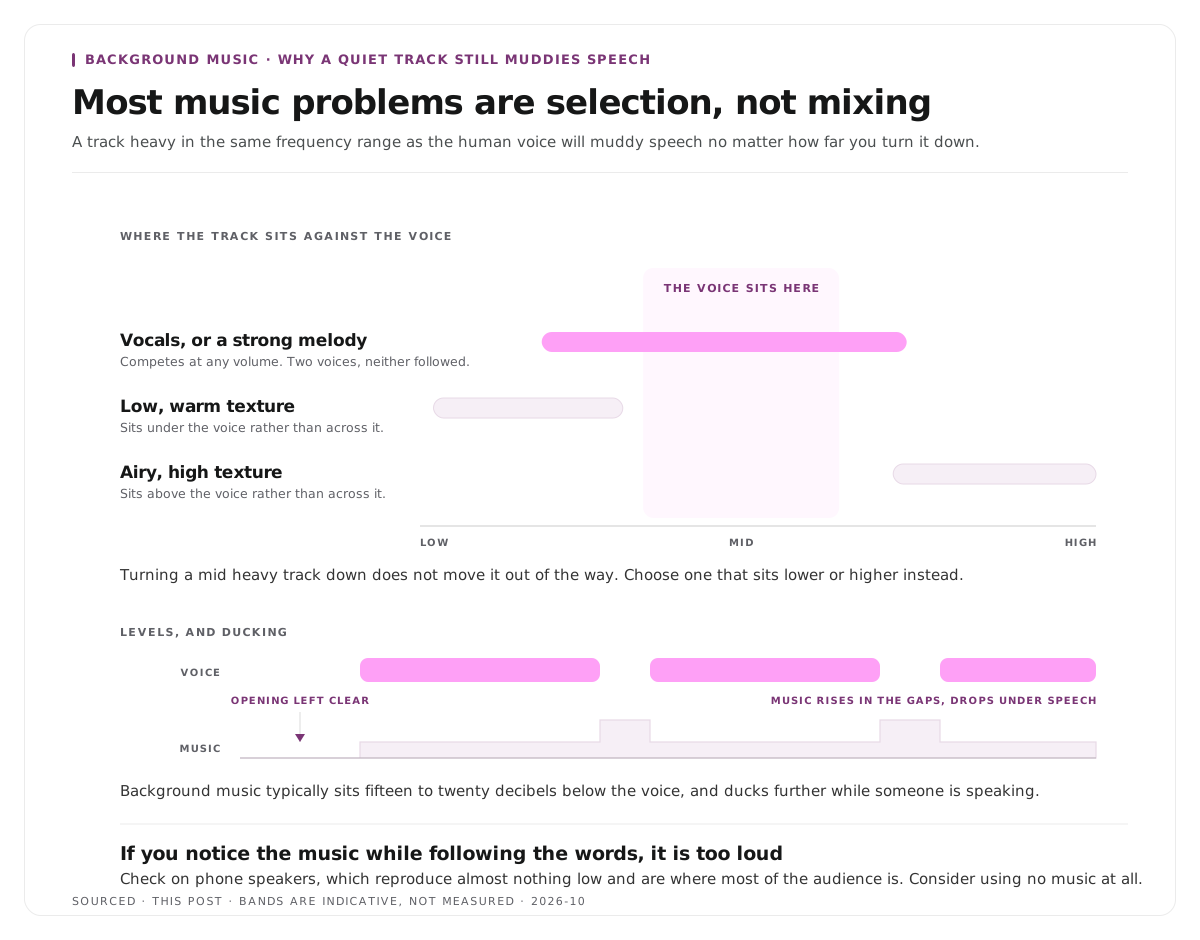
Most music problems in talking video are selection problems rather than mixing problems.
Avoid tracks with vocals under speech. Two voices compete and the viewer follows neither. Instrumental only, unless the music is the content.
Avoid strong melodic movement. A memorable melody pulls attention away from what is being said. For background use, texture beats tune.
Match the energy to the content, not to your taste. Upbeat music under a serious explanation reads as tonally confused.
Check the frequency range. Music heavy in the same range as the human voice, roughly the mid frequencies, will muddy speech no matter how quiet you make it. Tracks that sit low or high leave room.
Consider using none. This is the option people skip. Music is not a requirement, and a clear voice with no music is better than a clear voice fighting a track. Many of the best talking head videos have no music at all.
Mixing it so speech stays clear
Set music far lower than feels right. Background music under speech typically sits very quiet, around fifteen to twenty decibels below the voice. If you notice the music while listening to the words, it is too loud.
Use ducking. Automatically lowering the music when someone speaks and raising it in the gaps. Most editors offer this and it solves the problem better than a fixed level does.
Check on phone speakers. Music that sits politely under speech on headphones can swamp it on a phone, and that is where most of your audience is. This is the check people skip.
Fade in and out. Music that starts abruptly or stops dead draws attention to itself.
Leave the opening clear. The first few seconds belong to the hook. Music competing with the first line costs you viewers at exactly the point they decide, which is the argument in how to write a hook for short form video.
Clean the voice before adding music. Noise reduction after music is added is considerably harder, because the processing cannot tell the music from the noise. The order of operations for audio repair is in how to edit a podcast, the audio and video workflow.
Music in short clips specifically
Short form changes the calculation.
Many clips are watched muted, so music contributes nothing to a large share of views. Captions do the work instead, which is covered in captions vs subtitles vs SDH.
Platform audio matters more than your track. On some platforms using trending audio affects distribution in ways a library track does not. That is a platform strategy decision rather than a production one.
A forty second clip has no time for a music arc. Fades and builds that work across three minutes do nothing in forty seconds. A flat texture is usually correct.
Consistency across a batch matters. Using a different track per clip makes a set feel incoherent. One track or one small set across a batch reads as a channel rather than as unrelated videos, which fits the approach in how to batch a month of clips in one afternoon.
Worked example: two videos, one track
This is an invented example, not measured data.
A team adds music to two videos using the same library track.
The first is a three minute explainer. The track plays at a fixed level throughout, chosen because it sounded good in isolation. It has a vocal hook at ninety seconds. Viewers report the video is hard to follow and nobody can say exactly why.
The second is the same explainer, re-mixed. The track is instrumental, sits around eighteen decibels below the voice, ducks further whenever someone speaks, and is absent for the first five seconds. Nobody comments on the music at all.
The second mix is better precisely because the music became invisible. Background music succeeds when the viewer does not notice it, which makes it the one production element where going unremarked is the goal.
Where Montage fits
Montage does not add music, does not license tracks and has no audio library. It applies branded captions and framing to clips, and music is added afterwards in an editor.
Upload a long recording, up to 20GB at 4K, and it returns a timestamped transcript alongside 8 to 10 scored clip candidates, each trimmable by editing the transcript text, with branded captions and vertical reframing applied, exporting as MP4 for social or XML, FCPXML and JSON for an editor.
The relevant detail is the export. If clips need music, the XML or FCPXML hands an editor a timeline with the cuts already made, so the music is laid over a finished sequence rather than being added to eight separately assembled clips. That handoff is described in how XML export solves the producer and editor handoff problem.
To try it on one recording, use the podcast clip finder.
Limitations and troubleshooting
The video was claimed despite the track being royalty free. Either the licence did not cover your use, or the rights holder has registered the track with an automated system and the claim can be disputed with your licence as evidence. Keep every licence receipt.
The music is quiet and still obscures the voice. Frequency overlap rather than volume. The track sits in the same range as speech. Choose something lower or higher rather than turning it down further.
It sounds fine on headphones and bad on a phone. Phone speakers reproduce almost nothing low, which changes the balance entirely. Always check there.
The track was fine and the client rejected it. Standard and free tiers frequently exclude client work and advertising. Check the licence before using anything in a deliverable.
My subscription lapsed and I do not know if old videos are covered. Read the licence terms for what happens after cancellation. Some cover published work in perpetuity and some do not.
Music was added and now the voice cannot be cleaned. Noise reduction after music is mixed in is much harder, since the processing cannot distinguish music from noise. Clean the voice first, always.
Frequently asked questions
Does royalty free mean free?
No. It means you do not pay ongoing royalties per play, but you still buy a licence and that licence has terms. Some royalty free music is also free of charge, and the two things are unrelated.
Can you use music you bought on a streaming or download service in a video?
No. Buying a song gives you a personal listening licence, not a synchronisation licence to use it in a video. This is the most common cause of copyright claims.
What happens if you use copyrighted music in a video?
Usually an automated content claim where the rights holder takes the revenue. Less often a takedown, and repeated infringement can affect the account itself. Risk rises with reach, so the video that performs is the one that gets noticed.
How loud should background music be under speech?
Far quieter than feels right, typically around fifteen to twenty decibels below the voice, and ducked further while someone is speaking. If you notice the music while following the words, it is too loud.
Should short clips have background music?
Often not. A large share of short form viewing is muted, so music contributes nothing to those views, and a forty second clip has no time for a musical arc. Captions do more work than music does.
Is Creative Commons music safe to use commercially?
Only some of it. Creative Commons is a family of licences and several variants prohibit commercial use or require attribution. Check which specific licence applies to the track.
Does Montage add music to clips?
No. Montage produces clips with captions and framing applied. Music is added afterwards in an editor, which the XML and FCPXML exports are designed to support.