How to Batch a Month of Clips in One Afternoon
A batching workflow for video teams, why batching by task beats batching by post, and the realistic output from one recording session and one editing afternoon.
A batching workflow built for video rather than for graphics, why grouping by task beats grouping by post, and what one recording session and one editing afternoon realistically produce.
Content batching means doing one type of task for everything at once rather than taking each post from idea to publish individually. For video the order is: plan all topics, record everything in one session, select all clips in one pass, finish all clips together, then schedule the lot. Switching between those modes is what makes the daily approach so slow.
The useful question is not "how do I work faster?" It is "how many times am I changing mode?" Planning, recording, selecting and finishing use different parts of your attention, and every switch between them costs far more than the task itself.
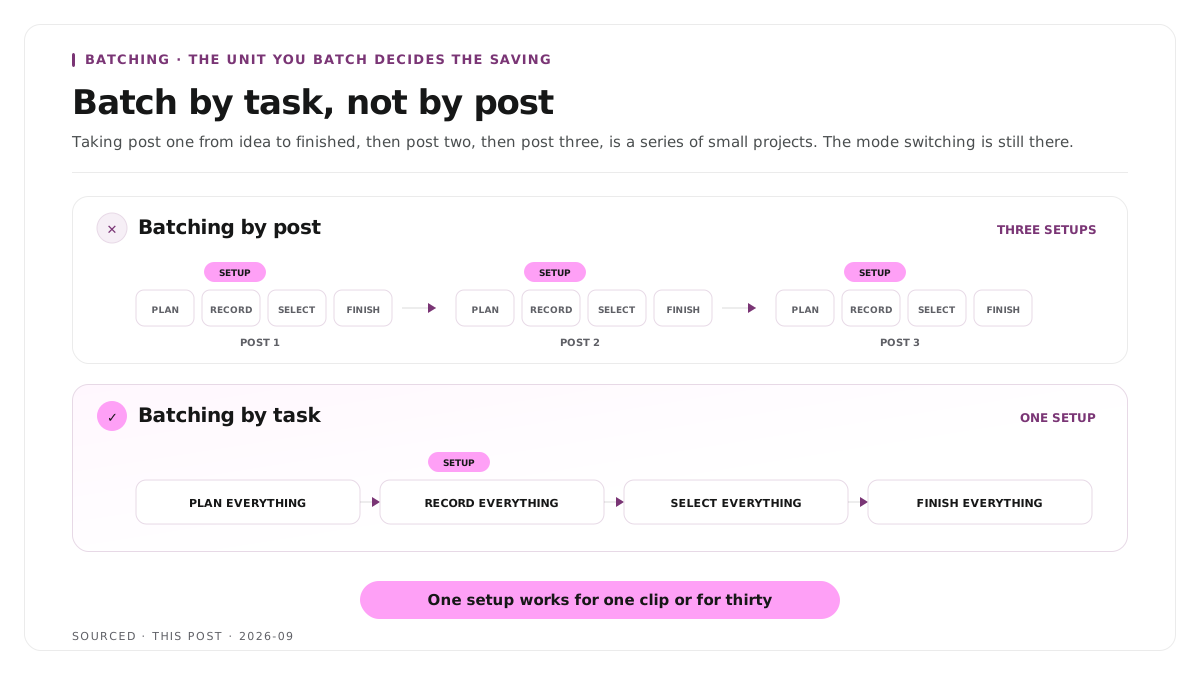
Batch by task, not by post
The common mistake is batching the wrong unit. People block out a day and then take post one from idea to finished, then post two, then post three. That is a series of small projects, not a batch, and the mode switching is still there.
Real batching groups the same task across everything. All the planning, then all the recording, then all the selection, then all the finishing.
The difference is largest where setup costs are high, which is exactly where video sits. Lighting a room, framing a shot and getting a speaker warmed up takes twenty minutes and works for one clip or thirty. Doing it thirty separate times is thirty setups.
Step 1: plan the whole batch first
Plan before you touch a camera, and plan more than you think you need.
Work from questions rather than topics. "Pricing" is a topic and it produces a rambling answer. "What is the most expensive pricing mistake you see?" is a question and it produces a clip. The editing side of turning those answers into clips is covered in how to edit an interview video.
Write down twice what you plan to publish. Some will not work, and discovering that during selection is fine. Discovering it during recording, with nothing left to say, is not.
Group by set up, not by theme. Everything filmed at the desk together, everything filmed standing together, everything needing a screen recording together. Theme does not cost you anything to switch. Position does.
Decide the format before recording. Whether a point is a thirty second clip or a three minute explainer changes how it should be delivered, and it is far too late to decide afterwards.
Step 2: record everything in one session
One setup, one lighting arrangement, one wardrobe, one session.
Do a test take and check it properly. Two minutes here prevents a whole batch being unusable. Check audio on headphones, check focus, check framing.
Take each point twice. A clean run and a looser one. The second is often better and it costs thirty seconds.
Leave a pause between points. Two seconds of silence either side of each one gives clean edit points and stops the selection pass becoming forensic.
Restate the question inside the answer. Otherwise the clip needs context bolted on afterwards. This single habit changes how many of your takes are usable.
Keep a marker file open. Note the timestamp of anything that lands. It saves scrubbing later.
Expect fatigue. Quality drops noticeably after about ninety minutes of talking to camera. Put the most important points first rather than working through your list in order.
The production sequence around it is in content production workflow, why editorial and editing should be two separate jobs.
Step 3: select everything in one pass
Do not edit yet. Selection is a separate mode and mixing the two is where afternoons disappear.
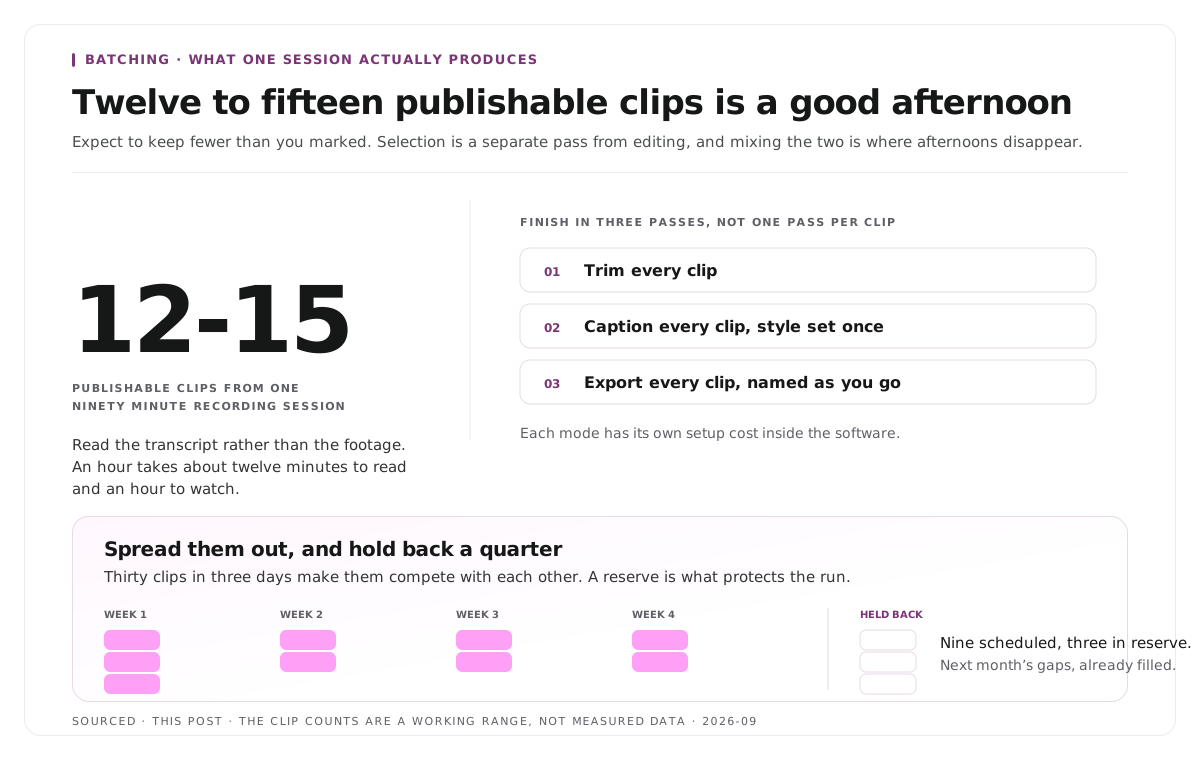
Work from the transcript rather than the footage. Read it through, mark every passage that stands alone, and produce a shortlist with timestamps. Reading an hour takes about twelve minutes and watching it takes an hour.
Apply one test to each candidate: would this make sense to someone who has seen nothing else? If it needs context, either move the start point earlier or drop it.
Expect to keep fewer than you marked. A ninety minute session producing twelve to fifteen publishable clips is a good outcome, and the selection criteria are in how many clips you should make from one podcast episode.
Step 4: finish everything together
Batch the finishing the same way you batched the recording.
Trim every clip first, then caption every clip, then export every clip. Three passes through the set beats one complete pass per clip, because each mode has its own setup cost inside the software.
Set the caption style once. Applied across a selection rather than per clip, this is a two minute job instead of forty. The treatment choices behind it are covered in caption styles for B2B and B2C platforms.
Do not redesign anything mid batch. If a better caption treatment occurs to you at clip nine, write it down and use it next month. Changing it now means going back to clips one through eight, and a consistent batch beats a slightly better looking half batch.
Name files as you export. Naming thirty files afterwards from memory is its own afternoon.
Step 5: schedule, and keep a buffer
Spread them out. Thirty clips published across four weeks works. Thirty clips published in three days makes them compete with each other.
Hold back a quarter. A reserve of unscheduled clips is what protects the run when a week gets away from you, which is the actual failure mode of batching. Batching produces a month of content and then a month of nothing, and the buffer is the fix.
Keep the leftovers. Clips that did not make the schedule are not waste, they are next month's gaps filled.
The two week cadence for podcast clips specifically is in how to repurpose podcast episodes for LinkedIn consistently.
Worked example: one afternoon, two approaches
This is an invented example, not measured data.
A founder blocks out an afternoon to produce a month of clips.
The first approach takes each clip individually: set up, record, trim, caption, export, name, schedule, then repeat. Setup happens once, but the software mode switching happens eight times, and after four clips the delivery has flattened because the energy goes into the process rather than the talking. Six clips get finished.
The second approach batches by task: ninety minutes recording everything with the list on the desk, a break, thirty minutes reading the transcript and marking passages, then one trimming pass, one captioning pass, one export pass. Fourteen clips get finished in the same afternoon, and eleven get scheduled with three held back.
Same person, same equipment, same afternoon. The difference was how many times they changed mode.
Where Montage fits
Montage does not plan your content, does not record anything and does not schedule or publish posts. There is no calendar in it and no scheduler, so the first and last steps above sit entirely outside it.
Where it fits is steps three and four. Upload a long recording, up to 20GB at 4K, and it returns 8 to 10 scored clip candidates rather than an unranked pile, each trimmable by editing transcript text, with branded captions and vertical reframing applied, exporting as MP4 for social or XML, FCPXML and JSON for an editor.
The relevant part for batching is that selection and finishing arrive together. The scored shortlist replaces the manual transcript pass, and the captions and framing are already applied across the whole set rather than configured per clip. You still decide which candidates are worth publishing, which is the part that should stay human.
To try it on one session before committing a month to the workflow, use the podcast clip finder.
Limitations and troubleshooting
The later clips are noticeably worse. Fatigue. Record the most important points first and stop at ninety minutes rather than pushing through the list.
Every clip sounds the same. One session, one energy level. Vary the question types rather than the delivery, since asking for different things produces different answers.
The batch produced half what was planned. Normal, and the reason for planning twice what you intend to publish.
The captions drifted in style across the set. Something was changed mid batch. Lock the style before the finishing pass and note improvements for next time.
A month of content, then nothing. The characteristic failure of batching. Hold back a quarter of every batch as a buffer rather than scheduling all of it.
Selection took longer than recording. You were watching rather than reading. Work from the transcript.
Frequently asked questions
What is content batching?
Doing one type of task for everything at once rather than taking each post from idea to publish individually. For video that means planning all topics, recording in one session, selecting in one pass, then finishing everything together.
How much content can you batch in one session?
A ninety minute recording session realistically produces twelve to fifteen publishable short clips, provided the topics were planned as questions in advance and each point was delivered so it stands alone.
Should you batch by task or by post?
By task. Batching by post keeps all the mode switching that makes the daily approach slow, and only removes the physical setup cost.
How far ahead should you schedule batched content?
Three to four weeks, with roughly a quarter of the batch held back unscheduled. The reserve is what prevents the month of content followed by a month of nothing.
Why does batched content sometimes feel repetitive?
It was recorded in one session at one energy level. Varying the type of question rather than the delivery is what produces variation, since different questions produce genuinely different answers.
Does Montage schedule or publish batched clips?
No. Montage produces the clips with captions and framing applied. Planning, scheduling and publishing all remain separate steps.