What Is Video Repurposing? Definition, Workflow and Examples
Video repurposing defined, how it differs from crossposting and reposting, the five stage workflow, and realistic output from one long recording.
A definition of video repurposing, how it differs from crossposting and reposting, the five stages of the workflow, and what one long recording realistically produces.
Video repurposing is the practice of transforming one piece of video into multiple assets shaped for different platforms and audiences. The transformation is the defining part. Taking the same file and posting it in four places is not repurposing, it is distribution.
The useful question is not "how do I get more out of this video?" It is "what does each platform actually want?" Repurposing is a series of translation decisions, and treating it as a copying exercise is why so much repurposed content underperforms on every platform it reaches.
Repurposing, crossposting and reposting
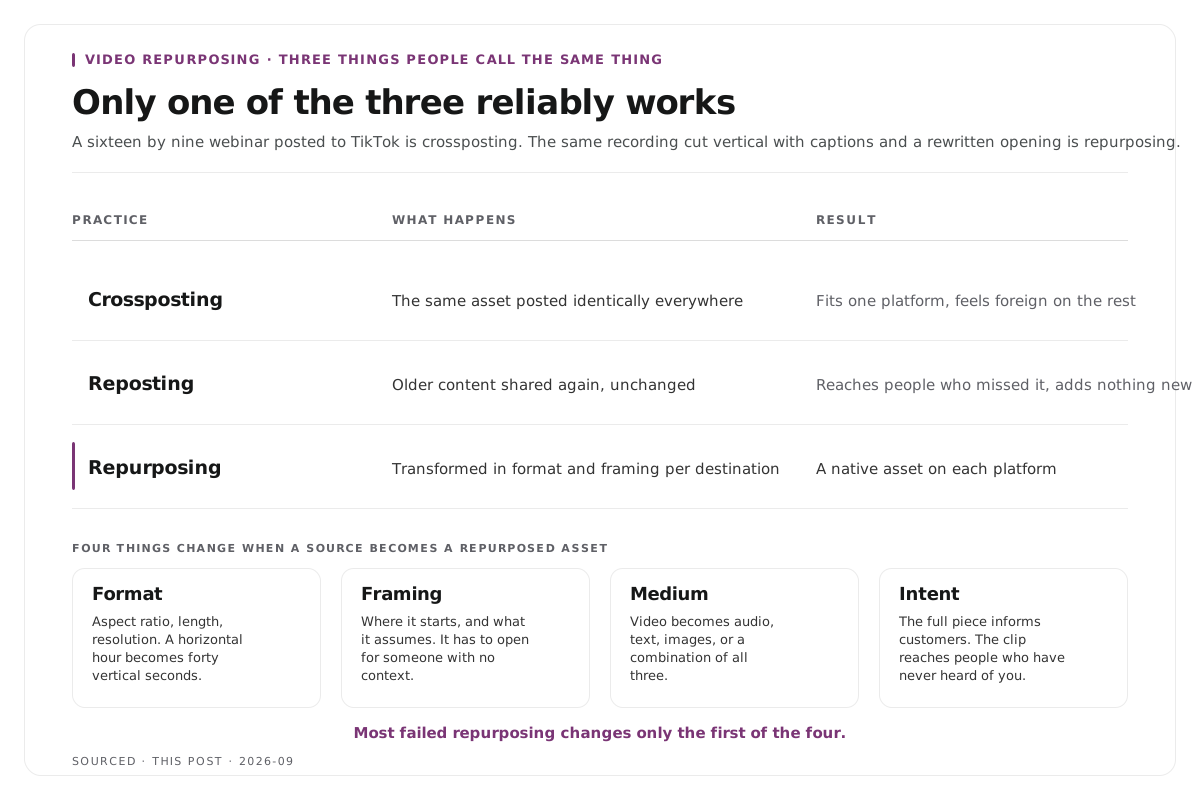
These get used interchangeably and mean different things, which matters because only one of them reliably works.
| Practice | What Happens | Result |
|---|---|---|
| Crossposting | The same asset posted identically everywhere | Fits one platform, feels foreign on the rest |
| Reposting | Older content shared again unchanged | Reaches people who missed it, adds nothing new |
| Repurposing | The source transformed in format and framing per destination | A native asset on each platform |
A sixteen by nine webinar recording posted to TikTok is crossposting. The same recording cut into a vertical forty second clip with captions and a rewritten opening is repurposing. The difference is work, and the work is the point.
What actually gets transformed
Four things change when a source becomes a repurposed asset, and skipping any of them produces something that reads as recycled.
Format. Aspect ratio, length, resolution. A horizontal hour becomes a vertical forty seconds.
Framing. Where the piece starts and what it assumes. A clip pulled from the middle of an hour has to open in a way that makes sense to someone with no context.
Medium. Video becomes audio, text, images or a combination. A recording can produce a newsletter, a carousel and a blog post as well as clips.
Intent. The full recording might exist to inform existing customers. A clip from it might exist to reach people who have never heard of you. Those are different jobs and they need different edits.
Most failed repurposing changes only the first of the four.
The five stage workflow
1. Plan the source so it contains repurposable moments. This is the stage almost everyone skips, and it determines the ceiling for everything after. A recording where the speaker answers in self contained statements yields several times more than one where every answer depends on the previous question.
2. Select the moments. Read the transcript rather than scrubbing the footage, mark every passage that stands alone, and shortlist. Reading an hour takes about twelve minutes, watching it takes an hour.
3. Edit per destination. Not one vertical export used everywhere. Length, captions, framing and opening line change by platform.
4. Distribute on a schedule. Spread across days and weeks rather than publishing everything at once, so the assets do not compete with each other.
5. Feed results back into the next recording. The clips that performed tell you what to ask for next time, which improves stage one.
The workflow applied to a specific source is covered in how to repurpose a podcast into 10 clips and, for the B2B case, how to turn a webinar into 10 social clips.
What one recording realistically produces
The claims in this category are frequently inflated, so here is a grounded version.
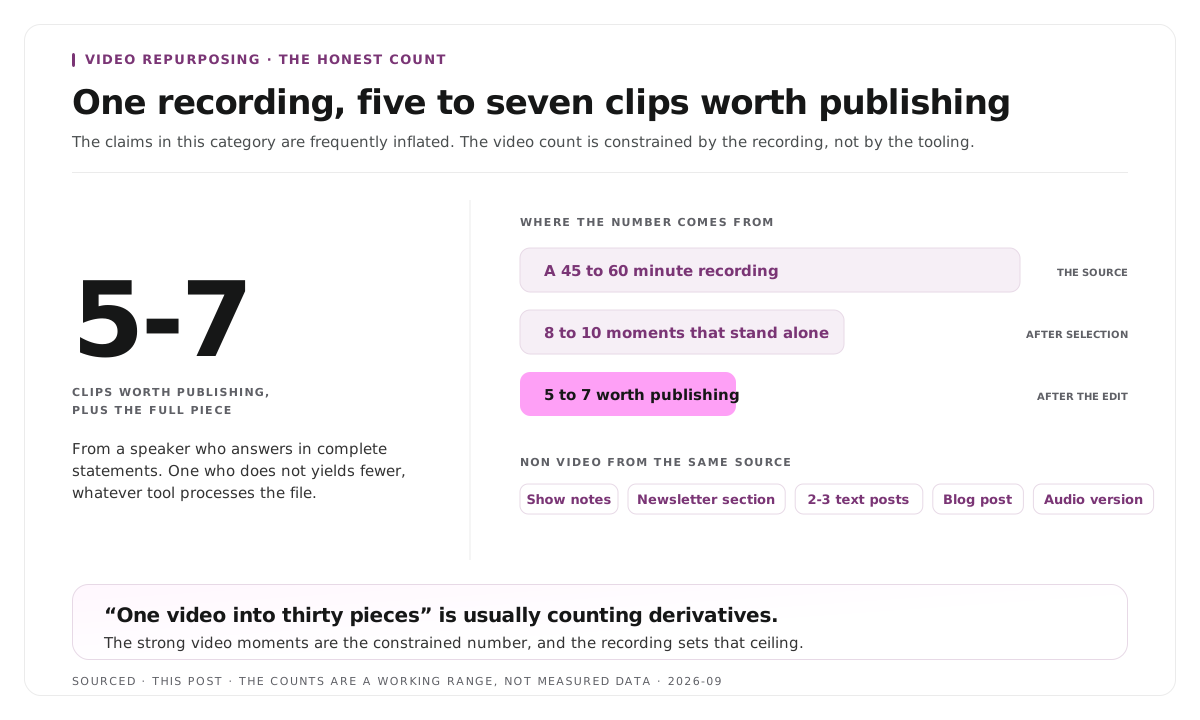
A forty five to sixty minute recording with a speaker who answers in complete statements contains roughly eight to ten moments that stand alone, of which five to seven are worth publishing. Add derivatives from the same source and the total asset count rises considerably, but the number of genuinely strong video moments does not.
Video from one recording: five to seven clips worth publishing, plus the full piece. Non video from the same source: show notes or a summary, a newsletter section, two or three text posts built on quotes, a blog post, an audio version.
The distinction matters because "one video into thirty pieces" is usually counting derivatives. The video count is the constrained number, and it is constrained by the recording rather than by the tooling. Realistic expectations per episode are in how many clips you should make from one podcast episode.
Worked example: one panel, three destinations
This is an invented example, not measured data.
A company records a fifty minute panel with four speakers.
The full recording goes on YouTube, unchanged apart from chapters. It serves people who already know the company and want the whole thing.
Four clips go to LinkedIn over two weeks, each vertical, captioned, opening on a claim rather than on the question that prompted it. Each is built for someone who has never heard of the company.
One transcript becomes a written piece covering the disagreement between two of the speakers, which is the part that worked best in the room and reads even better in text.
Three assets, three different formats, three different audiences, one recording. Nothing was posted twice.
Where Montage fits
Montage covers one stage of this, which is selection and production of video clips. It does not plan recordings, does not write the text derivatives, does not schedule and does not publish.
Upload a long recording, up to 20GB at 4K, and it returns 8 to 10 scored clip candidates rather than an unranked pile, each trimmable by editing transcript text, with branded captions and vertical reframing applied, exporting as MP4 for social or XML, FCPXML and JSON for an editor.
The other four stages stay with you, and stage one matters most. No tool improves a recording where every answer depends on the question before it, which is why the planning stage is at the top of this page rather than treated as an afterthought.
To see what a single recording yields, use the podcast clip finder, and the measurement side of the workflow is in the video content operations metrics that actually matter.
Limitations and troubleshooting
The clips underperform on every platform. They are probably one export used everywhere. Edit per destination rather than resizing once.
The recording yielded almost nothing. Look at stage one. Answers that depend on the preceding question cannot be extracted no matter what tool processes them.
Repurposed content feels stale to the existing audience. They are seeing the same material twice. Repurposing targets new audiences on new platforms; it is not a second serving for the same people.
The volume is there and the results are not. Counting assets rather than outcomes. Five strong clips beat thirty weak ones, and the weak ones train an audience to scroll past you.
It takes longer than making something new. The selection stage is being done by scrubbing footage. Work from the transcript.
Frequently asked questions
What is video repurposing?
Transforming one piece of video into multiple assets shaped for different platforms and audiences. The transformation of format, framing, medium and intent is what separates it from simply posting the same file in several places.
What is the difference between repurposing and crossposting?
Crossposting publishes the same asset identically everywhere. Repurposing changes the format and the framing for each destination so the result is native to the platform it appears on.
How many pieces can you get from one video?
From a forty five to sixty minute recording, five to seven video clips worth publishing, plus text and audio derivatives. Higher claims usually count derivatives rather than distinct video moments.
Is repurposing the same as reposting?
No. Reposting shares older content unchanged to reach people who missed it. Repurposing creates a new asset shaped for a different platform and audience.
What is the first step in video repurposing?
Planning the recording so it contains self contained moments. That decision sets the ceiling for everything downstream and cannot be fixed afterwards.
Does Montage handle the whole repurposing workflow?
No. Montage covers clip selection and production. Planning, text derivatives, scheduling and publishing all sit outside it.