9 Live Streaming Mistakes and How to Avoid Them
The live streaming mistakes that actually lose viewers, ranked by how much damage each one does, and the fix for each one before you go live again.
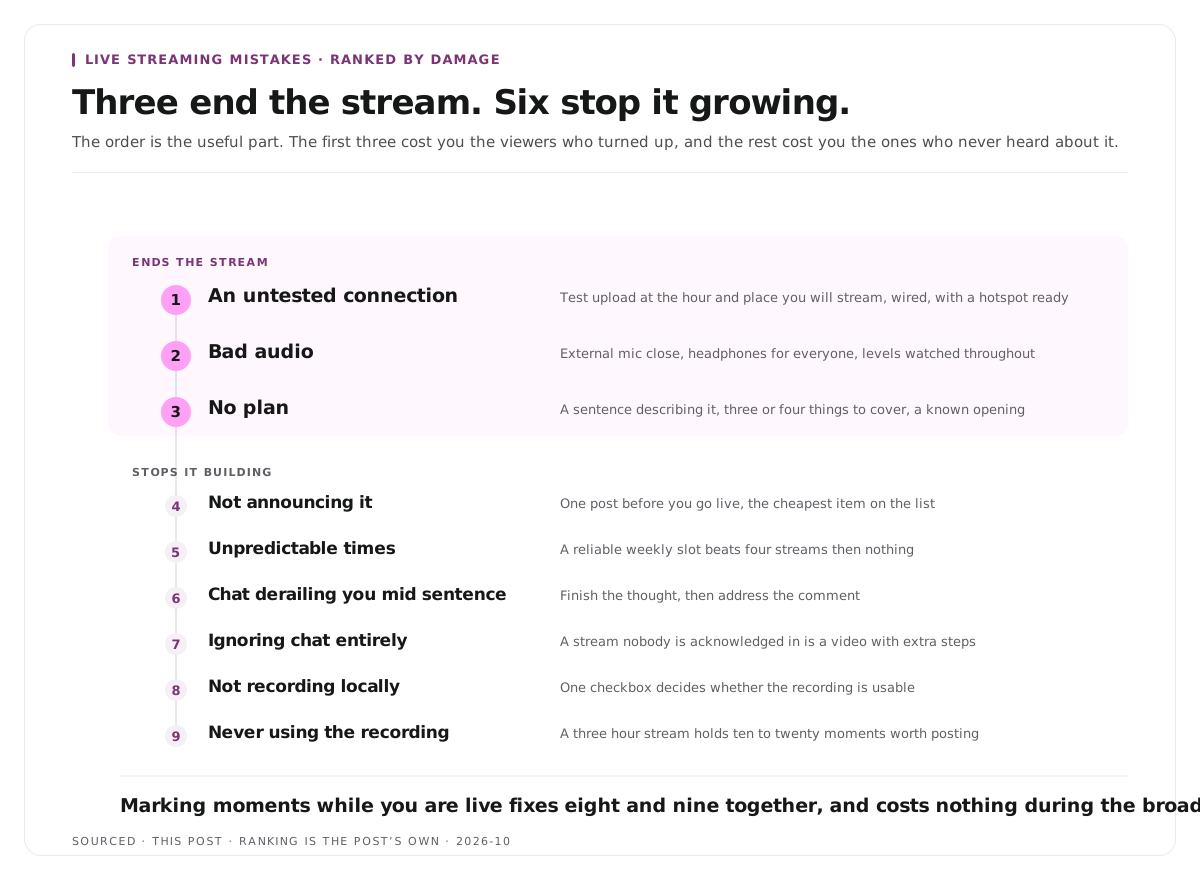
The nine mistakes that lose viewers, ordered by how much damage each one does rather than by how often they are mentioned, with the specific fix for each.
The mistakes that cost most are the ones that make a stream unwatchable rather than merely imperfect: an untested connection, bad audio, and no plan. Everything else is a refinement on top of those three, and fixing them in order is more useful than working through a long checklist.
The useful question is not "what should I improve?" It is "what would make someone leave in the first ninety seconds?" Almost nothing on a polish checklist does that. Three things on this page do.
The three that actually lose people
1. An untested connection
The most damaging mistake, because it does not degrade the stream, it ends it.
What goes wrong: upload bandwidth is insufficient or contested, the stream buffers, freezes or drops, and viewers leave rather than waiting.
The fix: test upload speed rather than download, at the location you will stream from, at the time of day you will stream, with the room as busy as it will be. Testing in an empty room at 9am tells you almost nothing about 8pm with an audience present.
Use a wired connection wherever physically possible. Wifi is contested in a way ethernet is not, and the contention appears exactly when people arrive.
Have a backup. A phone hotspot on a different network, configured in advance. Switching mid stream is far better than going dark.
2. Bad audio
Viewers tolerate a soft picture and leave over sound, consistently and quickly.
What goes wrong: the microphone is too far away, the room echoes, levels are too low or clipping on peaks, or there is feedback from speakers.
The fix: an external microphone used from three to six inches away, headphones rather than speakers for everyone on the stream, and a room with soft furnishings. Echo is the one problem with no fix at all once it is recorded.
Watch the levels while you talk, not just at the start. Aim well below the top of the range so loud moments do not clip, because a clipped peak cannot be repaired.
3. No plan
The least technical mistake and the one that makes a stream feel uncomfortable to watch.
What goes wrong: long silences while you decide what to do next, aimless drift, and no reason for anyone to keep watching.
The fix: a sentence describing what the stream is, and three or four things you intend to cover. Not a script. A structure that means you are never deciding on air what happens next.
Have an opening and a closing. Knowing how you start and how you finish removes the two most awkward moments.
The six that cost you growth
These do not break a stream. They stop it building.
4. Not announcing it
An unannounced stream is an empty stream. One post before you go live is the cheapest item on this entire list and the most frequently skipped.
5. Streaming at unpredictable times
An audience cannot form a habit around a schedule that does not exist. Consistency matters more than frequency, and a reliable weekly slot beats four streams in a fortnight followed by nothing.
6. Letting chat derail you mid sentence
Acknowledging chat is good. Breaking off halfway through explaining something to read a message is disorienting for everyone who was following the explanation.
The fix: finish the thought, then address the comment. Batch chat responses at natural breaks rather than interrupting yourself.
7. Ignoring chat entirely
The opposite failure, and equally common among people who are nervous. A stream where the broadcaster never acknowledges anyone is a video with extra steps.
8. Not recording locally
Streaming software can usually record a local copy while broadcasting. That copy never passed through your connection, so it is substantially higher quality than the broadcast.
Without it, anything you make afterwards is cut from compressed footage, and the compression is permanent. This is a single checkbox that determines whether the recording is usable.
9. Never doing anything with the recording
The most expensive mistake on the list in terms of missed reach, and the least discussed.
A stream reaches the people who were present. Clips from it reach people who have never heard of you, on platforms where discovery still happens, for weeks afterwards. A three hour stream typically contains ten to twenty moments worth posting, and most streamers post none of them.
The fix that solves several at once
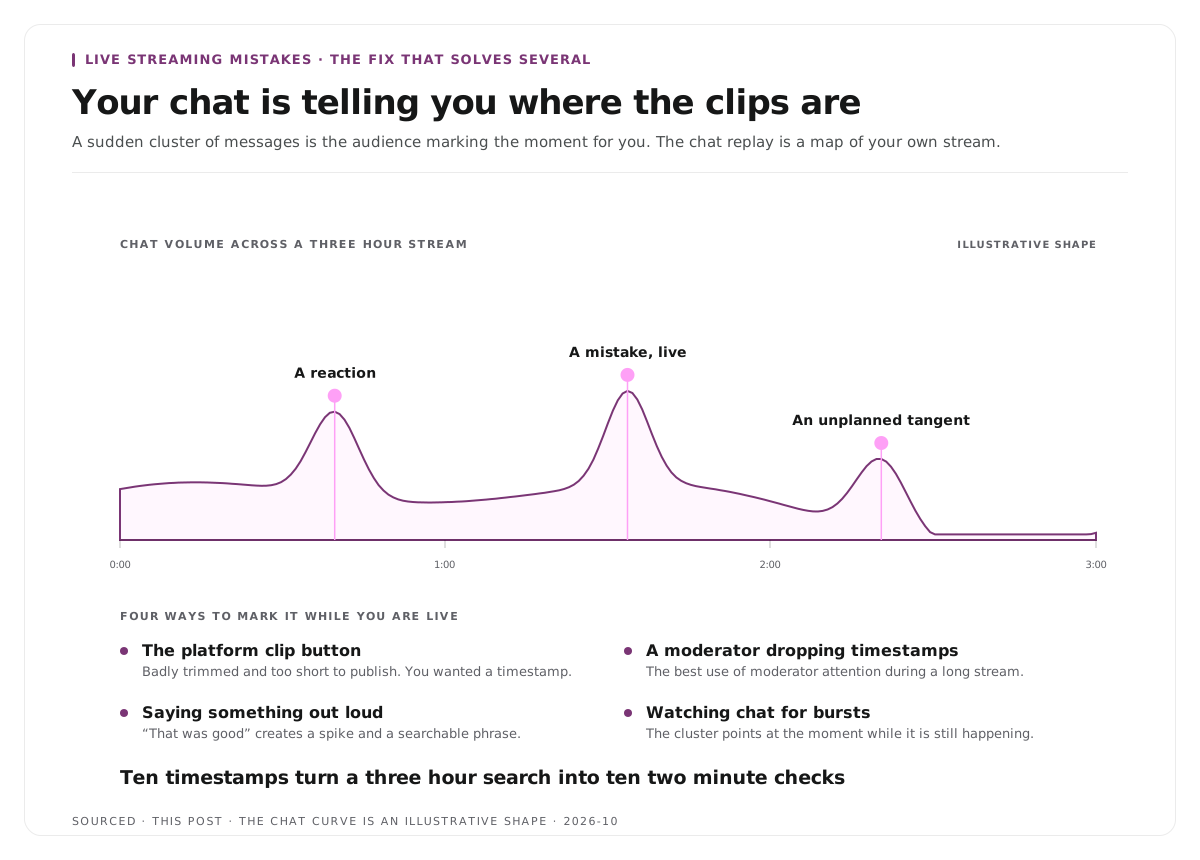
Marking moments during the broadcast addresses mistakes eight and nine together, and it costs nothing while you are live.
Use the platform clip button when something lands. The resulting clip is usually badly trimmed and too short to publish, which does not matter, because what you actually needed was a timestamp.
Ask a moderator to drop timestamps. The single best use of moderator attention during a long stream.
Say something out loud. Even "that was good" creates a findable spike in the audio and a searchable phrase in the transcript.
Watch chat for bursts. A sudden cluster of messages is your audience telling you exactly where the moment was, and the chat replay is effectively a map of your own stream.
Ten timestamps turn a three hour search into ten two minute checks. Nothing else saves comparable time, and it is the difference between clips getting made and clips remaining an intention.
What good looks like instead
Not a long checklist, five things.
Wired connection, tested in realistic conditions. With a hotspot ready.
External microphone, close, in a soft room, with headphones. Levels watched during the stream rather than only at the start.
A sentence describing the stream and three or four things to cover. Plus a known opening and closing.
Announced in advance, at a predictable time. Even if the audience is currently small.
Recording locally, with moments marked as they happen. So the stream produces something that keeps working afterwards.
The equipment side of this, in priority order, is in video podcast equipment, and the delivery side for anyone uncomfortable talking to a camera with no audience responding is in talking head videos.
Worked example: the same problems, two streams
This is an invented example, not measured data.
A creator streams weekly and the numbers are flat.
The diagnosis they expect is content. They consider changing format, buying a better camera, and streaming longer.
The actual diagnosis is three things. The stream runs on wifi and buffers roughly twice an hour. The microphone sits across the desk, so the audio is thin and roomy. Nobody is told in advance, so viewers arrive only if they happen to be browsing.
What changes after fixing them: ethernet, the microphone moved to six inches, and one post before each stream. The content is identical. Viewers stay longer because the stream is watchable, and more arrive because they knew it was happening.
Nothing about the format needed to change. Three mechanical problems were being read as a content problem.
Where Montage fits
Montage does not stream, has no live capability, and none of the mistakes on this page are ones it prevents. All of them are decided before and during the broadcast.
It addresses the ninth one specifically. Upload the recording, up to 20GB at 4K, which matters because streams produce very large files, and it returns a timestamped transcript alongside 8 to 10 scored clip candidates, each trimmable by editing the transcript text, with branded captions and vertical reframing applied, exporting as MP4 for social or XML, FCPXML and JSON for an editor.
The limit worth stating is that it cannot repair what the stream did to the audio or the picture. A clip cut from a buffered, echoing recording is a short version of a buffered, echoing recording, which is why the first two mistakes on this page matter more than anything that happens afterwards. The pipeline is explained in how AI video clipping works.
To try it on one recording, use the podcast clip finder.
Limitations and troubleshooting
The stream buffers for viewers but looks fine to me. You are watching locally. Check on a second device over mobile data, which is closer to what viewers experience.
Audio sounds fine in my headphones and bad on the stream. You are monitoring the source rather than the broadcast. Listen back to a recorded test rather than to yourself live.
I have a plan and it still feels awkward. Usually the opening. Script the first thirty seconds specifically, since that is where most of the discomfort sits.
Chat is quiet so I stopped acknowledging it. A quiet chat becomes a silent one when it is ignored. Respond to the few messages you get.
I record locally and never use the recordings. Mark moments during the stream. Without timestamps the recording is a three hour search nobody performs.
I fixed the audio and the numbers did not move. Growth from mechanical fixes is slow and mostly shows in watch time rather than in arrivals. Announcing and scheduling affect arrivals.
Frequently asked questions
What is the most common live streaming mistake?
An untested connection. It is the only one that takes the stream down entirely rather than degrading it, and it typically fails when the audience arrives rather than during a quiet test.
Why do viewers leave live streams quickly?
Most often audio and buffering. Picture quality is tolerated far more readily than sound a viewer has to strain to follow or a stream that keeps stalling.
How do you stop a live stream from buffering?
Lower the bitrate, drop the resolution, use a wired connection rather than wifi, and keep a hotspot on another network ready as a backup.
Should you respond to chat while streaming?
Yes, but at natural breaks. Breaking off mid sentence to read a message disorients everyone following the explanation, while ignoring chat entirely makes the stream feel like a video with extra steps.
Does it matter what time you stream?
Consistency matters more than the specific time. An audience cannot build a habit around an unpredictable schedule, so a reliable weekly slot beats irregular bursts.
Should you record locally while streaming?
Yes. The local copy never passes through your connection, so it is substantially higher quality than the broadcast, and it is what makes clips worth cutting afterwards.
Does Montage prevent any of these mistakes?
No. Every mistake on this page is decided before or during the broadcast. Montage processes the recording afterwards and cannot repair audio or picture problems baked into it.