Interview Transcript Template: Format, Labels and a Real Example
A copyable interview transcript template with metadata header, speaker labels, timestamps and notation, plus a fully formatted example and anonymisation guidance.
A copyable transcript template with a metadata header, speaker label conventions, timestamp placement and bracket notation, plus a fully formatted example and what to do about anonymity.
An interview transcript needs five structural elements: a metadata header recording who, when and in what style, consistent speaker labels followed by a colon, one paragraph per speaker turn, timestamps at each speaker change, and square bracket notation for anything that is not speech.
The useful question is not "what should a transcript look like?" It is "who is going to read this, and what will they need to do with it?" A transcript handed to a researcher, a lawyer, a journalist and an editor needs the same five elements and different levels of each.
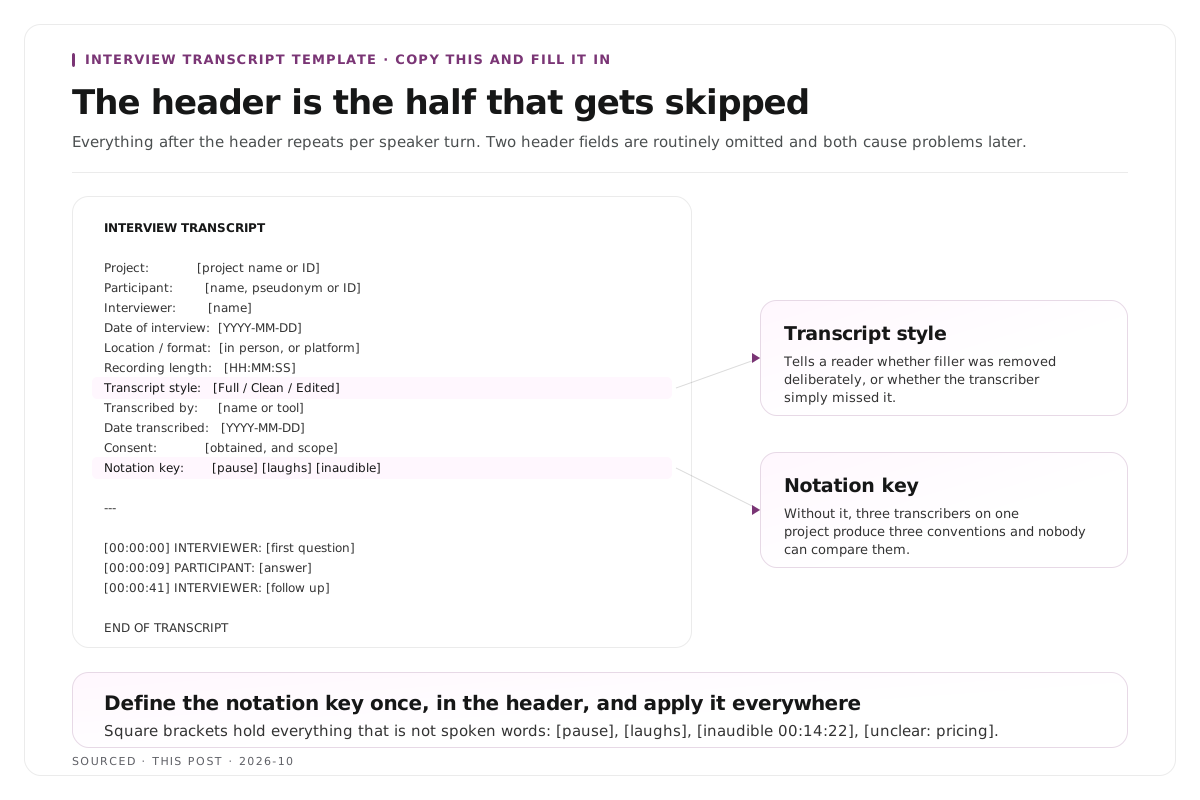
The template
Copy this and fill it in. Everything after the header repeats per speaker turn.
INTERVIEW TRANSCRIPT
Project: [project name or ID]
Participant: [name, pseudonym or participant ID]
Interviewer: [name]
Date of interview: [YYYY-MM-DD]
Location / format: [in person location, or remote platform]
Recording length: [HH:MM:SS]
Transcript style: [Full verbatim / Clean verbatim / Edited]
Transcribed by: [name or tool]
Date transcribed: [YYYY-MM-DD]
Consent: [recorded consent obtained, scope]
Notation key: [list the brackets used, e.g. [pause], [laughs], [inaudible]]
---
[00:00:00] INTERVIEWER: [first question]
[00:00:09] PARTICIPANT: [answer]
[00:00:41] INTERVIEWER: [follow up]
[00:00:47] PARTICIPANT: [answer] [laughs] [and so on]
---
END OF TRANSCRIPT
Total duration: [HH:MM:SS]
Notes: [anything deliberately not transcribed, and why]
Two header fields are routinely omitted and both cause problems later.
Transcript style tells a reader whether filler was removed deliberately or whether the transcriber simply missed it. Without it, nobody can tell whether a clean looking transcript is clean verbatim or a sloppy full verbatim.
Notation key means a reader does not have to guess what your brackets mean. Three transcribers on one project will otherwise produce three conventions.
A real formatted example
Here is what the template looks like filled in.
INTERVIEW TRANSCRIPT
Project: Small Shop Stories, episode 14
Participant: Maya R. (owner, Mill Street Bakery)
Interviewer: J. Adeyemi
Date of interview: 2026-09-18
Location / format: Remote, recorded locally both ends
Recording length: 00:42:11
Transcript style: Clean verbatim
Transcribed by: Automatic, corrected by J. Adeyemi
Date transcribed: 2026-09-19
Consent: Verbal consent recorded at 00:00:04, covers publication
Notation key: [pause] [laughs] [inaudible HH:MM:SS] [unclear: word]
---
[00:00:00] INTERVIEWER: Welcome back to Small Shop Stories. Today I am talking to Maya, who runs a bakery on the corner of Mill Street.
[00:00:07] MAYA: Thanks for having me. It is really small, just two ovens and a counter.
[00:00:12] INTERVIEWER: So how does a normal day start for you?
[00:00:16] MAYA: Four in the morning. [laughs] Everyone asks that and everyone is disappointed by the answer. [pause] The first hour is just me and the ovens, which honestly is the part I like most.
[00:00:31] INTERVIEWER: What changed when you took on staff?
[00:00:35] MAYA: Everything got slower before it got faster. I had to write
things down that had only ever been in my head, and that took about
[inaudible 00:00:43] months longer than I expected.
---
END OF TRANSCRIPT
Total duration: 00:42:11
Notes: 00:38:02 to 00:39:40 removed at participant's request (supplier name).
Notice three things in that example. The timestamps sit at speaker changes rather than at fixed intervals. The [inaudible] carries its own timestamp so it can be revisited. And the end note records what was deliberately removed, which is what stops a gap looking like an error.
Speaker label conventions
Pick one scheme and use it for every transcript in a project.
| Scheme | Example | Best For |
|---|---|---|
| Role words | INTERVIEWER: / PARTICIPANT: | Research, anonymised studies |
| Role initials | I: / P1: | Long research transcripts where space matters |
| Names | J. ADEYEMI: / MAYA: | Journalism, podcasts, anything published |
| Mixed | HOST: / MAYA: | Podcasts with a recurring host |
Four rules make labels work.
Never change scheme mid document. Switching from MAYA: to PARTICIPANT: halfway through breaks searching, coding and any automated processing.
Label every turn, not only the first appearance of each speaker. A reader scanning the middle of a transcript has no memory of who spoke last.
Use capitals and a colon. It is a visual anchor that lets the eye find turns without reading them, and it is the convention most tools expect on import.
Number additional speakers consistently. P1, P2, P3 rather than P1, Participant 2, third participant.
For group interviews and panels where several voices overlap, labelling becomes considerably harder, and the recording level fix is a separate track per speaker. The downstream consequences of not doing that are covered in how to clip multi speaker panel discussions without losing context.
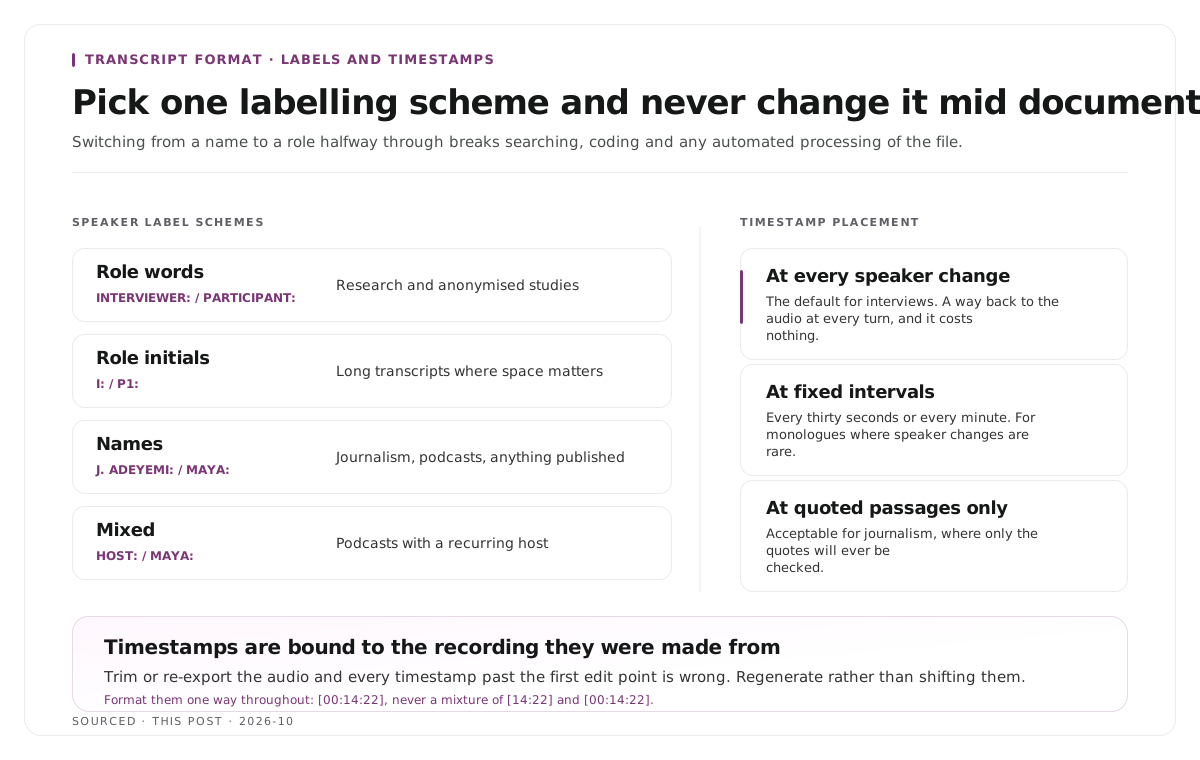
Timestamp placement
Three conventions exist and they serve different readers.
At every speaker change. The default for interviews. Gives a reader a way back to the audio at every turn, and costs nothing.
At fixed intervals, typically every thirty seconds or every minute. Useful for monologues and long uninterrupted answers where speaker changes are rare.
At quoted passages only. Acceptable for journalism where the transcript is a working document and only the quotes will ever be checked.
Format them consistently. [00:14:22] throughout, not a mixture of [14:22] and [00:14:22], because a mixture breaks sorting and makes automated processing unreliable.
One warning worth stating plainly. Timestamps are bound to the recording they were made from. If the audio is trimmed or re-exported afterwards, every timestamp past the first edit point is wrong. Regenerate rather than attempting to shift them.
That property is also what makes a timestamped transcript useful for more than reading, since it is the basis for building navigation, as described in how to create video chapters from a transcript.
Bracket notation
Everything that is not spoken words goes in square brackets, and the key goes in the header.
| Event | Notation |
|---|---|
| Pause worth noting | [pause] |
| Measured pause | [3 sec pause] |
| Laughter | [laughs] |
| Other meaningful non verbal | [sighs] [coughs] |
| Overlapping speech | [overlapping] on both lines |
| Could not make out | [inaudible 00:14:22] |
| Uncertain word | [unclear: pricing] |
| Redacted or removed | [removed at participant request] |
| Non speech event in the room | [door closes] |
Two rules. Only mark what carries meaning, because annotating every breath produces something nobody can read. And never guess silently, because a guessed word that reads like a quote can be repeated as one.
Anonymising a transcript
If participants were promised anonymity, this has to happen during transcription rather than after.
Replace at the point of typing. Write the pseudonym or code as you go rather than the real name. Retrofitting across a finished transcript reliably misses an instance, and one missed instance defeats the whole exercise.
Keep a key separately. A single document mapping codes to identities, stored apart from the transcripts and with different access control.
Anonymise more than names. Employers, job titles in small organisations, locations, distinctive events and unusual phrasing can all identify someone even with the name removed. Replace them with a bracketed category, for example [employer] or [city].
Record what you replaced. A note in the header saying identifying details were replaced is what tells a reader the gaps are deliberate.
Decide retention up front. How long the audio is kept, where, and who can reach it. A transcript frequently outlives its recording, and the two may have different requirements.
Formatting conventions that make it readable
A blank line between speaker turns. A wall of alternating text is unreadable at any length.
Paragraph breaks inside long answers, placed at topic shifts rather than arbitrary lengths.
Do not justify the text. Left aligned is easier to scan.
Keep the header on its own page for long research transcripts, so the body can be read or printed without it.
Number the pages if the document will be cited, because a citation needs a locator.
Export to a plain format as well as whatever you work in. A transcript that only exists inside one tool is a transcript you will lose.
If the transcript is also going to drive content, the show notes structure in podcast show notes is the next document down the chain.
Worked example: one template, three readers
This is an invented example, not measured data.
A company records twelve customer interviews. Three people need the transcripts.
The researcher needs the full header, role based labels, timestamps at every turn, full notation and anonymised identifiers. The header is the part they care about most, because it tells them the transcripts are comparable.
The marketing writer needs names rather than codes, timestamps at quoted passages, and almost no notation. They will read for quotable lines.
The video editor needs timestamps at every turn and nothing else. They are scanning for moments to cut and the header is irrelevant to them.
One template served all three, because the extra elements cost the researcher nothing to produce and the other two simply ignore the fields they do not need. Producing three different documents would have meant three passes and three chances to diverge.
Where Montage fits
Montage is not a transcription service and does not produce formatted research transcripts. It has no metadata header, no anonymisation feature and no notation conventions, so for any deliverable requiring those, use a dedicated provider or the template above.
It produces a timestamped transcript as the first stage of turning a long recording into publishable video. Upload a recording, up to 20GB at 4K, and it returns that transcript alongside 8 to 10 scored clip candidates, each trimmable by editing the transcript text, with branded captions and vertical reframing applied, exporting as MP4 for social or XML, FCPXML and JSON for an editor.[1]
The transcript it produces maps to the editor row in the worked example above, with timestamps at speaker changes and no notation. It is a working document for cutting, and the approach is described in text based video editing. To try it on a single recording, use the podcast clip finder.
Limitations and troubleshooting
The speaker labels drift halfway through. A convention changed mid document, usually when a third person joined. Set the scheme at the start and apply it mechanically rather than by judgement.
Timestamps no longer match the audio. The recording was trimmed or re-exported after transcription. Every timestamp past the first edit has shifted, so regenerate rather than attempting to correct them.
A participant's name survived the anonymisation. Almost always because anonymisation happened after transcription rather than during. Search for every variant including nicknames, initials and possessive forms.
Someone is identifiable despite the name being removed. Names are only part of it. Employers, job titles in small organisations, locations and distinctive events all need replacing with bracketed categories.
The transcript is unreadable despite being accurate. Usually no blank lines between turns and no paragraph breaks inside long answers. Both are formatting rather than content problems and both take minutes to fix.
Automated processing rejected the file. Inconsistent timestamp format or inconsistent labels are the usual causes. Pick one format for each and apply it throughout.
Frequently asked questions
What should an interview transcript include?
A metadata header covering project, participant, interviewer, date, length, transcript style and consent, then speaker labelled turns with timestamps, square bracket notation for non speech, and an end note recording anything deliberately omitted.
How do you label speakers in a transcript?
Pick one scheme and keep it throughout: role words such as INTERVIEWER: and PARTICIPANT:, role initials such as I: and P1:, or names. Label every turn, use capitals and a colon, and never change scheme mid document.
Where do timestamps go in a transcript?
At every speaker change for interviews, at fixed intervals for monologues, or at quoted passages only for journalism. Keep the format identical throughout, such as [00:14:22].
How do you anonymise an interview transcript?
Replace identifiers while transcribing rather than afterwards, keep the mapping key stored separately, and replace more than names, since employers, locations and distinctive details can all identify someone.
How do you mark inaudible sections?
With a bracketed marker carrying its own timestamp, such as [inaudible 00:14:22], so the passage can be revisited. Mark a best guess separately, as [unclear: word], rather than asserting it.
Should a transcript include a metadata header?
Yes. The transcript style field in particular tells a reader whether filler was removed deliberately, which they cannot otherwise determine, and the notation key stops them guessing what your brackets mean.
Does Montage produce formatted interview transcripts?
No. Montage produces a timestamped working transcript for locating moments in a recording. For research or legal formatting, use the template on this page or a dedicated transcription provider.