How to Transcribe Audio Files Accurately
How to transcribe audio files, which format and quality settings affect accuracy, when automatic transcription fails, and how to fix the errors that matter.
How to get an accurate transcript from an audio file, which properties of the recording actually affect the result, and how to correct the errors that matter without reading every line.
To transcribe an audio file, upload it to a transcription tool, select the correct language, run it, then correct the proper nouns, numbers and overlapping speech. Accuracy is determined almost entirely by the recording rather than by the tool, so the fastest way to improve a transcript is to improve the audio before it is processed.
The useful question is not "Which transcription tool is most accurate?" It is "What is wrong with this audio?" The gap between tools and clean speech is small. The gap between clean and poor audio is enormous, and it is the only variable most people can still change.
What actually affects accuracy
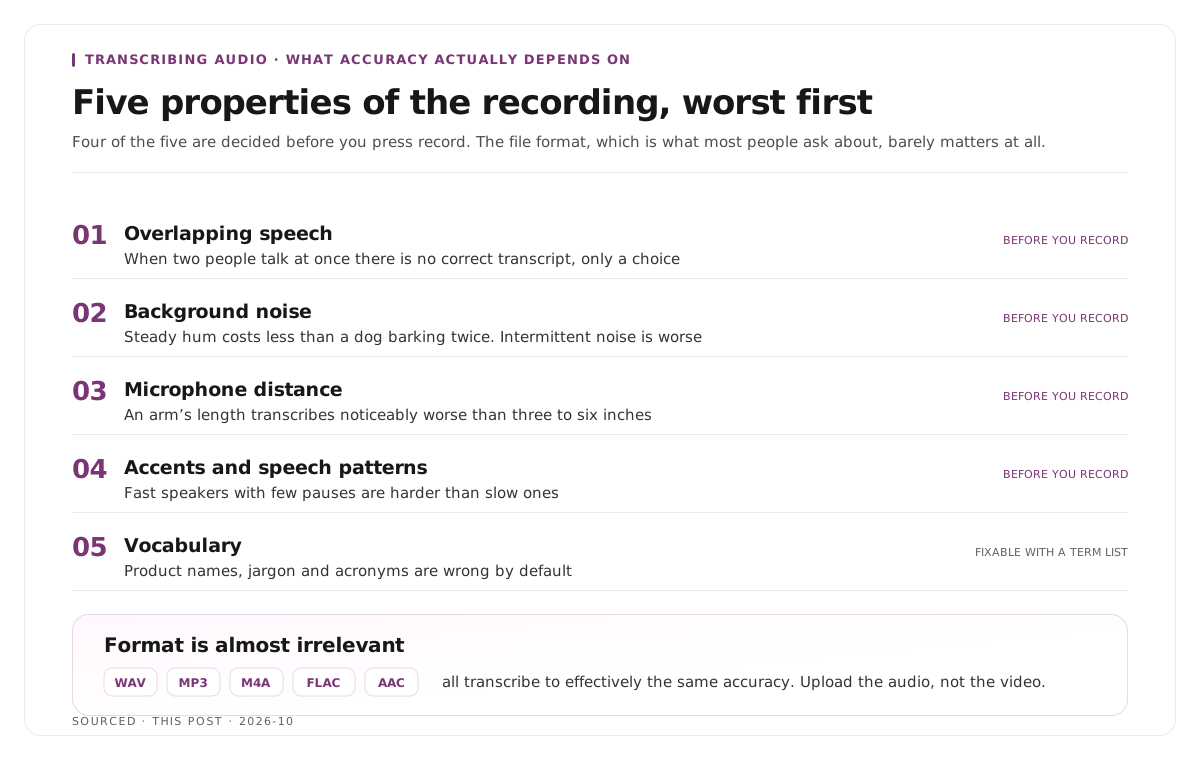
Five properties of the recording, in roughly the order of how much damage each one does.
Overlapping speech. The single hardest case. When two people talk at once there is no correct transcript, only a choice about which voice to follow. Separate tracks per speaker solve it completely and nothing else does.
Background noise. Air conditioning, traffic, keyboard typing and room echo all reduce accuracy. Steady noise is handled better than intermittent noise, which is why a constant hum costs less than a dog barking twice.
Microphone distance. A speaker sitting an arm's length from the microphone produces noticeably worse transcription than one sitting three to six inches away, because the ratio of voice to room goes down.
Accents and speech patterns. Models handle widely represented accents better than others, and fast speakers with few pauses are harder than slow ones.
Vocabulary. Product names, industry jargon, acronyms and unusual proper nouns are wrong by default, because the model has no reason to expect them.
Notice that four of the five are decided before you press record. The sixth, the file format, barely matters at all, which is the opposite of what most people assume.
File format and quality
Format is almost irrelevant. WAV, MP3, M4A, FLAC and AAC all transcribe to effectively the same accuracy. Do not convert a file hoping for a better result.
Bitrate matters a little, and only at the bottom. Very heavily compressed audio, the kind of quality a phone call produces, loses detail that affects transcription. Anything at normal recording quality is fine, and going higher achieves nothing.
Mono versus stereo makes no difference for accuracy, but a stereo file with each speaker on a separate channel is a different thing entirely and is worth preserving, because some tools use it for speaker separation.
Sample rate is not a lever. Recording at a higher sample rate does not improve transcription.
The practical implication is that the smallest reasonable file is the right one to upload. If you have both a video file and an audio file of the same recording, upload the audio. The transcript comes entirely from sound and the video adds nothing but upload time.
Step by step
- Pick the right file. Audio over video. The original over a re-encoded copy.
- Set the language explicitly. Auto detection is reliable on clean audio and is an unnecessary risk on anything accented or mixed language.
- Supply a term list if the tool accepts one. Product names, speaker names and acronyms given up front are corrected before they become errors, which is far cheaper than fixing them afterwards.
- Run the transcription.
- Correct in priority order, which is the next section.
- Export in the format the next step needs, whether that is plain text, SRT for captions, or a timestamped document.
The caption formats and when each applies are covered in captions vs subtitles vs SDH.
Correct in priority order, not line by line
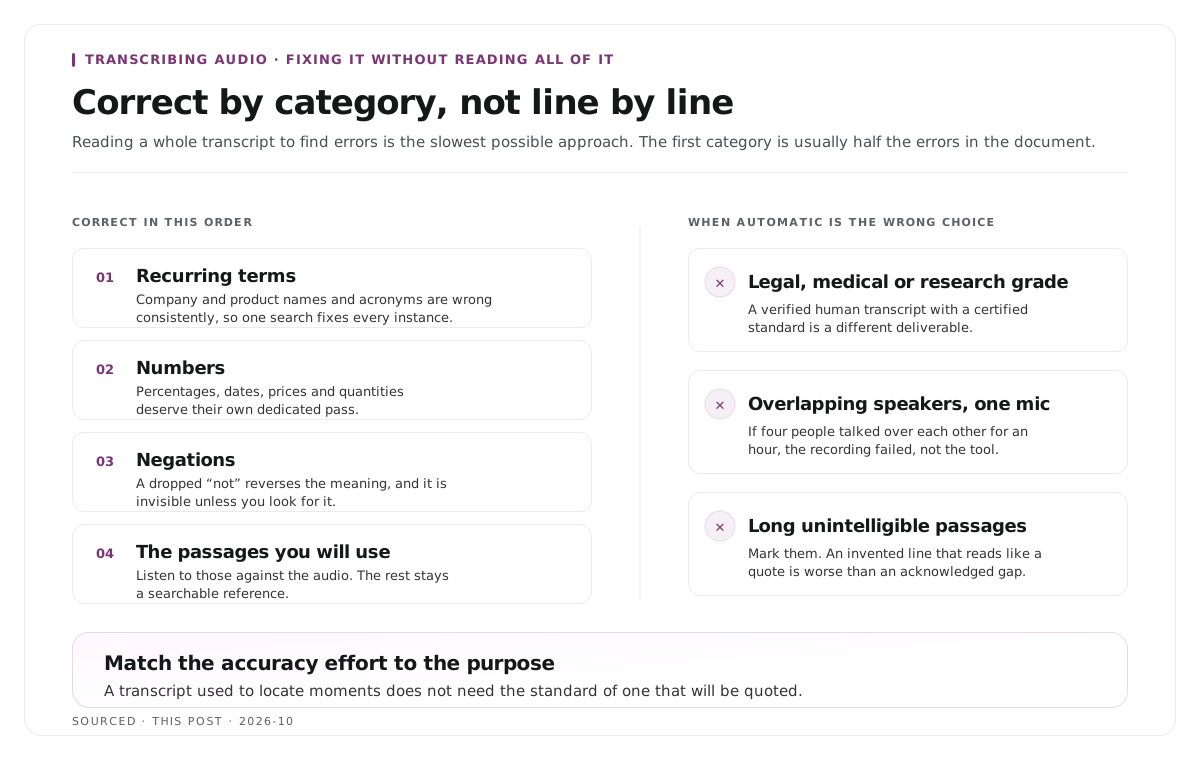
Reading a whole transcript to find errors is the slowest possible approach. Work by category instead.
First, search and replace the recurring terms. Your company name, product names and acronyms will be wrong consistently rather than randomly, which means one search fixes every instance. This is usually half the errors in the document.
Second, check every number. Percentages, dates, prices and quantities. These are wrong often enough and matter enough that they justify a dedicated pass.
Third, check negations. A dropped "not" reverses meaning entirely, and it is the error most likely to cause a real problem.
Fourth, check the passages you intend to use. If three quotes are going into an article, those three get listened to against the audio. The rest of the document can remain a searchable reference.
That last point is the one that saves the most time. Match the accuracy effort to the purpose. A transcript used to locate moments does not need the same standard as one that will be quoted.
When automatic transcription is the wrong choice
Three cases where it will not get you there.
Legal, medical or research grade work, where a verified human transcript with a certified accuracy standard is required. Automatic transcription with a correction pass is not the same deliverable.
Heavily overlapping multi speaker audio recorded on one microphone. If four people spoke over each other for an hour into a single device, the transcript will be poor regardless of tool, and the honest answer is that the recording failed rather than the transcription did. The multi speaker case is covered in how to clip multi speaker panel discussions without losing context.
Audio with long unintelligible passages. Mark them and move on rather than guessing. An invented line that reads like a quote is worse than an acknowledged gap.
Worked example: two recordings, one tool
This is an invented example, not measured data.
The same transcription tool processes two hour long recordings.
The first was recorded with a microphone per speaker, in a carpeted room, with participants sitting close to their microphones. The transcript needs eleven corrections, nine of which are the same product name. Correction takes about fifteen minutes.
The second was recorded on a laptop microphone in a meeting room with four people around a table and an air conditioning unit running. The transcript needs correction on almost every page, the overlapping sections are unrecoverable, and two speakers are frequently merged.
Same tool, same language, same length. The difference was entirely in the recording, which is why the first half of this page is about audio rather than about software.
Where Montage fits
Montage is not a transcription service and does not sell transcripts. It does not produce certified or research grade documents, and for a legal or academic deliverable you want a dedicated provider.
It transcribes as the first stage of finding the moments in a long recording worth publishing as video. Upload a recording, up to 20GB at 4K, and it returns a timestamped transcript alongside 8 to 10 scored clip candidates, each trimmable by editing the transcript text, with branded captions and vertical reframing applied, exporting as MP4 for social or XML, FCPXML and JSON for an editor.
The relevant design point is that the transcript is editable and the edit drives the cut. Deleting a sentence removes the video with it, which is the approach described in text based video editing. Correcting a name in the transcript also corrects it in the captions, because both come from the same source.
To try it on one recording, use the podcast clip finder.
Limitations and troubleshooting
Accuracy is poor and the audio sounds fine to me. Listen on headphones rather than speakers. Room echo and low level background noise are much easier to miss on speakers and both reduce accuracy significantly.
The same word is wrong every time. Good news, because one search and replace fixes all of it. Keep the term for next time.
Speakers are merged into one. Either they were recorded on one track or their voices are similar. Separate tracks at the recording stage is the only reliable fix.
The transcript drifts out of sync with the audio. The file was trimmed or re-encoded after transcription. Regenerate rather than attempting to re-time.
Converting to WAV did not improve anything. Expected. Format is not a meaningful accuracy lever, and converting a compressed file cannot restore detail that was already discarded.
A long section is marked inaudible. Listen once more at reduced speed, then leave it marked. Guessing at content is the one error with no upside.
Frequently asked questions
What is the most accurate way to transcribe audio?
Start with the best possible recording, since audio quality determines accuracy far more than tool choice does. Run automatic transcription, then correct proper nouns, numbers and negations against the audio.
Does file format affect transcription accuracy?
Barely. WAV, MP3, M4A and AAC transcribe to effectively the same result. Only very heavily compressed audio, at phone call quality, loses enough detail to matter.
Should you upload audio or video for transcription?
Audio. The transcript is generated from sound alone, so a video file only adds upload time without improving the result.
Why does transcription struggle with multiple speakers?
Overlapping speech has no single correct transcript, only a choice of which voice to follow. Recording each speaker on a separate track removes the problem entirely.
How do you fix repeated transcription errors quickly?
Search and replace. Recurring terms such as company names, products and acronyms are wrong consistently rather than randomly, so one correction fixes every instance.
Does Montage provide transcription as a service?
No. Montage transcribes as the first step of producing video clips from a recording. For certified, legal or research grade transcripts, use a dedicated transcription provider.