B-Roll: What It Is, How to Shoot It and How to Cut It In
What b-roll is, how to shoot it, how much you need, and how editors use it to hide jump cuts. Includes where to source it when you have none.
What b-roll is, why editors depend on it, how much footage to shoot, how to lay it over an edit, and where to find it when you have none.
B-roll is secondary footage laid over your main footage. It shows what the speaker is describing, and it covers the joins where you have cut something out. The main footage, the person talking, is the a-roll. Editing is almost always a-roll first, b-roll second.
The useful question is not "what b-roll should I shoot?" It is "where does this edit need somewhere else to look?" Answer that and the shot list writes itself, because every cut you make and every idea you cannot show with a talking head is a place b-roll has a job.
Why editors depend on it
B-roll does three jobs, and the third is the one that makes it indispensable.
It shows what is being described. A speaker saying "our warehouse floods every spring" is a claim. Footage of a flooded warehouse is evidence.
It paces the edit. A single unbroken talking head is exhausting to watch past about forty seconds, and the eye needs somewhere else to go.
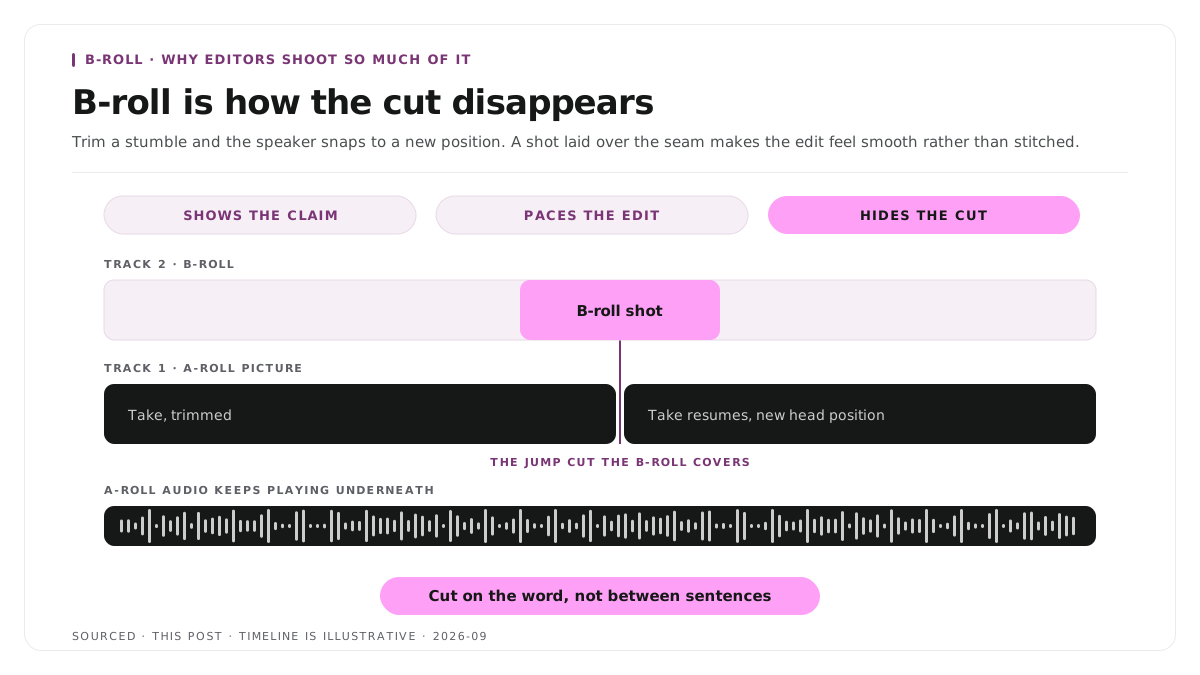
It hides your cuts. This is the real reason editors shoot so much of it. Every time you trim a stumble, delete a tangent or splice two takes together, you create a jump cut where the speaker visibly snaps to a new position. Laying a b-roll shot over that seam makes the cut disappear, so the edit feels smooth rather than stitched.
Without b-roll you are limited to the cuts you can disguise some other way. With it you can cut anywhere.
Step 1: plan the shots from the script
Do not shoot b-roll and hope it fits. Read the script or transcript and mark two things.
Every concrete noun the speaker mentions. Products, places, tools, documents, screens, people. Each is a shot.
Every point where you know you will cut. Anywhere the speaker is likely to ramble, repeat themselves or restart. Each needs something to cover it.
That list is your shot list, and it will be specific rather than generic, which is the difference between b-roll that illustrates the point and b-roll that just fills time.
Step 2: shoot far more than you think
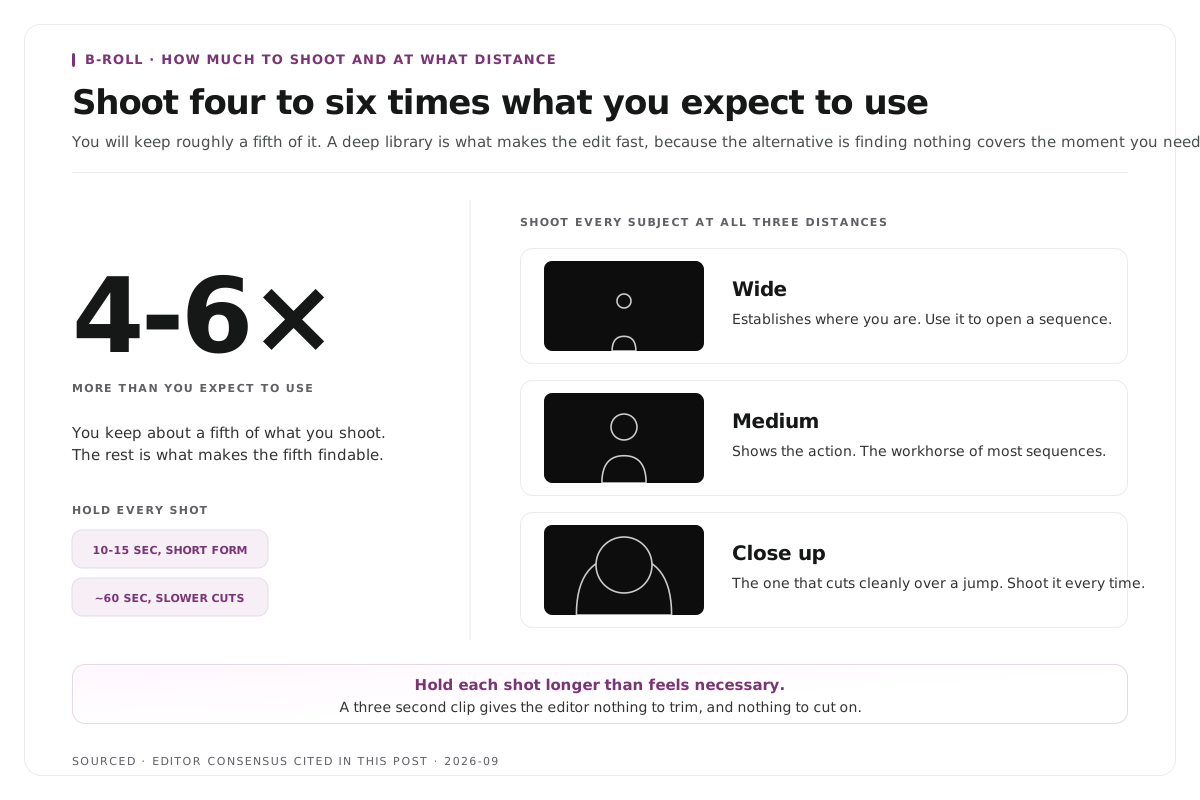
The working rule across editors is to shoot four to six times as much b-roll as you expect to use. You will keep roughly a fifth of it. A deep library makes editing dramatically faster, because the alternative is discovering at the edit stage that nothing covers the moment you need to fix.
Vary the shot. Wide for context, medium for action, close up for detail. Shoot each subject at all three distances, because the close up is what cuts cleanly over a jump.
Hold each shot longer than feels necessary. Ten to fifteen seconds minimum for short form work, around a minute for slower paced pieces. A three second clip gives the editor nothing to trim.
Keep the camera still unless movement has a reason. Handheld drift reads as amateur. If you move, move slowly and finish the move.
Shoot at the same resolution and frame rate as your a-roll. Mismatched footage is a problem you will fix under time pressure later.
Record ambient sound with it. Room tone under a b-roll shot is often the difference between a cut that feels natural and one that feels dropped in.
Step 3: cut the a-roll first
This is the order every experienced editor uses, and reversing it wastes hours.
- Lay the a-roll on track one and cut the audio until the story works. Trim the stumbles, delete the tangents, get the argument tight. Ignore how the picture looks entirely at this stage.
- Watch it back and mark every visible jump. Those are your b-roll positions, decided by the edit rather than by preference.
- Drop b-roll onto track two above each one. The a-roll audio keeps playing underneath, which is what holds the piece together.
- Trim each b-roll shot so it starts and ends cleanly, ideally beginning just before the speaker mentions the thing and ending just after.
- Check it with the sound off. If the visuals alone still communicate roughly what the piece is about, the b-roll is doing its job.
Cut on the word, not between sentences. Laying b-roll in exactly as the speaker names the subject feels motivated. Laying it in during a pause feels like filler.
Do not cover a moment the speaker's face is carrying. If somebody is being funny, moved or uncomfortable, the face is the shot, and cutting away throws away the moment. This matters most in interview footage, where the reaction often carries as much as the answer, a case covered in how to clip multi speaker panel discussions without losing context.
Step 4: source b-roll when you have none
Most people reading this have an episode already recorded and no b-roll at all.
Your own archive first. Previous recordings, product footage, event footage, screen recordings. It is free, it is yours, and it is on brand.
Screen recordings. For anything software related this is the strongest option available and it costs nothing. A recording of the thing being discussed beats a stock shot of a laptop every time, and if the source is a webinar or a demo you already have this footage, as set out in how to turn a webinar into social clips.
Stock footage. Fast and legal, and the reason so much corporate video looks identical. If you use it, pick the least generic option available and avoid anything with recognisable stock actors.
A dedicated shoot. An hour with a camera and your shot list produces a library you reuse for months, and it is usually a better investment than a stock subscription.
Static assets in motion. A photograph with a slow push in, a document scrolling, a chart building. Not strictly b-roll, and it does the same job.
The alternative when you have nothing: for interview and podcast footage, a second camera angle covers a jump cut as effectively as b-roll does, which is why multi camera setups reduce how much b-roll you need. That trade off is covered in how to edit an interview video.
B-roll in short form clips
Short clips follow different rules, and applying the long form approach to them makes clips worse.
Most clips need none. A forty second clip of someone making one good point rarely needs anywhere else to look, and cutting away from a strong delivery weakens it.
Cuts inside a clip are more visible, not less. There is less material to distract from a jump, so if you have trimmed filler out of a clip, either cover the join or use a subtle scale change on the same footage.
Full frame or not at all. Picture in picture b-roll inside a vertical frame competes with the captions and the speaker. If you use b-roll in a clip, let it take the whole frame briefly.
Never cover the hook. The first three seconds belong to the speaker's face and the opening line. That is what stops the scroll.
If your clips are coming out of long recordings, the trimming approach matters more than the b-roll, and that is covered in text based video editing and how many clips you should make from one podcast episode.
Worked example: covering four cuts in a two minute piece
This is an invented example, not measured data.
A founder records a two minute explanation of how their onboarding works. The raw take runs three minutes forty and contains two restarts, a long tangent about hiring, and a section where they lose their place.
The a-roll edit removes all four, which takes the piece to two minutes and creates four visible jump cuts.
Four b-roll shots cover them. A screen recording of the onboarding flow at the first, a wide shot of the office at the second, a close up of a hand on a trackpad at the third, and a return to a slow push on a screenshot at the fourth. Total b-roll used, about eighteen seconds. Total b-roll shot, roughly two minutes across eight setups.
The cuts are invisible and the piece is tighter than the take. The ratio, two minutes shot for eighteen seconds used, is normal rather than wasteful.
Where Montage fits
Montage does not shoot b-roll, does not supply stock footage, does not maintain a media library and does not insert cutaways for you. It is not a general purpose video editor and this workflow sits outside what it does.
What it does is take a long recording and return the moments worth publishing. Upload up to 20GB at 4K and it gives you 8 to 10 scored clip candidates rather than an unranked pile, each trimmable by editing transcript text, with branded captions, vertical reframing and exports to MP4 for social or XML, FCPXML and JSON for an editor.
That last export is the relevant part here. If a clip needs b-roll laid over it, you take the XML or FCPXML into Premiere or Final Cut with the cut already made, and do the b-roll work on a timeline rather than rebuilding the clip from scratch. The handoff is described in how XML export solves the producer and editor handoff problem.
Limitations and troubleshooting
The b-roll looks like stock footage. It probably is. Swap the most generic shots for screen recordings or your own archive, which read as specific because they are.
The cut still looks like a jump. The b-roll starts too late. Begin it a few frames before the cut rather than on it.
The b-roll is distracting. It is too long, too busy or too loud. Shorten it, choose a simpler frame, and drop any audio that came with it.
There is not enough footage to cover the cuts. Standard outcome of shooting b-roll last. Use a second camera angle, a scale change on the a-roll, or a static asset with slow movement.
The b-roll does not match the a-roll. Different resolution, frame rate or colour. Match settings at the shoot, because fixing it afterwards costs more than getting it right costs.
Every clip has b-roll and they all underperform. Likely covering the speaker at the moments that were working. Cut the b-roll from the first three seconds of every clip and compare.
Frequently asked questions
What is b-roll?
Secondary footage laid over the main footage. It shows what is being described and covers the joins where material has been cut out. The main footage of the person talking is called a-roll.
How much b-roll do you need?
Shoot four to six times as much as you expect to use. Most editors keep around a fifth of what they capture, and the surplus is what makes the edit fast rather than wasteful.
How long should each b-roll shot be?
Ten to fifteen seconds minimum for short form work and around a minute for slower paced pieces. Short clips leave an editor nothing to trim.
Does b-roll hide jump cuts?
Yes, and that is the main reason editors depend on it. Laying a b-roll shot over the splice removes the visible snap, so the edit feels continuous.
Where can you get b-roll footage?
Your own archive first, then screen recordings, then a dedicated shoot, then static assets with slow movement, and stock footage last. Stock is the fastest and the most generic.
Does Montage add b-roll to clips?
No. Montage produces the clip from your recording. If the clip needs b-roll, export it as XML or FCPXML and lay the cutaways in Premiere or Final Cut.