WAV vs MP3 vs AAC: Which Audio Format to Use and When
WAV, MP3, AAC, FLAC and M4A compared, which to record in, which to deliver in, and why converting between lossy formats quietly degrades your audio.
The common audio formats compared, which to record and edit in, which to deliver in, what bitrate actually controls, and the conversion mistake that quietly costs you quality every time.
Record and edit in WAV, which is uncompressed and lossless. Deliver in AAC or MP3, which are compressed and far smaller. The rule that matters more than the format choice is to compress once, at the end, because every lossy conversion discards data permanently.
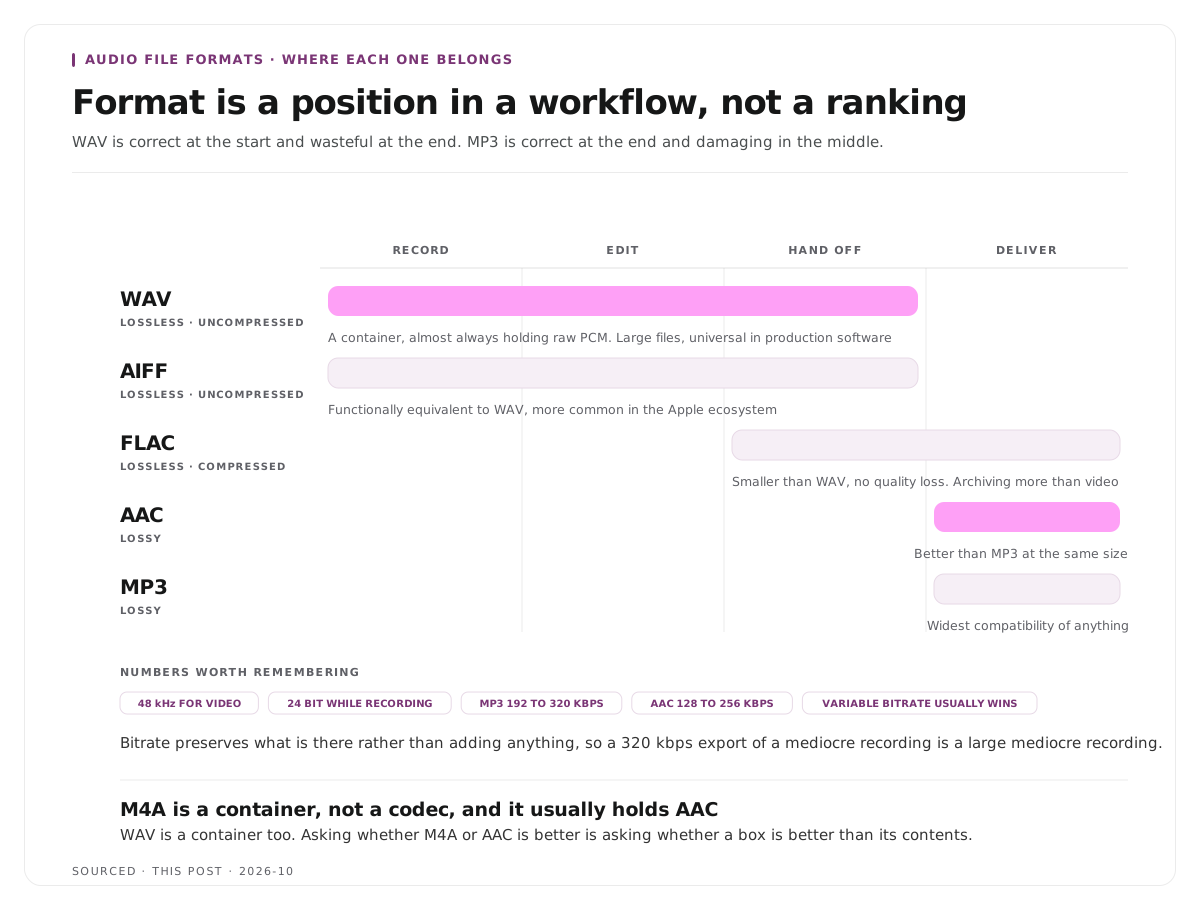
The useful question is not "which format is best quality?" It is "where in the chain am I?" WAV is correct at the start and wasteful at the end. MP3 is correct at the end and damaging in the middle. Format is a position in a workflow rather than a ranking.
Lossy and lossless, which is the only distinction that matters
Everything else follows from this.
Lossless formats keep all the original data. Nothing is discarded, the file is large, and you can convert in and out of them repeatedly without degradation. WAV, AIFF and FLAC are lossless.
Lossy formats discard data permanently to achieve smaller files. The discarded information is chosen to be the least audible, which is why a good MP3 sounds close to the original. It is gone regardless, and no later step restores it. MP3, AAC and Opus are lossy.
The consequence people miss: you cannot improve a lossy file by converting it to a lossless one. Converting an MP3 to WAV produces a large file containing exactly the same degraded audio. It wastes space and fixes nothing.
The formats
| Format | Type | Typical Use | Notes |
|---|---|---|---|
| WAV | Lossless, uncompressed | Recording, editing, mastering | A container usually holding raw PCM. Large files, universally supported in production software |
| AIFF | Lossless, uncompressed | Recording and editing, Apple ecosystem | Functionally equivalent to WAV |
| FLAC | Lossless, compressed | Archiving, music distribution | Smaller than WAV with no quality loss, less common in video production |
| MP3 | Lossy | Broad distribution, podcasts | The widest compatibility of anything. Older and less efficient than AAC |
| AAC | Lossy | Video, streaming, modern devices | Better quality than MP3 at the same size. The standard for YouTube and Apple devices |
| M4A | Container | Usually holds AAC | A container rather than a codec, which is a common source of confusion |
Two clarifications worth making because they cause real confusion.
M4A is not a codec. It is a container, and it usually contains AAC. Asking whether M4A or AAC is better is like asking whether a box is better than its contents.
WAV is also a container. It almost always contains uncompressed PCM audio, which is why the terms get used interchangeably, but the distinction occasionally matters when a WAV file is unexpectedly compressed.
What bitrate actually controls
Bitrate is the amount of data used per second, and it only applies to lossy formats.
Higher bitrate means more data retained and therefore a file closer to the original, at the cost of size. It is not a quality dial that goes above the source, so a 320 kbps MP3 made from a mediocre recording is a large file containing mediocre audio.
Common delivery points: MP3 at 192 to 320 kbps and AAC at 128 to 256 kbps are typical. AAC achieves comparable quality at a lower bitrate than MP3, which is the main reason it replaced it.
Variable bitrate allocates more data to complex passages and less to simple ones, usually producing a better size to quality ratio than a fixed rate.
Sample rate is a separate thing. It is how many times per second the audio was measured, commonly 44.1 or 48 kHz. Recording at a higher sample rate does not improve speech recordings meaningfully and does increase file size. For video work, 48 kHz is the usual choice because it matches video standards.
Bit depth is the resolution of each measurement, commonly 16 or 24 bit. Recording at 24 bit gives more headroom for level mistakes, which is a practical benefit during recording rather than an audible one afterwards.
The rule that matters: compress once, at the end
This is the practical heart of the subject and it is where most quality is lost unnecessarily.
Record in WAV. No compression decisions at the point where you have the most to lose.
Edit in WAV. Every edit, every effect, every export during the process stays lossless. Cutting and re-encoding a lossy file repeatedly compounds the damage each time.
Export to WAV if the file is going into another edit. Handing a compressed file to a video editor means it gets compressed again at final delivery.
Compress once, at delivery. AAC or MP3, at the bitrate the destination needs.
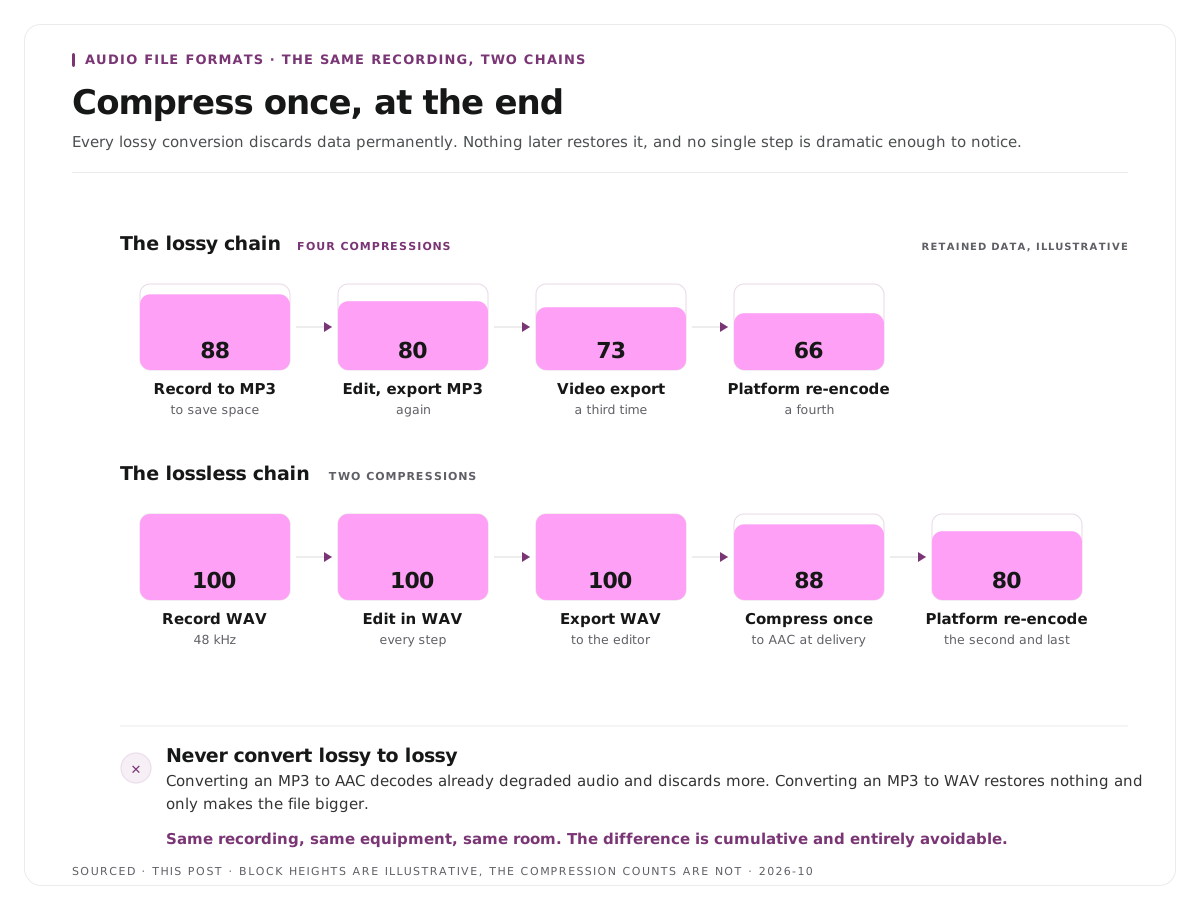
Never convert lossy to lossy. Converting an MP3 to AAC means decoding the already degraded audio and discarding more. It is the single most common avoidable quality loss, and it happens constantly because people convert files to satisfy an upload requirement.
If you must satisfy a format requirement and only have a lossy file, that is life, and it is worth knowing that you are paying a cost rather than assuming conversion is free.
For video specifically
Use 48 kHz. Video standards use it, and a mismatch between 44.1 and 48 kHz causes drift and conversion artefacts in an edit.
AAC is the usual delivery codec for video, and platforms re-encode anyway.
Platforms re-encode whatever you upload. You are giving them a master to compress, not a finished file. Upload at higher quality than you need so their compression starts from a good source, which is the same argument made in how to improve video quality in post.
Keep the audio with the video at the same sample rate throughout. Most sync problems blamed on editing software are sample rate mismatches.
For transcription and clipping
A practical note that saves time rather than quality.
Upload audio rather than video for transcription. The transcript is generated entirely from sound, so a video file adds upload time and nothing else. If you have both an MP4 and an M4A of the same recording, send the M4A.
Format barely affects transcription accuracy. WAV, MP3, M4A and AAC all transcribe to effectively the same result. Only very heavily compressed audio, at phone call quality, loses enough to matter, so converting a file hoping for a better transcript achieves nothing.
What does affect it is everything that happened in the room: overlapping speech, background noise, microphone distance. Those are recording problems rather than format ones, and the cleanup options are covered in how to edit a podcast, the audio and video workflow.
For clips, the source resolution and bitrate matter more than the container, because clips are cut from the master and inherit whatever it contains.
Worked example: the same recording, two chains
This is an invented example, not measured data.
A one hour interview is recorded and published.
The lossy chain. Recorded directly to MP3 to save space. Edited, exported to MP3 again. Sent to a video editor who exports the finished video, compressing the audio a third time. Uploaded to a platform, which re-encodes a fourth time. The result is noticeably thin, and nobody can point to the step where it happened because no single step was dramatic.
The lossless chain. Recorded to WAV at 48 kHz. Edited in WAV. Exported to WAV for the video editor. Compressed once to AAC at final delivery. Uploaded, where the platform re-encodes once. Two compressions total rather than four.
Same recording, same equipment, same room. The difference is cumulative and entirely avoidable.
Where Montage fits
Montage does not convert audio formats, does not offer a format selection and has no audio processing. Format decisions sit in your recording and editing tools.
Upload a recording, up to 20GB at 4K, and it returns a timestamped transcript alongside 8 to 10 scored clip candidates, each trimmable by editing the transcript text, with branded captions and vertical reframing applied, exporting as MP4 for social or XML, FCPXML and JSON for an editor.
Two points connect to this page. Upload the highest quality source you have, because clips inherit the master and nothing recovers detail that was already discarded. And the XML or FCPXML export hands an editor a timeline rather than a rendered file, which means the final compression happens once at their export rather than twice, which is described in how XML export solves the producer and editor handoff problem.
To try it on one recording, use the podcast clip finder.
Limitations and troubleshooting
I converted MP3 to WAV and it sounds the same. Expected. The file is larger and contains the same degraded audio, because conversion to a lossless format cannot restore discarded data.
The audio drifts out of sync over a long edit. Usually a sample rate mismatch, commonly 44.1 against 48 kHz. Set everything to 48 kHz for video work.
The exported file is enormous. You exported WAV where AAC was appropriate. Use lossless for intermediate files and compress at delivery.
Quality dropped after uploading. The platform re-encoded it. Upload above what you need so their compression starts from a better master.
A tool rejects my file format. Convert if you must, and be aware that lossy to lossy conversion costs quality. Convert from the lossless master instead, if you still have it.
Higher bitrate did not improve anything. Bitrate preserves what exists and cannot exceed the source. A high bitrate export of a poor recording is a large poor recording.
Frequently asked questions
What is the difference between WAV and MP3?
WAV is lossless and uncompressed, keeping all the original data in a large file. MP3 is lossy, permanently discarding data to make a far smaller file. Use WAV to record and edit, MP3 to distribute.
Is AAC better than MP3?
At the same file size, yes. AAC is the newer codec and achieves better quality at a given bitrate, which is why it is the standard for video platforms and Apple devices. MP3 retains broader legacy compatibility.
What is an M4A file?
A container, usually holding AAC audio. It is not a codec itself, which is why comparing M4A to AAC is comparing a container to its contents.
What audio format should you record in?
WAV at 48 kHz for video work. It is lossless, universally supported in production software, and avoids making compression decisions at the point where you have the most to lose.
Does converting MP3 to WAV improve quality?
No. The discarded data cannot be restored. You get a much larger file containing exactly the same audio.
What bitrate should you export audio at?
Around 192 to 320 kbps for MP3, or 128 to 256 kbps for AAC. Bitrate preserves what is there rather than adding anything, so a high bitrate cannot improve a poor source.
Does audio format affect transcription accuracy?
Barely. WAV, MP3, M4A and AAC transcribe to effectively the same result. Only phone call quality compression loses enough to matter, and recording conditions affect accuracy far more than format does.
Does Montage care what format I upload?
Upload the best quality source you have, since clips inherit the master. Format conversion itself happens in your recording and editing tools rather than in Montage.