YouTube Thumbnail Tips That Actually Move CTR
What changes YouTube thumbnail click through rate, how to use Test and Compare properly, and why YouTube picks the winner on watch time rather than clicks.
What genuinely changes thumbnail click through rate, how to run YouTube's built in Test and Compare, and the detail about how it picks a winner that changes what you should be optimising for.
Thumbnail click through rate improves through three things: one clear subject rather than a busy frame, high contrast against a crowded feed, and fewer than about four words of text. Test the result with YouTube's built in Test and Compare rather than guessing, which lets you run up to three titles and thumbnails against each other.
The useful question is not "how do I get more clicks?" It is "which viewers do I want to click?" A thumbnail that pulls in people who leave after eight seconds damages the video, and YouTube's own testing tool is built on that assumption, which most advice on this subject misses entirely.
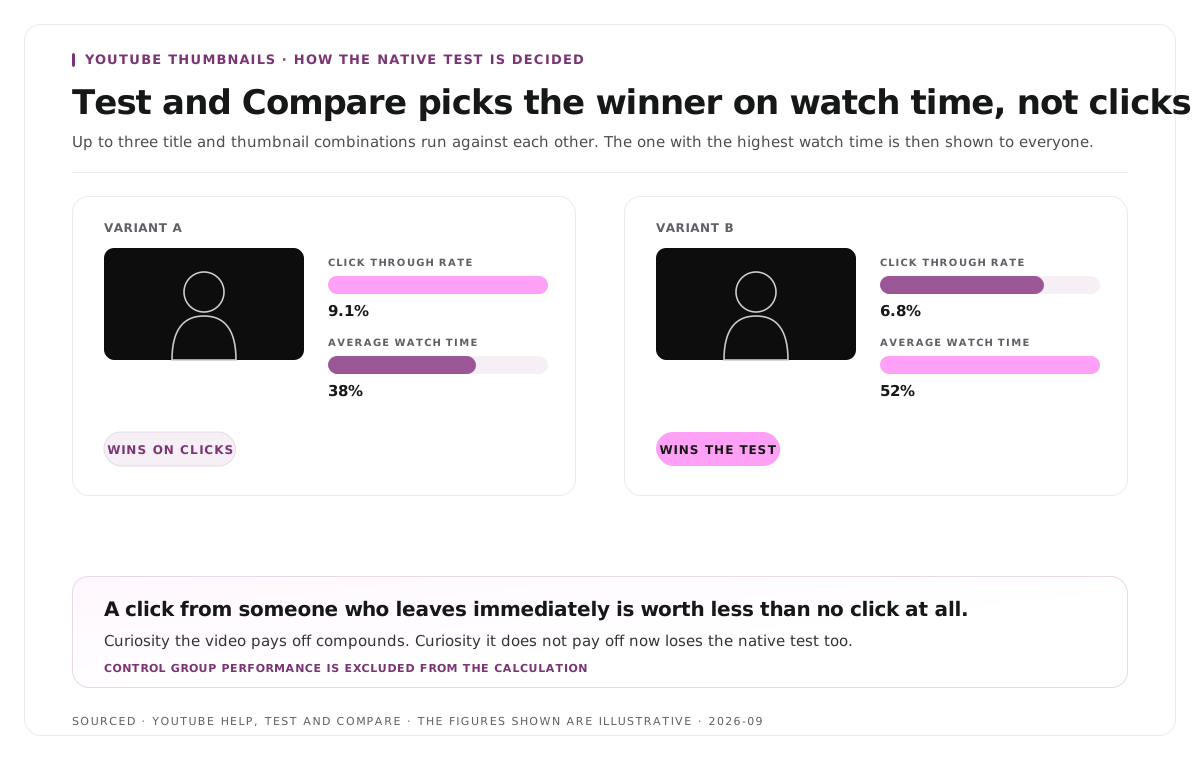
The detail that changes what you optimise
YouTube's Test and Compare lets you run up to three titles and thumbnails against each other. At the end of the test, the combination with the highest watch time is shown to all viewers.
Not the highest click through rate. Watch time.
That is not a quirk, it is a statement of what the platform values. A thumbnail that wins on clicks and loses on retention will lose the test, because a click from someone who leaves immediately is worth less than no click at all.
The practical consequence is that the usual advice to maximise curiosity is only half right. Curiosity that the video pays off compounds. Curiosity that it does not pay off trains the algorithm against you, and now also loses the native test.
So the working definition of a good thumbnail is not the one that gets the most clicks. It is the one that gets the most clicks from people who then stay.
What actually moves the number
One subject, not four. A thumbnail is viewed at roughly the size of a postage stamp on a phone. Anything with three elements competing becomes noise at that size. Pick the single thing the video is about and let it fill the frame.
Contrast against the feed, not against itself. Your thumbnail sits in a grid of other thumbnails, most of which are mid tone and busy. A clean frame with strong separation between subject and background stands out precisely because everything around it does not.
A face with a real expression. Faces draw the eye, and a genuine expression of surprise, concentration or concern outperforms a posed one. The exaggerated open mouth look works in some niches and reads as desperate in others, so match the register of your subject.
Four words maximum. Thumbnail text should be glanceable rather than readable. If a viewer has to read the thumbnail, the thumbnail has already lost. Shorter is consistently better.
Text that adds rather than repeats. The title is already next to it. A thumbnail that repeats the title wastes the only space where you get to say a second thing.
Check it at actual size. Shrink the thumbnail to the size it appears on a phone and look at it. Almost every thumbnail problem is visible immediately at that size and invisible at full size.
How to run Test and Compare
The feature lives somewhere most people never look.
- Open YouTube Studio on a computer. The feature is not available on mobile, and your channel needs advanced features enabled to be eligible.
- Select the video, then scroll down to Thumbnail.
- Click the three dot icon and choose Test & Compare.
- Upload your variants. You can run up to three.
- Check results on the video's Details page, or in the Reach tab of the video's Analytics.
Two things worth knowing about how the results are calculated. The winner is decided by watch time rather than clicks. And the control group's performance is excluded from the experiment calculations, so the comparison is between your variants rather than against the video's prior performance.
Test one variable at a time. Three thumbnails that differ in subject, colour and text tell you nothing about which change mattered. Three that differ only in the expression tell you something you can reuse.
Reading CTR honestly
Click through rate is one of the most misread numbers in YouTube analytics.
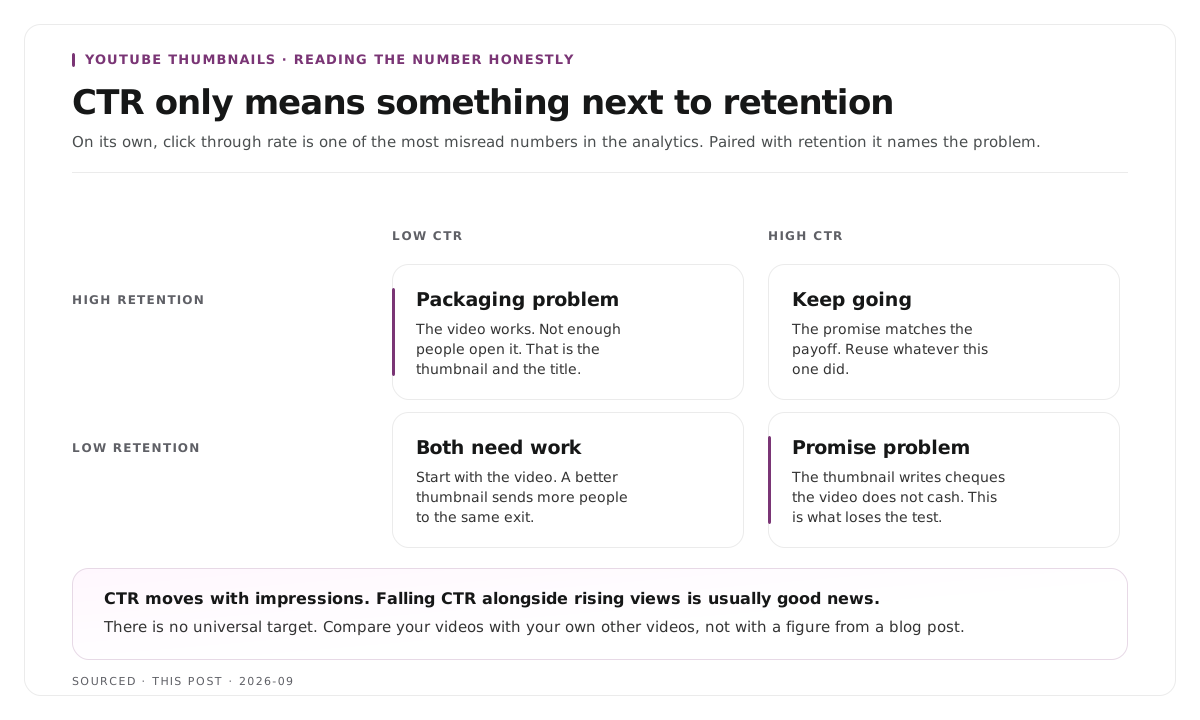
It moves with impressions. A video shown mostly to subscribers will show a high rate. The same video pushed to a wider audience will show a lower one while getting far more views. Falling CTR alongside rising views is usually good news rather than bad.
There is no universal target. Comparing your number to a figure from a blog post tells you nothing, because it depends on your niche, your audience size and where the impressions came from. Compare your videos to your own other videos.
Low CTR with high retention means a packaging problem. The video works and not enough people are opening it. That is the thumbnail and title.
High CTR with low retention means a promise problem. People are opening it and leaving. The thumbnail is writing cheques the video does not cash, and this is the pattern that loses a Test and Compare.
The broader argument for measuring retention over raw views is in the video content operations metrics that actually matter.
Thumbnails for Shorts and clips
Short form changes the rules and a lot of thumbnail advice does not transfer.
In the Shorts feed, there is no thumbnail. The video plays. The first frame and the first caption are doing the job a thumbnail would do, which is covered in how to make shareable podcast clips for social media.
The thumbnail still matters elsewhere. On your channel page, in search, and in suggested placements, a Short displays a thumbnail, and a Short with a default frozen frame looks abandoned next to one with a chosen still.
Pick a frame rather than designing a graphic. For clips cut from longer recordings, the strongest thumbnail is usually a frame from the clip itself showing the speaker mid expression. It is honest about what the viewer gets, which is exactly the property that wins on watch time. Picking the right expression is easier when the source has several usable moments, which is the selection question covered in how many clips you should make from one podcast episode.
Worked example: two thumbnails, one winner
This is an invented example, not measured data.
A channel tests two thumbnails on the same interview clip. Both use the same frame of the guest.
The first adds the words "THIS CHANGED EVERYTHING" in large yellow text. It is dramatic, vague, and it does not describe what the video contains.
The second adds three words naming the specific topic, in smaller text, with the guest's expression left visible rather than covered.
The first gets noticeably more clicks in the first hours. It also loses the test, because the people it attracted leave within seconds when the video turns out to be a measured conversation about a specific subject rather than a revelation.
The second wins on watch time and gets shown to everyone. The lesson is that the more clickable thumbnail was the worse thumbnail, and only a watch time based test would have caught it.
Where Montage fits
Montage does not design thumbnails, does not generate them and has no role in your packaging. There is no thumbnail feature in it, and nothing on this page is something it does for you.
Where it touches this workflow is the frame. Upload a long recording, up to 20GB at 4K, and it returns 8 to 10 scored clip candidates rather than an unranked pile, each trimmable by editing transcript text, with branded captions and vertical reframing applied, exporting as MP4 for social or XML, FCPXML and JSON for an editor.
Because the source can be 4K, a still pulled from a clip is high enough resolution to use as a thumbnail without upscaling, which matters if your thumbnail approach is a real frame rather than a designed graphic. Choosing the frame, cropping it and adding text remain yours.
To try it on a single recording, use the podcast clip finder, and for the editing decisions that produce usable stills see how to edit an interview video.
Limitations and troubleshooting
Test and Compare is not showing up. It is available on computers only through YouTube Studio, and the channel needs advanced features enabled.
The test result contradicts the click numbers. Expected. The winner is chosen on watch time, so the variant with more clicks can still lose.
CTR dropped after a video started performing. Usually a sign of wider reach rather than a worse thumbnail. More impressions from outside your subscriber base pull the average down while views rise.
The thumbnail looks great and gets no clicks. Check it at phone size. Detail that reads on a monitor disappears at the size it is actually viewed.
All three test variants perform identically. They were too similar, or the sample is too small. Change one thing meaningfully rather than three things slightly.
Clips have no thumbnail in the feed. Correct, the Shorts feed plays the video. The first frame and first caption are the packaging there.
Frequently asked questions
What is a good CTR on YouTube?
There is no universal figure, because it depends on your niche, audience size and where the impressions came from. Compare a video to your own other videos rather than to a published benchmark.
How do you A/B test YouTube thumbnails?
Use Test and Compare in YouTube Studio on a computer. Open the video, scroll to Thumbnail, click the three dot icon, choose Test and Compare and upload up to three variants.
Does YouTube pick the thumbnail with the most clicks?
No. At the end of a Test and Compare, the combination with the highest watch time is shown to all viewers, so a variant can win on clicks and still lose the test.
How much text should a YouTube thumbnail have?
Four words at most. Thumbnail text needs to be glanceable rather than readable, and it should add something the title does not already say.
Why did my CTR drop when views went up?
The video reached a wider audience. Impressions beyond your subscriber base convert at a lower rate, which pulls the average down while total views rise. That is usually a good sign.
Does Montage create thumbnails?
No. Montage produces clips from your recording. Because it works from sources up to 4K, a still pulled from a clip is high enough resolution to use, but choosing and designing the thumbnail is yours.