Jump Cuts: When They Work and When They Look Broken
What a jump cut is, why it happens, the 30 degree rule for avoiding one, and when a visible jump is the right choice rather than a mistake.
What a jump cut is, why trimming a talking head creates one, the rules for avoiding it, and the situations where a visible jump is the better choice.
A jump cut is a cut between two shots that are too similar, so the subject appears to snap to a new position rather than move there. It happens automatically whenever you trim something out of a single continuous shot, which is why it is the most common artefact in interview and talking head editing.
The useful question is not "how do I get rid of my jump cuts?" It is "is this jump doing something?" A jump that compresses time or drives pace is a technique. A jump that simply exposes where you deleted a stumble is a mistake, and the two look identical on a timeline.
Why trimming creates them
A jump cut is a continuity break. The camera has not moved, the framing has not changed, and the background is identical, so the only thing that changes across the cut is the subject. The eye reads that as a glitch rather than as an edit.
This is why it dominates talking head work. Every time you remove an "um", delete a false start or splice the best halves of two answers together, you join two frames that are nearly identical. Nothing about your edit was wrong. The format produces the artefact.
Scripted drama rarely has this problem because it is shot with coverage, multiple angles of the same moment, which gives the editor somewhere to cut to. A single camera interview has no coverage at all, so every trim is exposed.
The rules for avoiding them
If you want cuts to disappear, three things work.
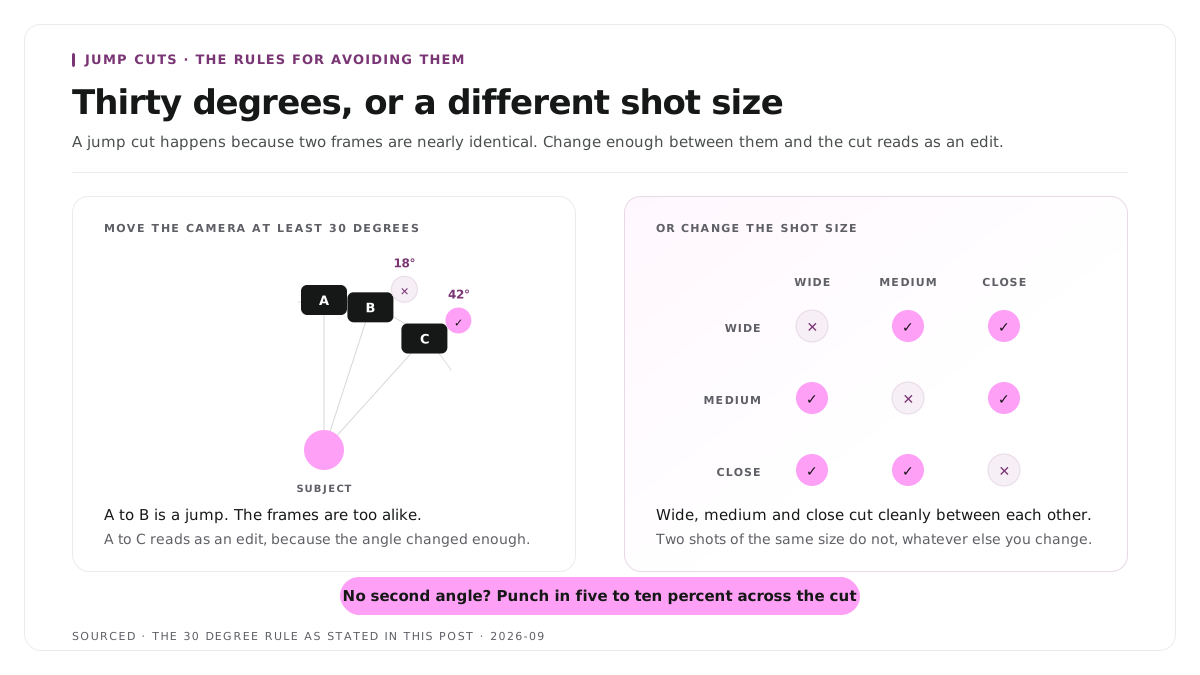
Change the angle by at least thirty degrees. The long standing rule of thumb is that between two similarly composed shots, the camera position should move at least thirty degrees. Below that the shots are too alike and the cut reads as a jump. This is the single most reliable fix, and it is the argument for a second camera.
Change the shot size. Cutting from a wide to a close up of the same subject reads as an edit rather than a glitch, because the frames share little visual information. Wide, medium and close cut cleanly between each other. Two mediums do not.
Cover the join. Lay a cutaway or a b-roll shot over the splice. The viewer accepts the visual change as intentional and never registers the cut underneath. That method is covered in how to edit an interview video.
When none of those are available, a slight scale change on the same footage across the cut, punching in five or ten percent, disguises it well enough. It is a compromise, and it beats a generic stock shot.
When a visible jump is the right choice
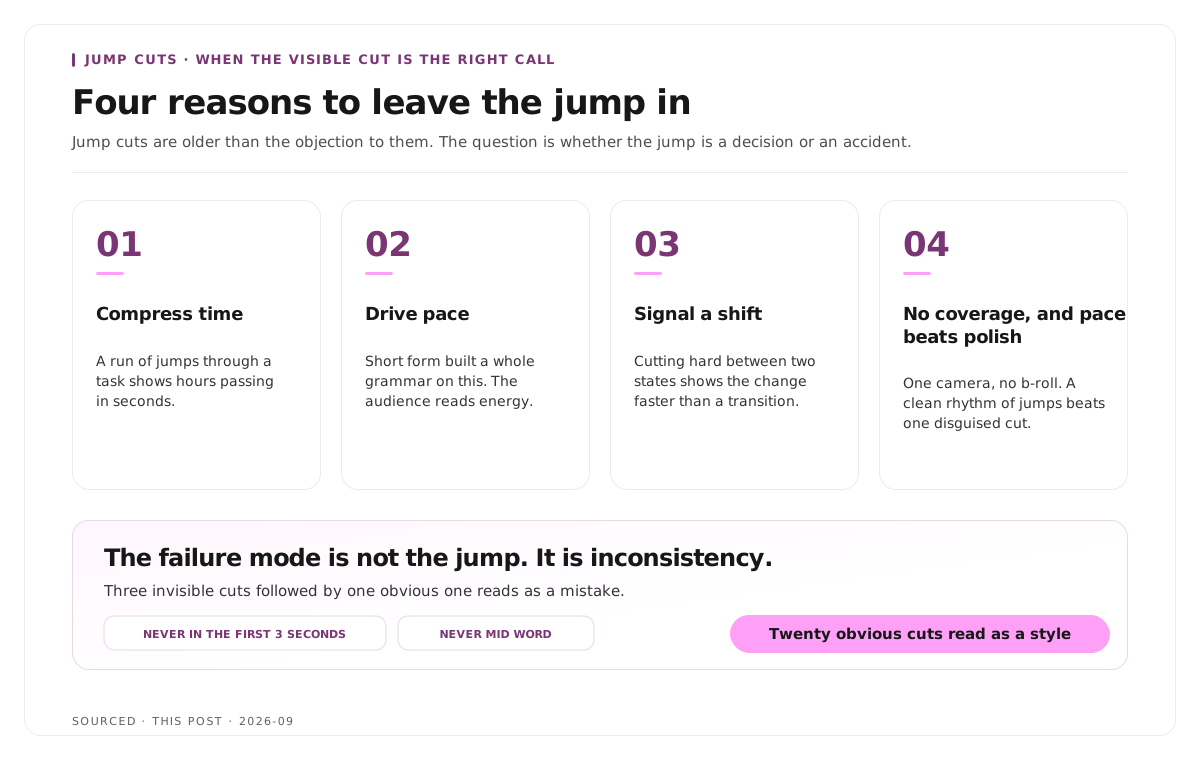
Jump cuts are older than the objection to them, and they are used deliberately for four reasons.
To compress time. A sequence of jumps through a task shows hours passing in seconds, and no viewer misreads it as an error.
To drive pace. Fast, deliberate jumps create urgency. Vlogging and short form built an entire grammar on this, and the audience for that content reads visible cuts as energy rather than sloppiness.
To signal emotional shifts. Cutting hard between two states shows a change faster than any transition does.
Because you have no coverage and pace matters more than polish. This is the honest one. If you shoot with one camera and have no b-roll, covering every jump is not an option, and a clean deliberate rhythm of jumps looks far better than one awkwardly disguised cut every thirty seconds.
The failure mode is not the jump. It is inconsistency. Three invisible cuts followed by one obvious one reads as a mistake. Twenty obvious ones read as a style.
The short form exception
Short form is where the usual advice inverts, and applying long form instincts makes clips worse.
Visible jumps are the norm and the audience does not mind. Trimming filler out of a forty second clip is what makes it tight, and the resulting jumps are so common in the format that they have stopped registering.
But a jump inside a short clip is more visible, not less. There is less material around it to distract the eye, so a single awkward jump in a forty second piece draws more attention than five in a four minute one.
Never jump in the first three seconds. The opening belongs to the hook, and a cut there breaks the thing that stops the scroll.
Never jump mid word. Cutting inside a spoken word produces an audio artefact that no amount of visual disguise covers. Cut on the gap between words, even when that means keeping half a second you wanted to lose.
The trimming approach for clip work specifically is in text based video editing, and realistic expectations for how many clips a recording yields are in how many clips you should make from one podcast episode.
How to shoot so you have the option
Most jump cut problems are recording problems, and the fixes are cheap.
Run a second camera, even a phone. One extra angle gives you somewhere to cut and removes the problem entirely. It is the highest value addition to a single camera setup, ahead of a better main camera.
Shoot a few minutes of coverage at the end of every recording. Hands, the room, the equipment, the subject listening. Five minutes buys you a whole edit's worth of cover.
Ask for a clean restart. When a speaker fumbles, ask them to take the whole sentence again rather than picking up mid thought. Two complete versions splice better than one broken one, which is part of the wider argument in content production workflow, why editorial and editing should be two separate jobs.
Keep the subject still between takes. If they shift position during a pause, the cut you make later will be obvious. Worth mentioning once at the start.
The editing sequence that depends on it is in how to edit an interview video.
Worked example: the same trim, two outcomes
This is an invented example, not measured data.
A founder answers a question in ninety seconds and restarts twice. The editor removes both restarts, which takes the answer to sixty seconds and creates two jump cuts.
In the first version the piece is otherwise smooth, with invisible cuts elsewhere. The two jumps stand out badly, and a viewer notices them because nothing else in the piece behaves that way.
In the second version the editor commits. They also trim every pause and hesitation, producing eleven visible cuts across sixty seconds at a consistent rhythm. Nobody notices any of them, because the piece has established that this is how it moves.
Same footage, same removals, opposite result. Consistency did the work rather than concealment.
Where Montage fits
Montage does not add coverage, does not supply b-roll and does not disguise cuts. It is not a general purpose editor, and the techniques on this page belong to a timeline.
What it does is take a long recording and return the moments worth publishing. Upload up to 20GB at 4K and it gives you 8 to 10 scored clip candidates rather than an unranked pile, each trimmable by editing transcript text, with branded captions, vertical reframing and exports to MP4 for social or XML, FCPXML and JSON for an editor.
Trimming by transcript does change one thing about jump cuts specifically. Because you are deleting sentences rather than dragging handles, the cuts land on the boundaries between spoken phrases rather than in the middle of them, which is where jumps read worst. That is a side effect of the method, not a repair.
If a clip needs the joins covered properly, export XML or FCPXML and finish it in Premiere or Final Cut, which is described in how XML export solves the producer and editor handoff problem.
Limitations and troubleshooting
The jump is visible even though the cut is on a pause. The subject moved between the two frames. No fix in post beyond covering it, which is why keeping still between takes is worth asking for.
Cutting between two angles still jumps. The angles are too close together. Thirty degrees is the minimum, and shot size should change as well as position.
The audio clicks at the cut. You cut mid word or mid breath. Move the edit to a gap between words and add a short cross fade on the audio only.
A punch in to hide the cut looks soft. The source resolution is too close to your publishing resolution. Recording above what you publish at leaves room to scale.
Every cut is covered and the piece drags. Over correction. Covering every join slows the pace and makes the edit feel cautious. Let some jumps show.
The clip has one obvious jump and the rest are clean. The worst of both approaches. Either cover that one or expose the others so the rhythm is consistent.
Frequently asked questions
What is a jump cut?
A cut between two shots that are too similar in angle and framing, so the subject appears to snap to a new position instead of moving there. It happens whenever you trim material out of a single continuous shot.
What is the 30 degree rule?
A guideline that between two similarly composed shots, the camera should move at least thirty degrees. Below that the two frames are too alike and the cut reads as a glitch rather than an edit.
Are jump cuts bad?
Not inherently. They are used deliberately to compress time, drive pace and signal emotional shifts. They read as mistakes when they are inconsistent with the rest of the edit rather than when they are simply present.
How do you avoid jump cuts?
Change the camera angle by at least thirty degrees, change the shot size, or cover the join with a cutaway. Without any of those, a slight scale change on the same footage disguises it reasonably well.
Should short form clips have jump cuts?
Usually yes. Trimming filler is what makes a clip tight, and visible jumps are normal in the format. Avoid them only in the first three seconds and never cut inside a spoken word.
Does Montage remove jump cuts?
No. Montage produces the clip from your recording. Covering the joins is timeline work, which is why the exports include XML and FCPXML.