
1 long video → 10+ clips
Unlike clip generators, Montage understands your footage and selects the moments that actually perform.
Unlike clip generators, Montage understands your footage and selects the moments that actually perform.
Full Control
No abrupt cuts
Publish Ready


Trusted by 1000+ Marketers and Agencies

Publishing Consistently Has Never Been This Simple
Most marketers struggle to post regularly because editing takes too long. Montage removes the bottleneck—so you can go from upload to published in under 30 minutes.
Publishing Consistently Has Never Been This Simple
Most marketers struggle to post regularly because editing takes too long. Montage removes the bottleneck—so you can go from upload to published in under 30 minutes.
Publishing Consistently Has Never Been This Simple
Most marketers struggle to post regularly because editing takes too long. Montage removes the bottleneck—so you can go from upload to published in under 30 minutes.
YOUR NEW WORKFLOW
1. Upload & Analyze
Montage watches your video and maps every topic, moment, and potential clip.
2. Review "Moments"
Review 8-10 moments ranked by brief match and platform fit. Skip the duds, finalize the winners.
3. Finalize & Download
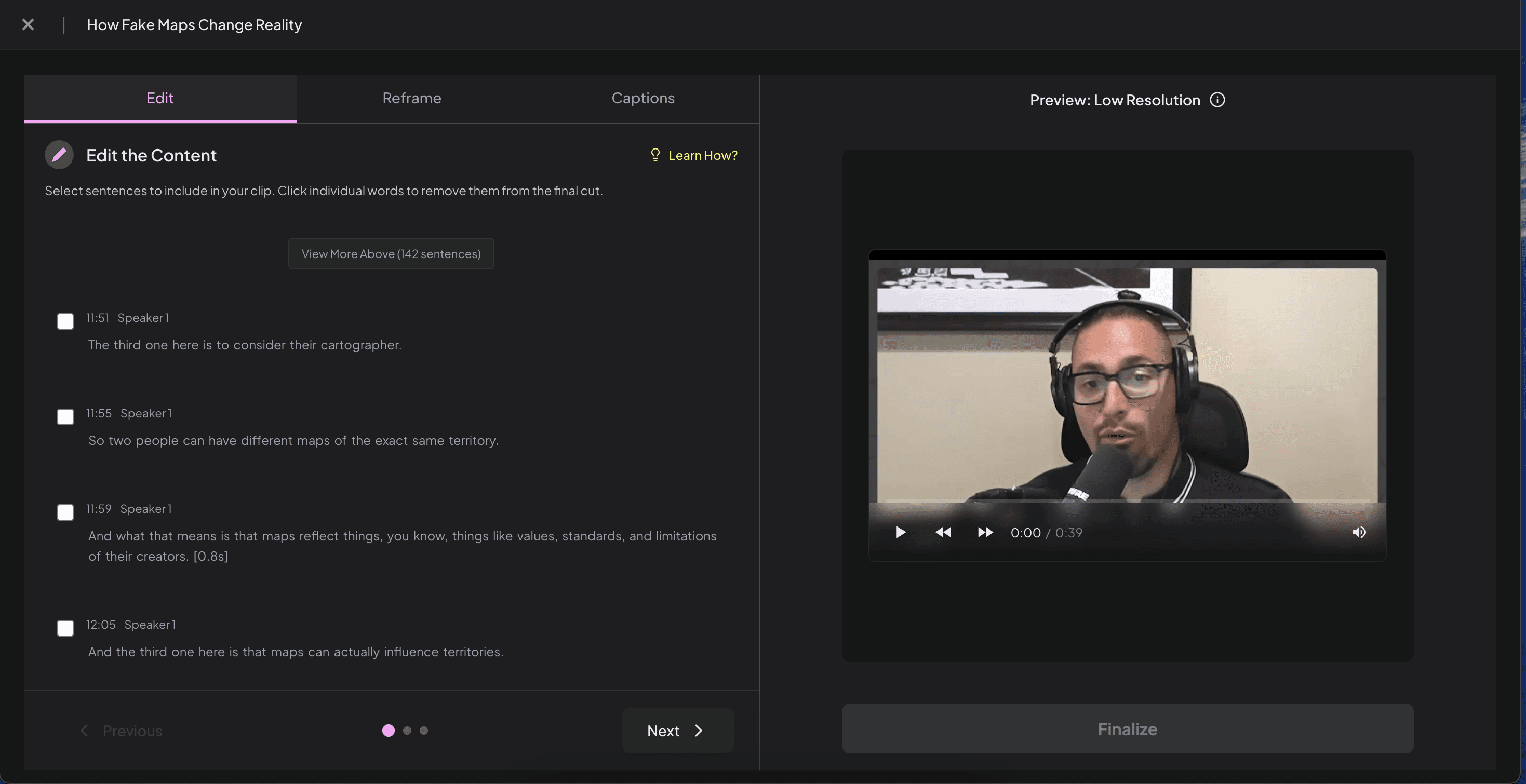
Pick the clips you want and refine them by editing text—no timeline scrubbing required.
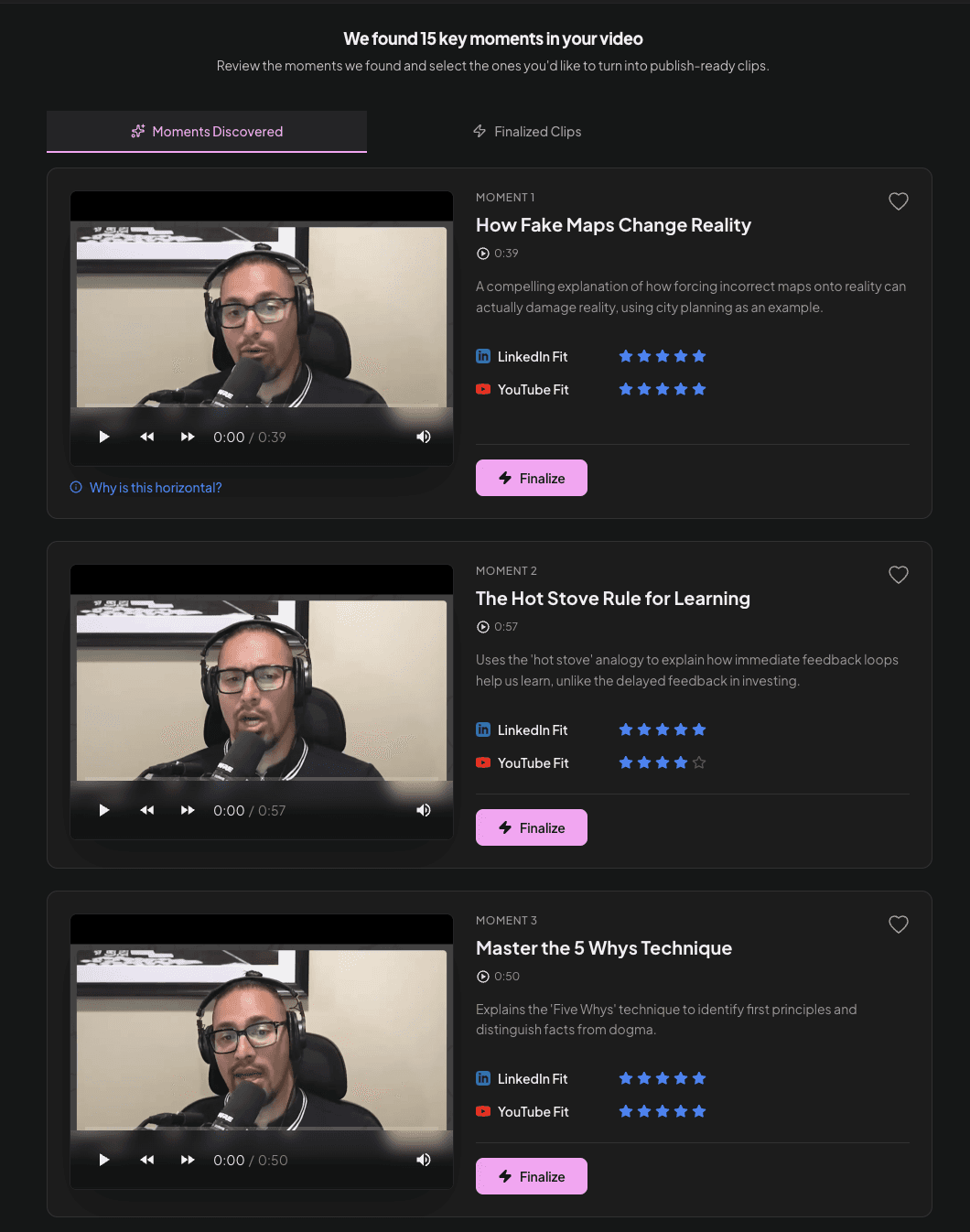
THE SCORING SYSTEM
Montage suggests. You decide.
Montage suggests. You decide.
Montage suggests. You decide.
Our AI scores each potential clip based on how well it matches your brief and platform requirements. You see the scores, review the suggestions, and decide what's worth publishing. Your editorial judgment. Our AI legwork.
Our AI scores each potential clip based on how well it matches your brief and platform requirements. You see the scores, review the suggestions, and decide what's worth publishing. Your editorial judgment. Our AI legwork.
Prompt Relevance: 95%
Prompt Match Score
Prompt Match Score
How well each clip delivers on your content goals
How well each clip delivers on your content goals
LinkedIn Fit
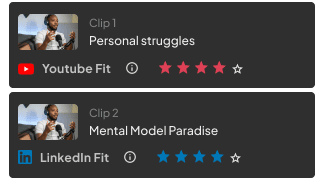
Platform Fit Score
Platform Fit Score
Optimized for LinkedIn, YouTube Shorts, TikTok standards
Optimized for LinkedIn, YouTube Shorts, TikTok standards
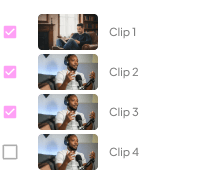
Your Final Call
Your Final Call
AI suggests, you approve
AI suggests, you approve
WORLD'S SIMPLEST VIDEO EDITOR
...once you'e selected moments, refine without becoming a video editor
Edit by words, not timelines. Fix text, adjust clips, refine framing—no video editor required.
...once you'e selected moments, refine without becoming a video editor
Edit by words, not timelines. Fix text, adjust clips, refine framing—no video editor required.
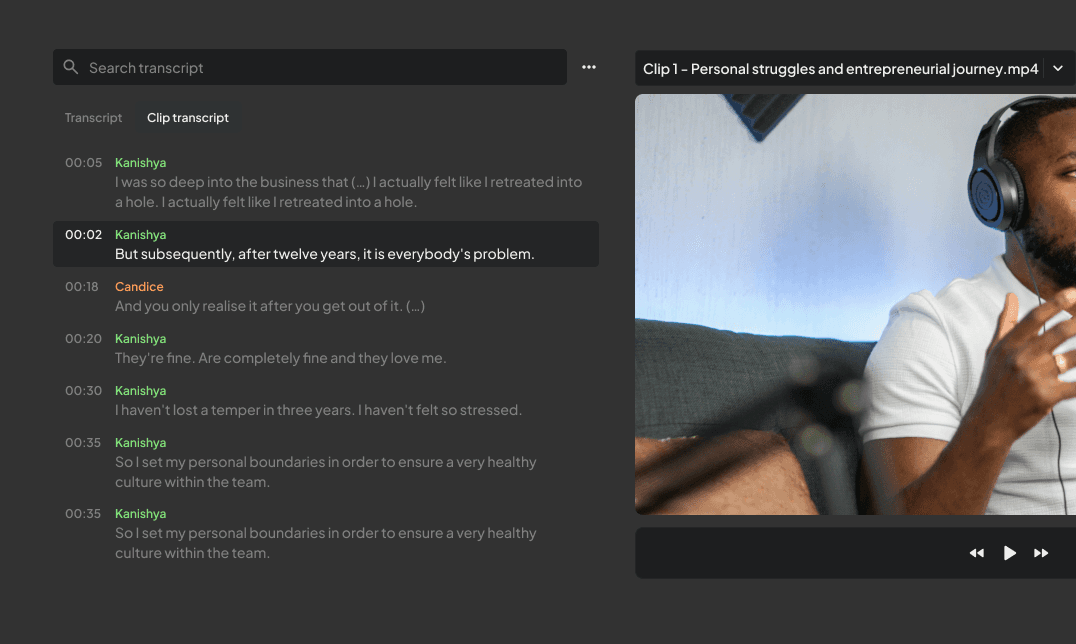
Script-level editing
Trim at the word level without scrubbing timelines. Remove filler words, fix mid-sentence cuts, adjust boundaries to ensure every clip starts and ends cleanly.
Script-level editing
Trim at the word level without scrubbing timelines. Remove filler words, fix mid-sentence cuts, adjust boundaries to ensure every clip starts and ends cleanly.
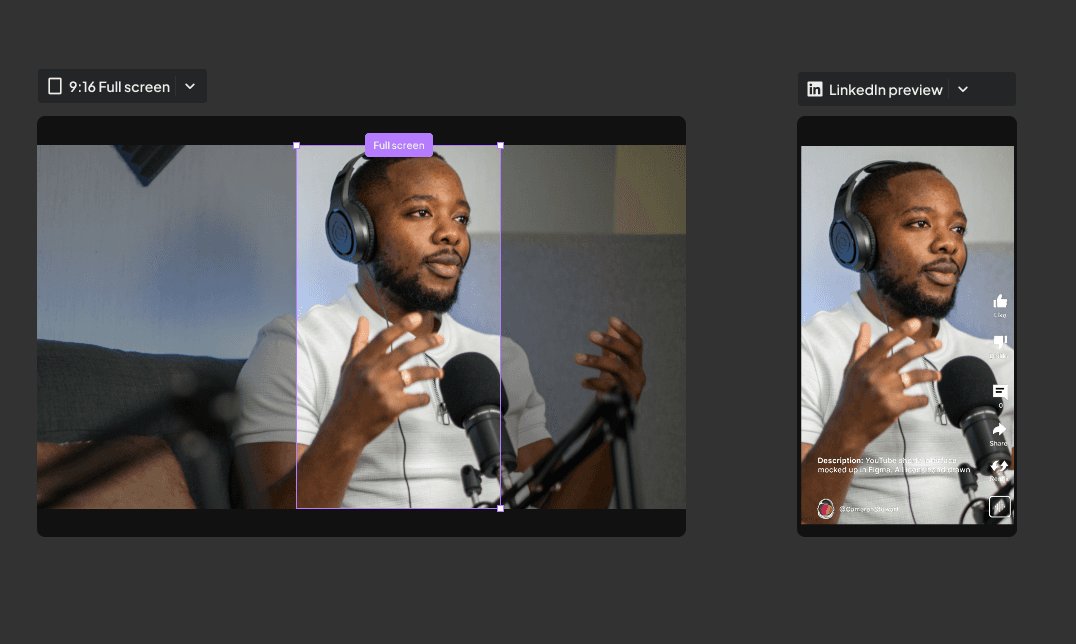
Horizontal → Vertical Reframing
Adjust aspect ratios for each platform. LinkedIn 1:1, YouTube Shorts 9:16, TikTok vertical—reframe once, export to all formats without re-editing
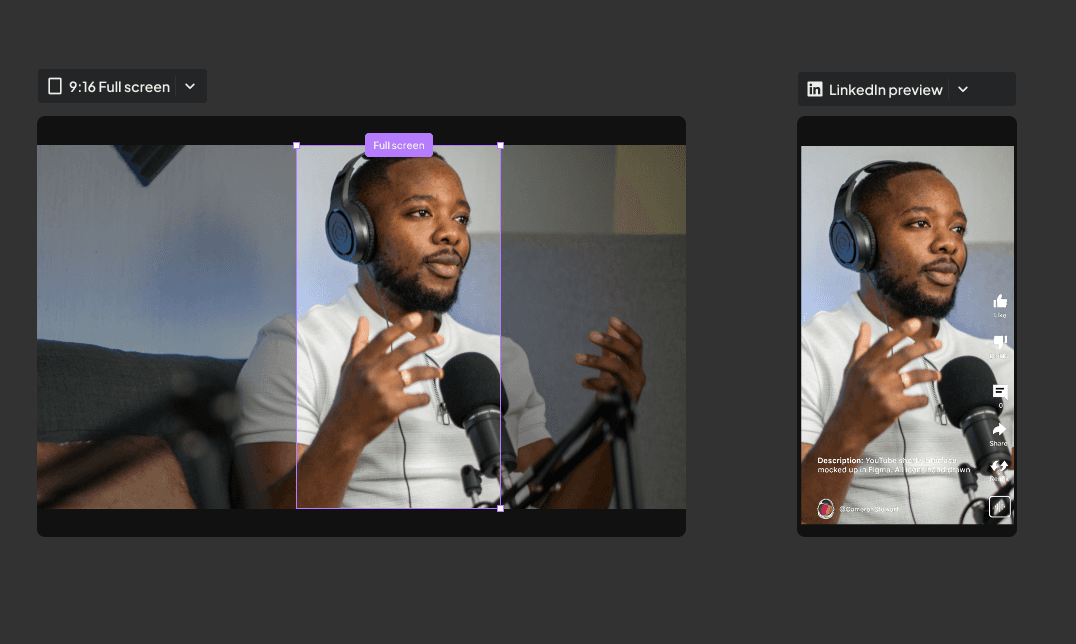
Horizontal → Vertical Reframing
Adjust aspect ratios for each platform. LinkedIn 1:1, YouTube Shorts 9:16, —reframe once, export to all formats without re-editing
Captions
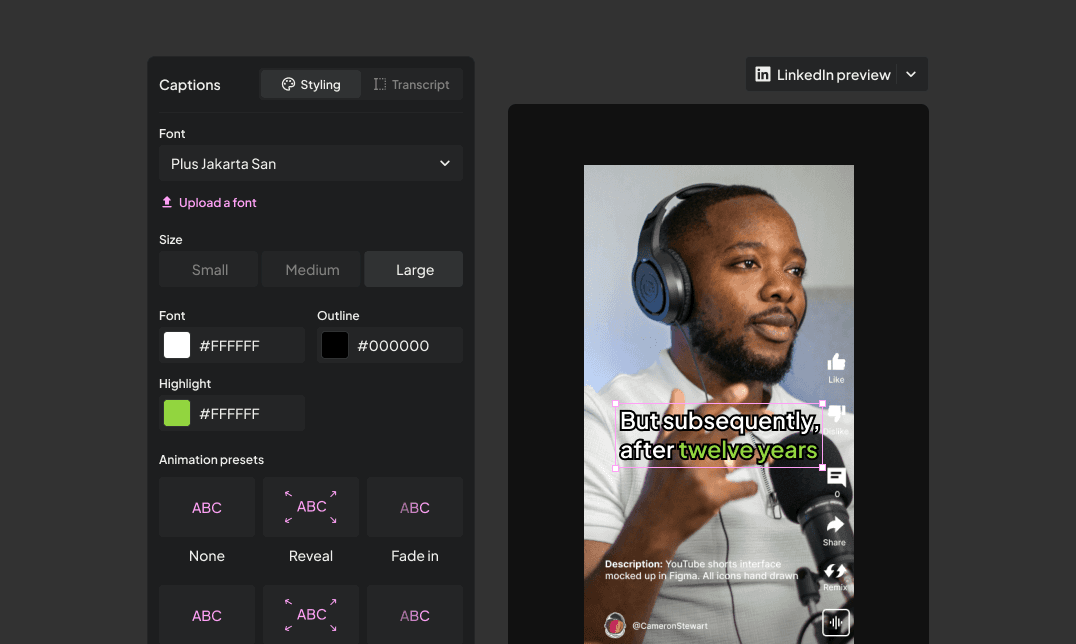
Design captions that match your brand. Choose fonts, adjust colors, add highlight animations, and preview how they'll look on each platform. Export with captions burned in or as separate files—your brand, your style.
Captions
Design captions that match your brand. Choose fonts, adjust colors, add highlight animations, and preview how they'll look on each platform. Export with captions burned in or as separate files—your brand, your style.
Multi Format Export
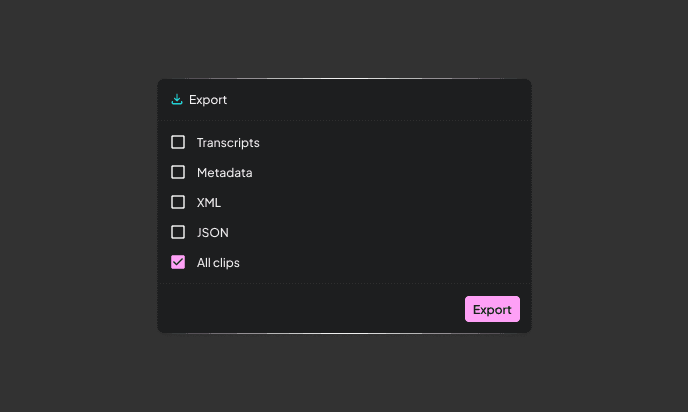
Ship clips straight to social or hand them to your editor. Export finished videos ready to publish, or download XML/JSON files to continue editing in Premiere Pro, Final Cut, or DaVinci Resolve. Full flexibility for your workflow.
Built for Marketers & Content Teams Tired of AI Slop or Time Consuming Softwares
Built for Marketers & Content Teams Tired of AI Slop or Time Consuming Softwares
Built for Marketers & Content Teams Tired of AI Slop or Time Consuming Softwares
Opus Pro & Similar Tools
Generates 30+ random clips based on generic virality scores
Clips start/end at arbitrary timestamps—mid-sentence cuts everywhere
Take it or leave it—minimal refinement options
One-size-fits-all scoring (views/likes predictions)
You watch all 30 to find the 3 worth using
Built for TikTok virality
Montage
You define your content goals. AI finds moments that match YOUR brief
Scene-level intelligence ensures complete thoughts with natural boundaries
Edit clips by editing text. Adjust framing, remove filler, fix awkward cuts
Dual scoring: Brief Match (does this hit your goals?) + Platform Fit (will this work on LinkedIn?)
Review 5-10 pre-scored candidates, refine the winners
Built for B2B authority and LinkedIn engagement
Opus Pro & Similar Tools
Generates 30+ random clips based on generic virality scores
Clips start/end at arbitrary timestamps—mid-sentence cuts everywhere
Take it or leave it—minimal refinement options
One-size-fits-all scoring (views/likes predictions)
You watch all 30 to find the 3 worth using
Built for TikTok virality
Montage
You define your content goals. AI finds moments that match YOUR brief
Scene-level intelligence ensures complete thoughts with natural boundaries
Edit clips by editing text. Adjust framing, remove filler, fix awkward cuts
Dual scoring: Brief Match (does this hit your goals?) + Platform Fit (will this work on LinkedIn?)
Review 5-10 pre-scored candidates, refine the winners
Built for B2B authority and LinkedIn engagement
Opus Pro & Similar Tools
Generates 30+ random clips based on generic virality scores
Clips start/end at arbitrary timestamps—mid-sentence cuts everywhere
Take it or leave it—minimal refinement options
One-size-fits-all scoring (views/likes predictions)
You watch all 30 to find the 3 worth using
Built for TikTok virality
Montage
You define your content goals. AI finds moments that match YOUR brief
Scene-level intelligence ensures complete thoughts with natural boundaries
Edit clips by editing text. Adjust framing, remove filler, fix awkward cuts
Dual scoring: Brief Match (does this hit your goals?) + Platform Fit (will this work on LinkedIn?)
Review 5-10 pre-scored candidates, refine the winners
Built for B2B authority and LinkedIn engagement
Montage is built for the gap between: AI that understands your content goals, suggests the best moments, and lets you refine at sentence-level without timeline complexity. Professional results in 60 seconds. No video editing skills required.
Montage is built for the gap between: AI that understands your content goals, suggests the best moments, and lets you refine at sentence-level without timeline complexity. Professional results in 60 seconds. No video editing skills required.
No Credit Card Required

SpeakEasy


NutritionCo
5k follower growth

Link clicks
Link clicks
Performance-led clips that help brands scale faster.
Performance-led clips that help brands scale faster.
Performance-led clips that help brands scale faster.
We blend aesthetics with performance to help you turn views into real business outcomes.
We blend aesthetics with performance to help you turn views into real business outcomes.
We blend aesthetics with performance to help you turn views into real business outcomes.
Finally a Clips Creation tool that builds authority
FAQs
Here are answers to the most common things people ask before getting started.
FAQs
Here are answers to the most common things people ask before getting started.
FAQs
Here are answers to the most common things people ask before getting started.
What types of content works best with Montage?
How is this different from Opus Clip or other AI tools?
Most AI clipping tools generate clips automatically with no control over what gets selected or how it's framed. Montage gives you AI suggestions with scores, then lets you refine at sentence-level before publishing. You maintain editorial control without video editing complexity.
Do I need video editing experience?
How long does it take to create clips?
What if I'm not happy with the AI suggestions?
What types of content works best with Montage?
How is this different from Opus Clip or other AI tools?
Most AI clipping tools generate clips automatically with no control over what gets selected or how it's framed. Montage gives you AI suggestions with scores, then lets you refine at sentence-level before publishing. You maintain editorial control without video editing complexity.
Do I need video editing experience?
How long does it take to create clips?
What if I'm not happy with the AI suggestions?
Ready to Level Up?
Whether it’s a one-off edit or a full channel transformation, we’re ready when you are. Let’s talk ideas.
Low Views? Fixed
Fixed CTR
Watch Time Wins
From meh to wow!
Refine without becoming a Video Editor
Edit by words, not timelines. Fix text, adjust clips, refine framing—no video editor required.
Script Level Editing
Trim at the word level without scrubbing timelines. Remove filler words, fix mid-sentence cuts, adjust boundaries to ensure every clip starts and ends cleanly.
Script Level Editing
Trim at the word level without scrubbing timelines. Remove filler words, fix mid-sentence cuts, adjust boundaries to ensure every clip starts and ends cleanly.
Horizontal → Vertical Reframing
Adjust aspect ratios for each platform. LinkedIn 1:1, YouTube Shorts 9:16, —reframe once, export to all formats without re-editing
Captions
Design captions that match your brand. Choose fonts, adjust colors, add highlight animations, and preview how they'll look on each platform. Export with captions burned in or as separate files—your brand, your style.
Multi Format Export
Ship clips straight to social or hand them to your editor. Export finished videos ready to publish, or download XML/JSON files to continue editing in Premiere Pro, Final Cut, or DaVinci Resolve. Full flexibility for your workflow.
EDITING WITHOUT VIDEO SOFTWARE